CWE-22
Allowed-with-ReviewImproper Limitation of a Pathname to a Restricted Directory ('Path Traversal')
Abstraction: Base · Status: Stable
The product uses external input to construct a pathname that is intended to identify a file or directory that is located underneath a restricted parent directory, but the product does not properly neutralize special elements within the pathname that can cause the pathname to resolve to a location that is outside of the restricted directory.
13302 vulnerabilities reference this CWE, most recent first.
GHSA-HVMH-VJJX-RW3H
Vulnerability from github – Published: 2026-06-10 00:31 – Updated: 2026-06-10 00:31CAI Content Credentials versions c2pa-web@0.7.1, c2pa-v0.80.1 and earlier are affected by an Improper Limitation of a Pathname to a Restricted Directory ('Path Traversal') vulnerability that could result in an arbitrary file system write. An attacker could leverage this vulnerability to write to unauthorized files or directories outside of intended restrictions. Exploitation of this issue requires user interaction in that a victim must extract a maliciously crafted file.
{
  "affected": [],
  "aliases": [
    "CVE-2026-34657"
  ],
  "database_specific": {
    "cwe_ids": [
      "CWE-22"
    ],
    "github_reviewed": false,
    "github_reviewed_at": null,
    "nvd_published_at": "2026-06-09T22:16:22Z",
    "severity": "MODERATE"
  },
  "details": "CAI Content Credentials versions c2pa-web@0.7.1, c2pa-v0.80.1 and earlier are affected by an Improper Limitation of a Pathname to a Restricted Directory (\u0027Path Traversal\u0027) vulnerability that could result in an arbitrary file system write. An attacker could leverage this vulnerability to write to unauthorized files or directories outside of intended restrictions. Exploitation of this issue requires user interaction in that a victim must extract a maliciously crafted file.",
  "id": "GHSA-hvmh-vjjx-rw3h",
  "modified": "2026-06-10T00:31:49Z",
  "published": "2026-06-10T00:31:49Z",
  "references": [
    {
      "type": "ADVISORY",
      "url": "https://nvd.nist.gov/vuln/detail/CVE-2026-34657"
    },
    {
      "type": "WEB",
      "url": "https://helpx.adobe.com/security/products/content-authenticity-sdk/apsb26-61.html"
    }
  ],
  "schema_version": "1.4.0",
  "severity": [
    {
      "score": "CVSS:3.1/AV:L/AC:L/PR:N/UI:R/S:U/C:N/I:H/A:N",
      "type": "CVSS_V3"
    }
  ]
}
GHSA-HVP5-5X4F-33FQ
Vulnerability from github – Published: 2024-04-22 15:56 – Updated: 2024-04-22 15:56Summary
when jadx parses a resource file, there is an escape problem with the style file, which can overwrite other files in the directory when saving the decompile result.
Although I don't think this vulnerability realizes path traversal in the true sense of the word , I reported it anyway
Details
I see that getResAlias does something with the filename.
private String getResAlias(int resRef, String origKeyName, @Nullable FieldNode constField) {
but type style will return the original filename directly.
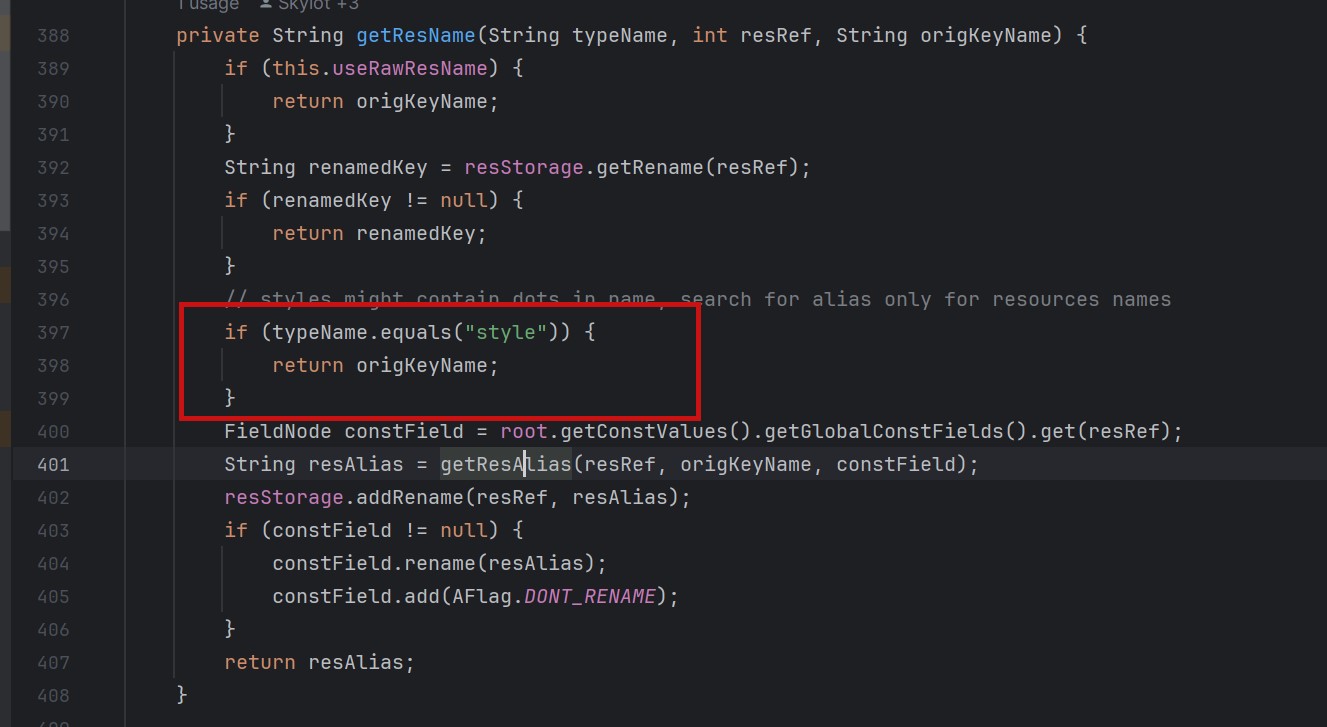 so our goal is to take a malicious file that was originally of type raw, modify its type to style, trick jadx into
step1
create an android project using androidstudio and create a raw folder with the name attack_file_sayhiiiiiiiiiiiii, it doesn't matter what the content is!
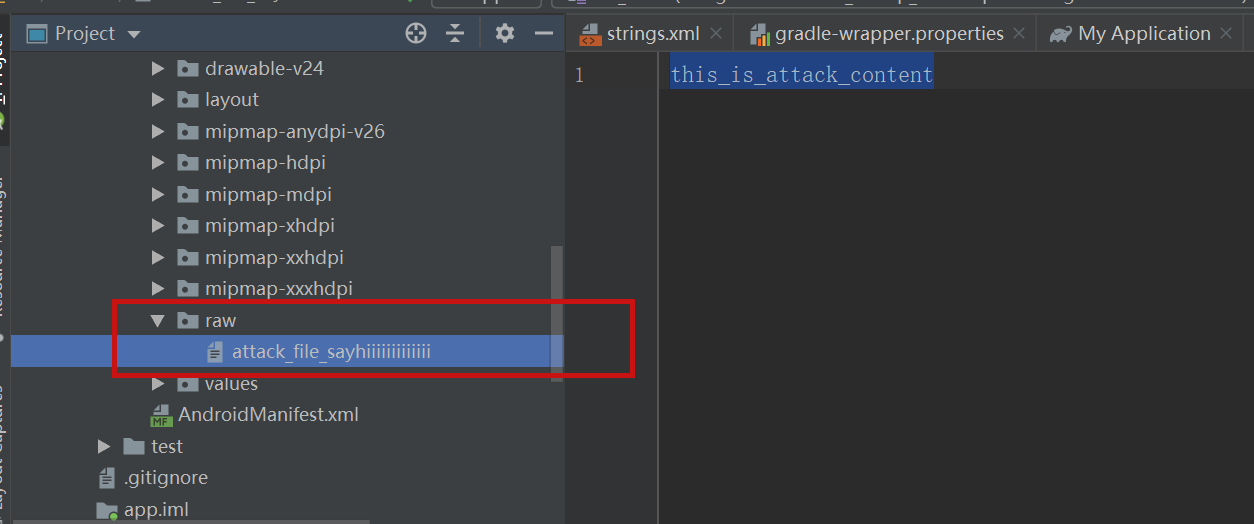 generate an initial APK
step2
extract this initial APK using ZIP software to get resources.arsc
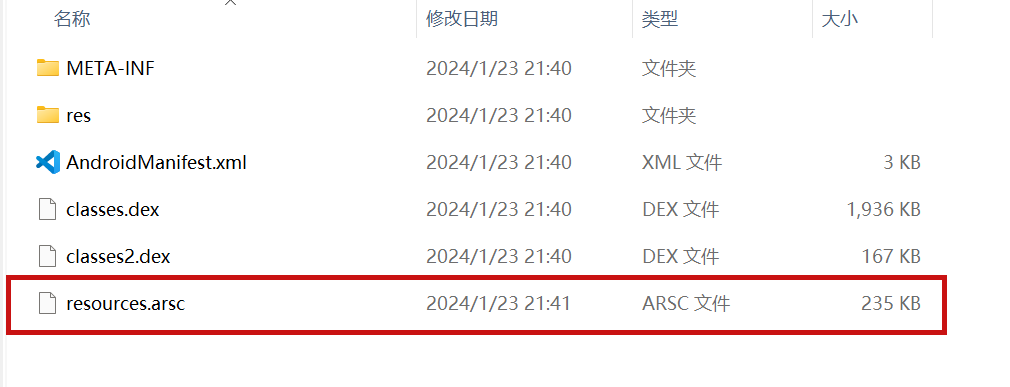 drop resources.arsc into 010editor
step3
search for the previous filename attack_file_sayhiiiiiiiiiiiii , two will appear here, we choose the second one
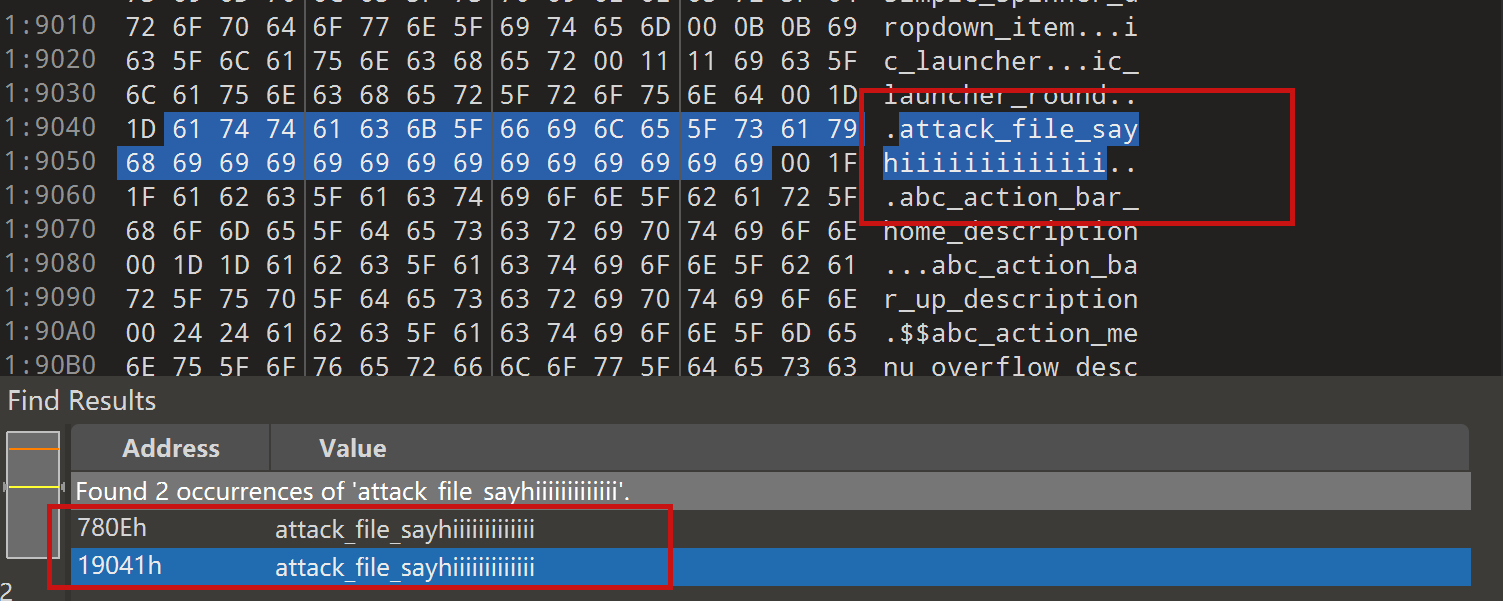 let's change the name of the file here. I'll change it to ../../_file_sayhiiiiiiiiiiiii
note that you can only overwrite files in the folder where the decompile was saved.
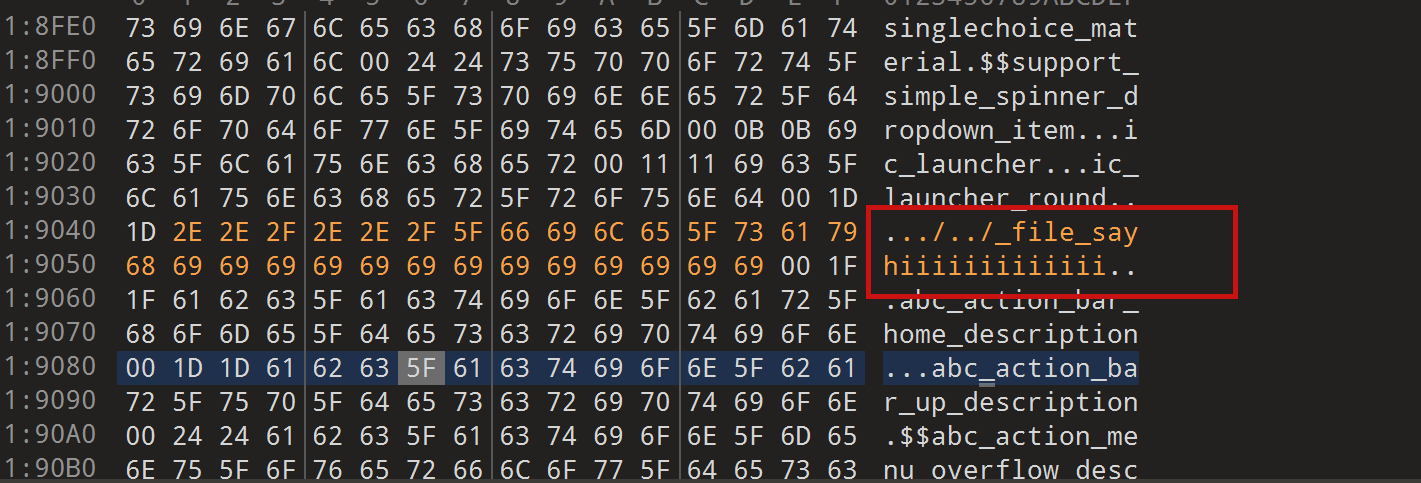
step4
change the type of this file to style
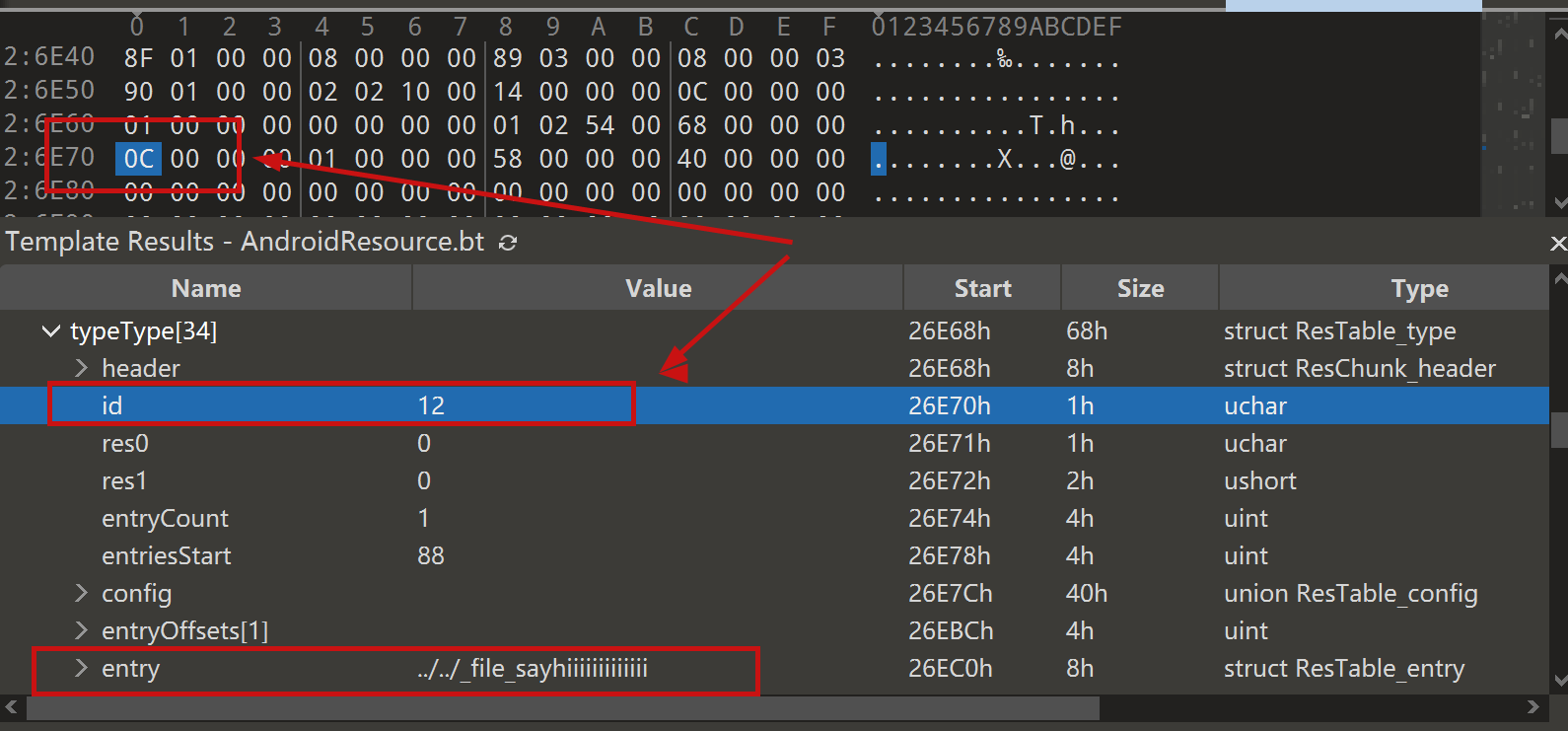 modified to 0E
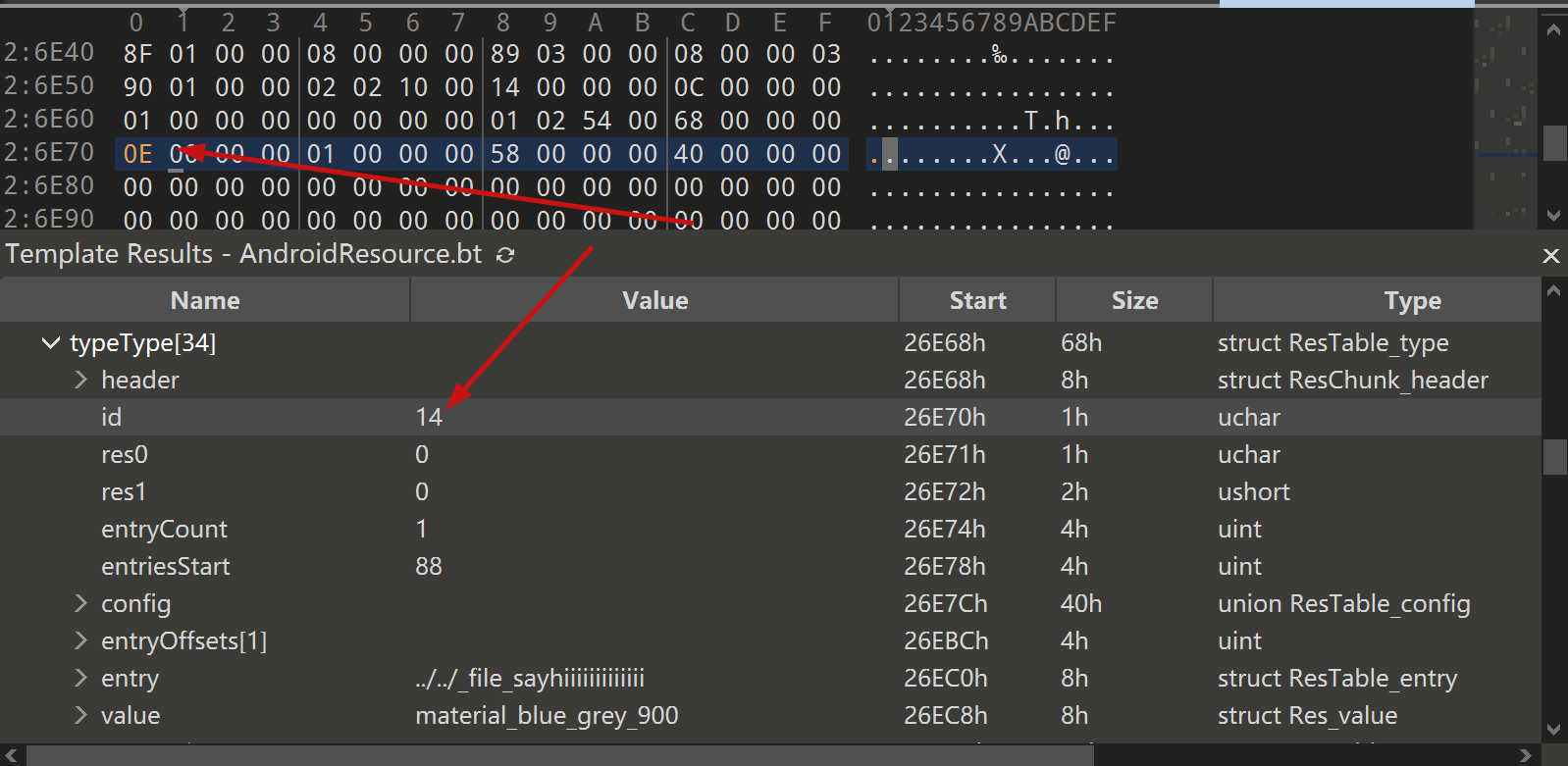
step5
After saving, re-compress the whole folder into a zip, then change the extension to APK.
open it with JADX and you can see that it has been changed to a style type.
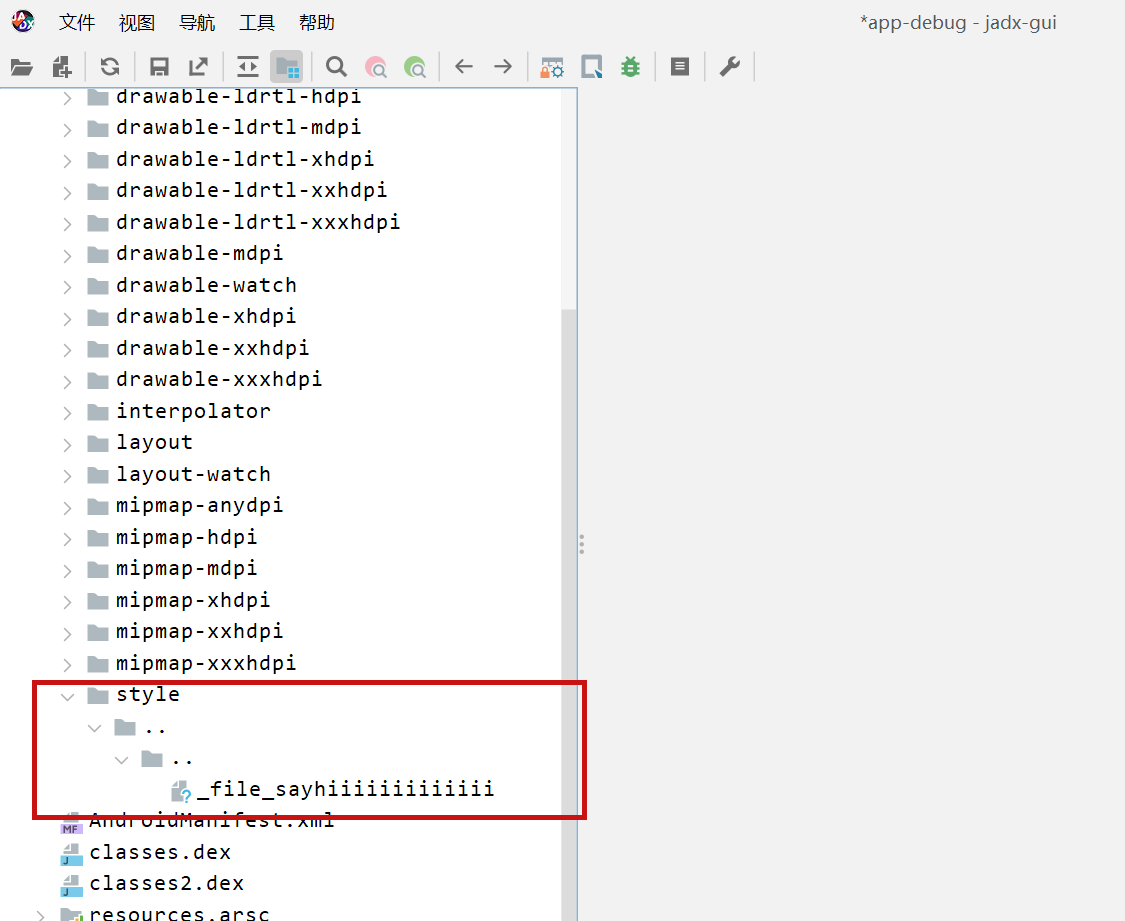 click save all
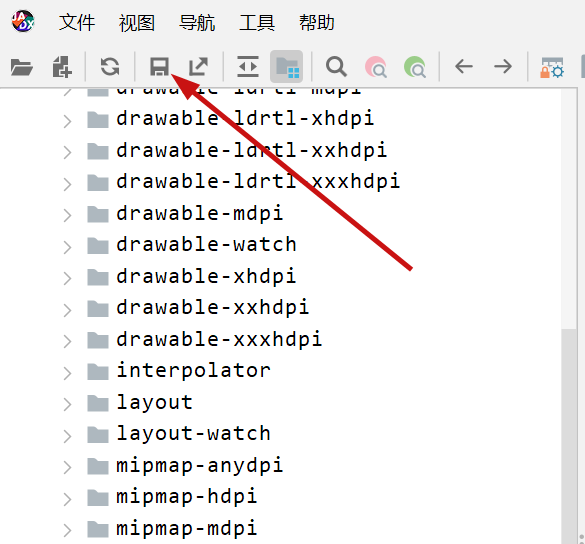 you can see the file escaping.
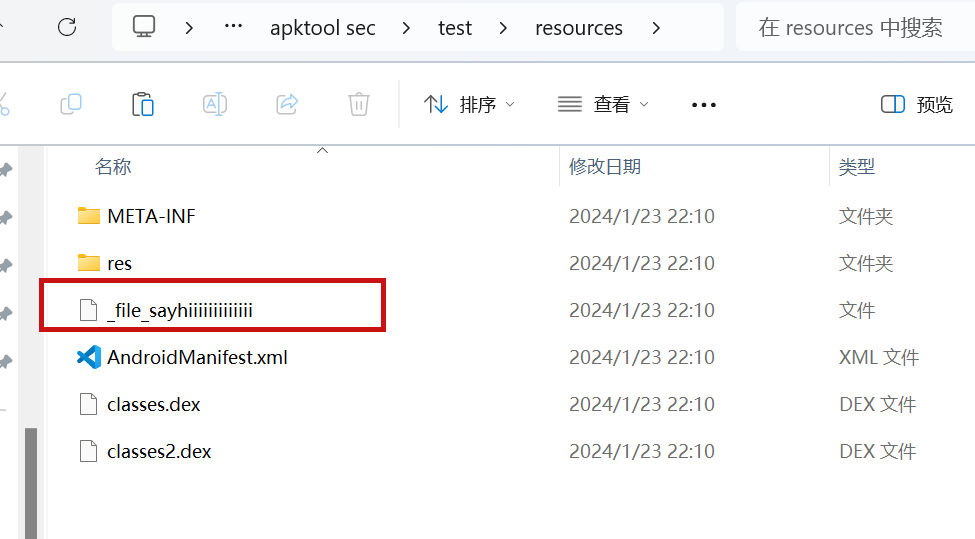 so we can also construct a
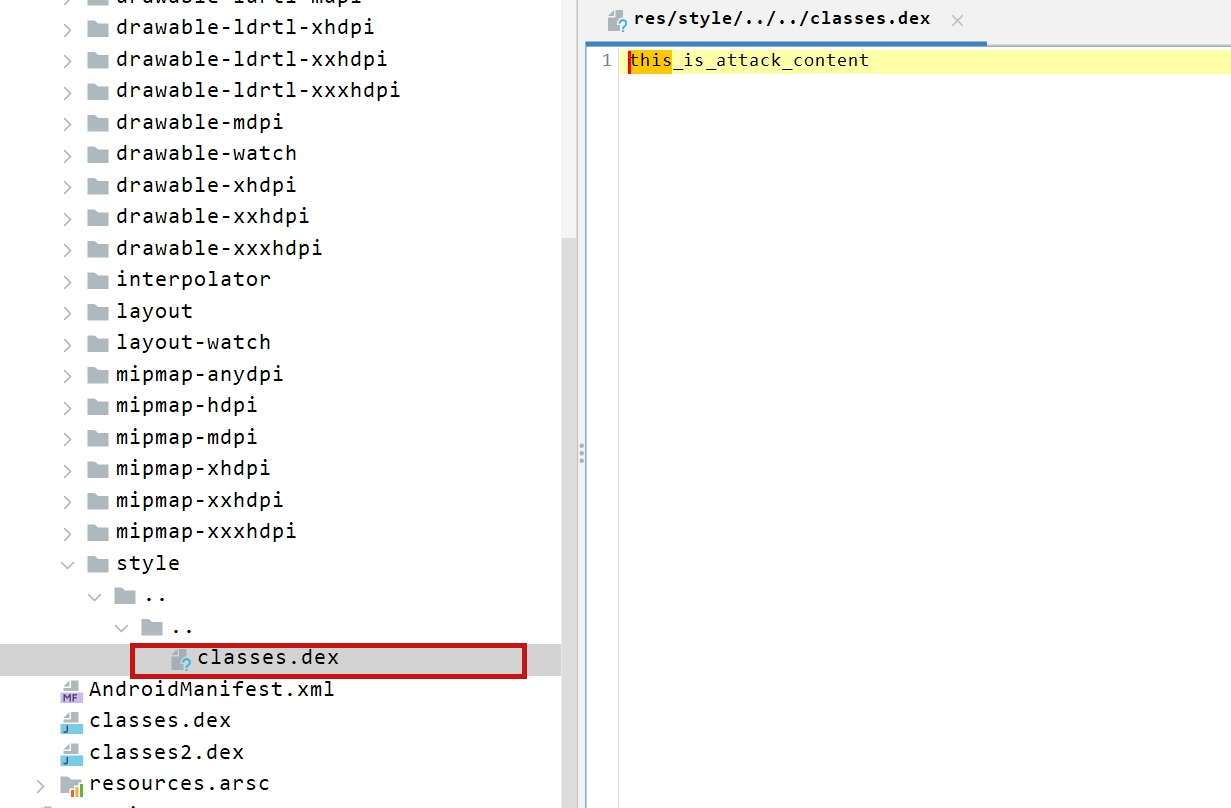 so the classes.dex file is also replaced here
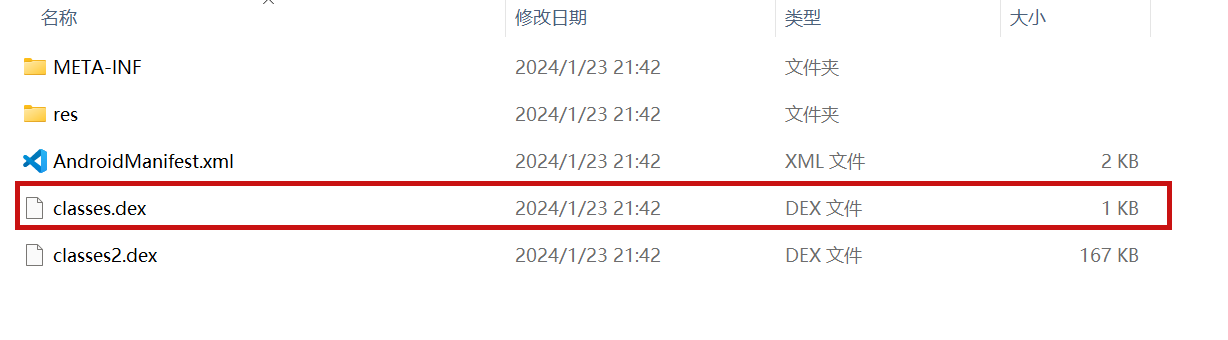
PoC
the details above have been written
Impact
latest version
{
"affected": [
{
"package": {
"ecosystem": "Maven",
"name": "io.github.skylot:jadx-core"
},
"ranges": [
{
"events": [
{
"introduced": "0"
},
{
"fixed": "1.5.0"
}
],
"type": "ECOSYSTEM"
}
]
}
],
"aliases": [],
"database_specific": {
"cwe_ids": [
"CWE-22"
],
"github_reviewed": true,
"github_reviewed_at": "2024-04-22T15:56:04Z",
"nvd_published_at": null,
"severity": "LOW"
},
"details": "### Summary\nwhen jadx parses a resource file, there is an escape problem with the style file, which can overwrite other files in the directory when saving the decompile result.\n\nAlthough I don\u0027t think this vulnerability realizes path traversal in the true sense of the word , I reported it anyway\n\n### Details\n\nI see that getResAlias does something with the filename.\n\n```java\nprivate String getResAlias(int resRef, String origKeyName, @Nullable FieldNode constField) {\n```\n\nbut type style will return the original filename directly.\n\n\nso our goal is to take a malicious file that was originally of type raw, modify its type to style, trick jadx into\n\n#### step1\n\ncreate an android project using androidstudio and create a raw folder with the name attack_file_sayhiiiiiiiiiiiii, it doesn\u0027t matter what the content is!\n\n\ngenerate an initial APK\n\n#### step2 \n\nextract this initial APK using ZIP software to get resources.arsc\n\n\ndrop resources.arsc into 010editor\n\n#### step3\n\nsearch for the previous filename attack_file_sayhiiiiiiiiiiiii , two will appear here, we choose the second one\n\n\nlet\u0027s change the name of the file here. I\u0027ll change it to ../../_file_sayhiiiiiiiiiiiii\n\nnote that you can only overwrite files in the folder where the decompile was saved.\n\n\n#### step4 \nchange the type of this file to style\n\n\nmodified to 0E\n\n\n#### step5 \n\nAfter saving, re-compress the whole folder into a zip, then change the extension to APK.\n\nopen it with JADX and you can see that it has been changed to a style type.\n\n\nclick save all\n\n\nyou can see the file escaping.\n\n\nso we can also construct a \n\n\nso the classes.dex file is also replaced here\n\n\n\n### PoC\nthe details above have been written\n\n### Impact\nlatest version \n",
"id": "GHSA-hvp5-5x4f-33fq",
"modified": "2024-04-22T15:56:04Z",
"published": "2024-04-22T15:56:04Z",
"references": [
{
"type": "WEB",
"url": "https://github.com/skylot/jadx/security/advisories/GHSA-hvp5-5x4f-33fq"
},
{
"type": "WEB",
"url": "https://github.com/skylot/jadx/commit/d86449a8ea26381d0ce6fafaed7deb7542dfd70b"
},
{
"type": "PACKAGE",
"url": "https://github.com/skylot/jadx"
}
],
"schema_version": "1.4.0",
"severity": [
{
"score": "CVSS:3.1/AV:L/AC:L/PR:L/UI:N/S:U/C:N/I:L/A:N",
"type": "CVSS_V3"
}
],
"summary": "JADX file override vulnerability"
}
GHSA-HVPW-H4QJ-VX47
Vulnerability from github – Published: 2022-11-14 12:00 – Updated: 2022-11-16 19:00The Web Server in Ironman Software PowerShell Universal v3.x and v2.x allows for directory traversal outside of the configuration directory, which allows a remote attacker with administrator privilege to create, delete, update, and display files outside of the configuration directory via a crafted HTTP request to particular endpoints in the web server. Patched Versions are 3.5.3 and 3.4.7.
{
  "affected": [],
  "aliases": [
    "CVE-2022-45184"
  ],
  "database_specific": {
    "cwe_ids": [
      "CWE-22"
    ],
    "github_reviewed": false,
    "github_reviewed_at": null,
    "nvd_published_at": "2022-11-14T08:15:00Z",
    "severity": "HIGH"
  },
  "details": "The Web Server in Ironman Software PowerShell Universal v3.x and v2.x allows for directory traversal outside of the configuration directory, which allows a remote attacker with administrator privilege to create, delete, update, and display files outside of the configuration directory via a crafted HTTP request to particular endpoints in the web server. Patched Versions are 3.5.3 and 3.4.7.",
  "id": "GHSA-hvpw-h4qj-vx47",
  "modified": "2022-11-16T19:00:25Z",
  "published": "2022-11-14T12:00:15Z",
  "references": [
    {
      "type": "ADVISORY",
      "url": "https://nvd.nist.gov/vuln/detail/CVE-2022-45184"
    },
    {
      "type": "WEB",
      "url": "https://blog.ironmansoftware.com/psu-2022-11-cve"
    },
    {
      "type": "WEB",
      "url": "https://docs.powershelluniversal.com/changelog"
    },
    {
      "type": "WEB",
      "url": "https://ironmansoftware.com"
    }
  ],
  "schema_version": "1.4.0",
  "severity": [
    {
      "score": "CVSS:3.1/AV:N/AC:L/PR:H/UI:N/S:U/C:H/I:H/A:H",
      "type": "CVSS_V3"
    }
  ]
}
GHSA-HVQR-RXGQ-V4XP
Vulnerability from github – Published: 2025-08-12 03:31 – Updated: 2026-04-08 18:33The WooCommerce Purchase Orders plugin for WordPress is vulnerable to arbitrary file deletion due to insufficient file path validation in the delete_file() function in all versions up to, and including, 1.0.2. This makes it possible for authenticated attackers, with Subscriber-level access and above, to delete arbitrary files on the server, which can easily lead to remote code execution when the right file is deleted (such as wp-config.php).
{
  "affected": [],
  "aliases": [
    "CVE-2025-5391"
  ],
  "database_specific": {
    "cwe_ids": [
      "CWE-22"
    ],
    "github_reviewed": false,
    "github_reviewed_at": null,
    "nvd_published_at": "2025-08-12T03:15:28Z",
    "severity": "HIGH"
  },
  "details": "The WooCommerce Purchase Orders plugin for WordPress is vulnerable to arbitrary file deletion due to insufficient file path validation in the delete_file() function in all versions up to, and including, 1.0.2. This makes it possible for authenticated attackers, with Subscriber-level access and above, to delete arbitrary files on the server, which can easily lead to remote code execution when the right file is deleted (such as wp-config.php).",
  "id": "GHSA-hvqr-rxgq-v4xp",
  "modified": "2026-04-08T18:33:55Z",
  "published": "2025-08-12T03:31:52Z",
  "references": [
    {
      "type": "ADVISORY",
      "url": "https://nvd.nist.gov/vuln/detail/CVE-2025-5391"
    },
    {
      "type": "WEB",
      "url": "https://plugins.trac.wordpress.org/browser/wc-purchase-orders/trunk/includes/class-bbpo-purchase-orders-files.php#L148"
    },
    {
      "type": "WEB",
      "url": "https://plugins.trac.wordpress.org/browser/wc-purchase-orders/trunk/includes/class-bbpo-purchase-orders.php#L151"
    },
    {
      "type": "WEB",
      "url": "https://plugins.trac.wordpress.org/changeset/3356360"
    },
    {
      "type": "WEB",
      "url": "https://www.wordfence.com/threat-intel/vulnerabilities/id/05a27a34-b324-4968-937e-2c0d24175d2a?source=cve"
    }
  ],
  "schema_version": "1.4.0",
  "severity": [
    {
      "score": "CVSS:3.1/AV:N/AC:L/PR:L/UI:N/S:U/C:N/I:H/A:H",
      "type": "CVSS_V3"
    }
  ]
}
GHSA-HVW8-56V7-X24Q
Vulnerability from github – Published: 2022-05-14 02:05 – Updated: 2022-05-14 02:05Directory traversal vulnerability in libraries/gis/GIS_Factory.class.php in the GIS editor in phpMyAdmin 4.0.x before 4.0.10.6, 4.1.x before 4.1.14.7, and 4.2.x before 4.2.12 allows remote authenticated users to include and execute arbitrary local files via a crafted geometry-type parameter.
{
  "affected": [],
  "aliases": [
    "CVE-2014-8959"
  ],
  "database_specific": {
    "cwe_ids": [
      "CWE-22"
    ],
    "github_reviewed": false,
    "github_reviewed_at": null,
    "nvd_published_at": "2014-11-30T11:59:00Z",
    "severity": "MODERATE"
  },
  "details": "Directory traversal vulnerability in libraries/gis/GIS_Factory.class.php in the GIS editor in phpMyAdmin 4.0.x before 4.0.10.6, 4.1.x before 4.1.14.7, and 4.2.x before 4.2.12 allows remote authenticated users to include and execute arbitrary local files via a crafted geometry-type parameter.",
  "id": "GHSA-hvw8-56v7-x24q",
  "modified": "2022-05-14T02:05:55Z",
  "published": "2022-05-14T02:05:55Z",
  "references": [
    {
      "type": "ADVISORY",
      "url": "https://nvd.nist.gov/vuln/detail/CVE-2014-8959"
    },
    {
      "type": "WEB",
      "url": "https://github.com/phpmyadmin/phpmyadmin/commit/80cd40b6687a6717860d345d6eb55bef2908e961"
    },
    {
      "type": "WEB",
      "url": "https://security.gentoo.org/glsa/201505-03"
    },
    {
      "type": "WEB",
      "url": "http://lists.opensuse.org/opensuse-updates/2014-12/msg00017.html"
    },
    {
      "type": "WEB",
      "url": "http://www.mandriva.com/security/advisories?name=MDVSA-2014:228"
    },
    {
      "type": "WEB",
      "url": "http://www.phpmyadmin.net/home_page/security/PMASA-2014-14.php"
    },
    {
      "type": "WEB",
      "url": "http://www.securityfocus.com/bid/71247"
    }
  ],
  "schema_version": "1.4.0",
  "severity": []
}
GHSA-HVWP-F8CC-FXC2
Vulnerability from github – Published: 2022-05-24 16:46 – Updated: 2024-04-04 00:45Adobe XD versions 16.0 and earlier have a path traversal vulnerability. Successful exploitation could lead to arbitrary code execution.
{
  "affected": [],
  "aliases": [
    "CVE-2019-7105"
  ],
  "database_specific": {
    "cwe_ids": [
      "CWE-22"
    ],
    "github_reviewed": false,
    "github_reviewed_at": null,
    "nvd_published_at": "2019-05-23T16:29:00Z",
    "severity": "CRITICAL"
  },
  "details": "Adobe XD versions 16.0 and earlier have a path traversal vulnerability. Successful exploitation could lead to arbitrary code execution.",
  "id": "GHSA-hvwp-f8cc-fxc2",
  "modified": "2024-04-04T00:45:48Z",
  "published": "2022-05-24T16:46:29Z",
  "references": [
    {
      "type": "ADVISORY",
      "url": "https://nvd.nist.gov/vuln/detail/CVE-2019-7105"
    },
    {
      "type": "WEB",
      "url": "https://helpx.adobe.com/security/products/xd/apsb19-22.html"
    }
  ],
  "schema_version": "1.4.0",
  "severity": [
    {
      "score": "CVSS:3.0/AV:N/AC:L/PR:N/UI:N/S:U/C:H/I:H/A:H",
      "type": "CVSS_V3"
    }
  ]
}
GHSA-HW36-CFQ9-PQHG
Vulnerability from github – Published: 2022-05-17 04:46 – Updated: 2022-05-17 04:46Directory traversal vulnerability in the LYSESOFT AndExplorer application before 20140403 and AndExplorerPro application before 20140405 for Android allows attackers to overwrite or create arbitrary files via unspecified vectors.
{
  "affected": [],
  "aliases": [
    "CVE-2014-1974"
  ],
  "database_specific": {
    "cwe_ids": [
      "CWE-22"
    ],
    "github_reviewed": false,
    "github_reviewed_at": null,
    "nvd_published_at": "2014-04-19T19:55:00Z",
    "severity": "MODERATE"
  },
  "details": "Directory traversal vulnerability in the LYSESOFT AndExplorer application before 20140403 and AndExplorerPro application before 20140405 for Android allows attackers to overwrite or create arbitrary files via unspecified vectors.",
  "id": "GHSA-hw36-cfq9-pqhg",
  "modified": "2022-05-17T04:46:00Z",
  "published": "2022-05-17T04:46:00Z",
  "references": [
    {
      "type": "ADVISORY",
      "url": "https://nvd.nist.gov/vuln/detail/CVE-2014-1974"
    },
    {
      "type": "WEB",
      "url": "https://play.google.com/store/apps/details?id=lysesoft.andexplorer"
    },
    {
      "type": "WEB",
      "url": "https://play.google.com/store/apps/details?id=lysesoft.andexplorerpro"
    },
    {
      "type": "WEB",
      "url": "http://jvn.jp/en/jp/JVN22670349/index.html"
    },
    {
      "type": "WEB",
      "url": "http://jvndb.jvn.jp/jvndb/JVNDB-2014-000037"
    }
  ],
  "schema_version": "1.4.0",
  "severity": []
}
GHSA-HW4C-CMMG-HP4C
Vulnerability from github – Published: 2025-11-18 09:30 – Updated: 2025-11-18 09:30A Path Restriction Bypass vulnerability exists in Serv-U that when abused, could give a malicious actor with access to admin privileges the ability to execute code on a directory.
This issue requires administrative privileges to abuse. On Windows systems, this scored as medium due to differences in how paths and home directories are handled.
{
  "affected": [],
  "aliases": [
    "CVE-2025-40549"
  ],
  "database_specific": {
    "cwe_ids": [
      "CWE-22"
    ],
    "github_reviewed": false,
    "github_reviewed_at": null,
    "nvd_published_at": "2025-11-18T09:15:52Z",
    "severity": "CRITICAL"
  },
  "details": "A Path Restriction Bypass vulnerability exists in Serv-U that when abused, could give a malicious actor with access to admin privileges the ability to execute code on a directory. \n\nThis issue requires administrative privileges to abuse. On Windows systems, this scored as medium due to differences in how paths and home directories are handled.",
  "id": "GHSA-hw4c-cmmg-hp4c",
  "modified": "2025-11-18T09:30:52Z",
  "published": "2025-11-18T09:30:52Z",
  "references": [
    {
      "type": "ADVISORY",
      "url": "https://nvd.nist.gov/vuln/detail/CVE-2025-40549"
    },
    {
      "type": "WEB",
      "url": "https://documentation.solarwinds.com/en/success_center/servu/content/release_notes/servu_15-5-3_release_notes.htm"
    },
    {
      "type": "WEB",
      "url": "https://www.solarwinds.com/trust-center/security-advisories/CVE-2025-40549"
    }
  ],
  "schema_version": "1.4.0",
  "severity": [
    {
      "score": "CVSS:3.1/AV:N/AC:L/PR:H/UI:N/S:C/C:H/I:H/A:H",
      "type": "CVSS_V3"
    }
  ]
}
GHSA-HW4X-Q63W-42VP
Vulnerability from github – Published: 2023-05-26 15:30 – Updated: 2025-11-03 21:30Nagvis before 1.9.34 was discovered to contain an arbitrary file read vulnerability via the component /core/classes/NagVisHoverUrl.php.
{
  "affected": [],
  "aliases": [
    "CVE-2022-46945"
  ],
  "database_specific": {
    "cwe_ids": [
      "CWE-22"
    ],
    "github_reviewed": false,
    "github_reviewed_at": null,
    "nvd_published_at": "2023-05-26T15:15:09Z",
    "severity": "MODERATE"
  },
  "details": "Nagvis before 1.9.34 was discovered to contain an arbitrary file read vulnerability via the component /core/classes/NagVisHoverUrl.php.",
  "id": "GHSA-hw4x-q63w-42vp",
  "modified": "2025-11-03T21:30:48Z",
  "published": "2023-05-26T15:30:21Z",
  "references": [
    {
      "type": "ADVISORY",
      "url": "https://nvd.nist.gov/vuln/detail/CVE-2022-46945"
    },
    {
      "type": "WEB",
      "url": "https://github.com/NagVis/nagvis/commit/71aba7f46f79d846e1df037f165d206a2cd1d22a"
    },
    {
      "type": "WEB",
      "url": "https://github.com/NagVis/nagvis/compare/nagvis-1.9.33...nagvis-1.9.34"
    },
    {
      "type": "WEB",
      "url": "https://lists.debian.org/debian-lts-announce/2025/05/msg00000.html"
    },
    {
      "type": "WEB",
      "url": "https://www.sonarsource.com/blog/checkmk-rce-chain-3"
    }
  ],
  "schema_version": "1.4.0",
  "severity": [
    {
      "score": "CVSS:3.1/AV:N/AC:L/PR:L/UI:N/S:C/C:H/I:L/A:L",
      "type": "CVSS_V3"
    }
  ]
}
GHSA-HW5H-J2W2-44C7
Vulnerability from github – Published: 2022-05-13 01:26 – Updated: 2022-05-13 01:26LAOBANCMS 2.0 allows install/mysql_hy.php?riqi=../ Directory Traversal.
{
  "affected": [],
  "aliases": [
    "CVE-2018-19328"
  ],
  "database_specific": {
    "cwe_ids": [
      "CWE-22"
    ],
    "github_reviewed": false,
    "github_reviewed_at": null,
    "nvd_published_at": "2018-11-17T15:29:00Z",
    "severity": "CRITICAL"
  },
  "details": "LAOBANCMS 2.0 allows install/mysql_hy.php?riqi=../ Directory Traversal.",
  "id": "GHSA-hw5h-j2w2-44c7",
  "modified": "2022-05-13T01:26:58Z",
  "published": "2022-05-13T01:26:58Z",
  "references": [
    {
      "type": "ADVISORY",
      "url": "https://nvd.nist.gov/vuln/detail/CVE-2018-19328"
    },
    {
      "type": "WEB",
      "url": "https://github.com/onkyoworm/poc/blob/master/laobancms/poc.md"
    }
  ],
  "schema_version": "1.4.0",
  "severity": [
    {
      "score": "CVSS:3.0/AV:N/AC:L/PR:N/UI:N/S:U/C:H/I:H/A:H",
      "type": "CVSS_V3"
    }
  ]
}
Mitigation MIT-5.1
Strategy: Input Validation
- Assume all input is malicious. Use an "accept known good" input validation strategy, i.e., use a list of acceptable inputs that strictly conform to specifications. Reject any input that does not strictly conform to specifications, or transform it into something that does.
- When performing input validation, consider all potentially relevant properties, including length, type of input, the full range of acceptable values, missing or extra inputs, syntax, consistency across related fields, and conformance to business rules. As an example of business rule logic, "boat" may be syntactically valid because it only contains alphanumeric characters, but it is not valid if the input is only expected to contain colors such as "red" or "blue."
- Do not rely exclusively on looking for malicious or malformed inputs. This is likely to miss at least one undesirable input, especially if the code's environment changes. This can give attackers enough room to bypass the intended validation. However, denylists can be useful for detecting potential attacks or determining which inputs are so malformed that they should be rejected outright.
- When validating filenames, use stringent allowlists that limit the character set to be used. If feasible, only allow a single "." character in the filename to avoid weaknesses such as CWE-23, and exclude directory separators such as "/" to avoid CWE-36. Use a list of allowable file extensions, which will help to avoid CWE-434.
- Do not rely exclusively on a filtering mechanism that removes potentially dangerous characters. This is equivalent to a denylist, which may be incomplete (CWE-184). For example, filtering "/" is insufficient protection if the filesystem also supports the use of "\" as a directory separator. Another possible error could occur when the filtering is applied in a way that still produces dangerous data (CWE-182). For example, if "../" sequences are removed from the ".../...//" string in a sequential fashion, two instances of "../" would be removed from the original string, but the remaining characters would still form the "../" string.
Mitigation MIT-15
For any security checks that are performed on the client side, ensure that these checks are duplicated on the server side, in order to avoid CWE-602. Attackers can bypass the client-side checks by modifying values after the checks have been performed, or by changing the client to remove the client-side checks entirely. Then, these modified values would be submitted to the server.
Mitigation MIT-20.1
Strategy: Input Validation
- Inputs should be decoded and canonicalized to the application's current internal representation before being validated (CWE-180). Make sure that the application does not decode the same input twice (CWE-174). Such errors could be used to bypass allowlist validation schemes by introducing dangerous inputs after they have been checked.
- Use a built-in path canonicalization function (such as realpath() in C) that produces the canonical version of the pathname, which effectively removes ".." sequences and symbolic links (CWE-23, CWE-59). This includes:
- realpath() in C
- getCanonicalPath() in Java
- GetFullPath() in ASP.NET
- realpath() or abs_path() in Perl
- realpath() in PHP
Mitigation MIT-4
Strategy: Libraries or Frameworks
Use a vetted library or framework that does not allow this weakness to occur or provides constructs that make this weakness easier to avoid [REF-1482].
Mitigation MIT-29
Strategy: Firewall
Use an application firewall that can detect attacks against this weakness. It can be beneficial in cases in which the code cannot be fixed (because it is controlled by a third party), as an emergency prevention measure while more comprehensive software assurance measures are applied, or to provide defense in depth [REF-1481].
Mitigation MIT-17
Strategy: Environment Hardening
Run your code using the lowest privileges that are required to accomplish the necessary tasks [REF-76]. If possible, create isolated accounts with limited privileges that are only used for a single task. That way, a successful attack will not immediately give the attacker access to the rest of the software or its environment. For example, database applications rarely need to run as the database administrator, especially in day-to-day operations.
Mitigation MIT-21.1
Strategy: Enforcement by Conversion
- When the set of acceptable objects, such as filenames or URLs, is limited or known, create a mapping from a set of fixed input values (such as numeric IDs) to the actual filenames or URLs, and reject all other inputs.
- For example, ID 1 could map to "inbox.txt" and ID 2 could map to "profile.txt". Features such as the ESAPI AccessReferenceMap [REF-185] provide this capability.
Mitigation MIT-22
Strategy: Sandbox or Jail
- Run the code in a "jail" or similar sandbox environment that enforces strict boundaries between the process and the operating system. This may effectively restrict which files can be accessed in a particular directory or which commands can be executed by the software.
- OS-level examples include the Unix chroot jail, AppArmor, and SELinux. In general, managed code may provide some protection. For example, java.io.FilePermission in the Java SecurityManager allows the software to specify restrictions on file operations.
- This may not be a feasible solution, and it only limits the impact to the operating system; the rest of the application may still be subject to compromise.
- Be careful to avoid CWE-243 and other weaknesses related to jails.
Mitigation MIT-34
Strategy: Attack Surface Reduction
- Store library, include, and utility files outside of the web document root, if possible. Otherwise, store them in a separate directory and use the web server's access control capabilities to prevent attackers from directly requesting them. One common practice is to define a fixed constant in each calling program, then check for the existence of the constant in the library/include file; if the constant does not exist, then the file was directly requested, and it can exit immediately.
- This significantly reduces the chance of an attacker being able to bypass any protection mechanisms that are in the base program but not in the include files. It will also reduce the attack surface.
Mitigation MIT-39
- Ensure that error messages only contain minimal details that are useful to the intended audience and no one else. The messages need to strike the balance between being too cryptic (which can confuse users) or being too detailed (which may reveal more than intended). The messages should not reveal the methods that were used to determine the error. Attackers can use detailed information to refine or optimize their original attack, thereby increasing their chances of success.
- If errors must be captured in some detail, record them in log messages, but consider what could occur if the log messages can be viewed by attackers. Highly sensitive information such as passwords should never be saved to log files.
- Avoid inconsistent messaging that might accidentally tip off an attacker about internal state, such as whether a user account exists or not.
- In the context of path traversal, error messages which disclose path information can help attackers craft the appropriate attack strings to move through the file system hierarchy.
Mitigation MIT-16
Strategy: Environment Hardening
When using PHP, configure the application so that it does not use register_globals. During implementation, develop the application so that it does not rely on this feature, but be wary of implementing a register_globals emulation that is subject to weaknesses such as CWE-95, CWE-621, and similar issues.
CAPEC-126: Path Traversal
An adversary uses path manipulation methods to exploit insufficient input validation of a target to obtain access to data that should be not be retrievable by ordinary well-formed requests. A typical variety of this attack involves specifying a path to a desired file together with dot-dot-slash characters, resulting in the file access API or function traversing out of the intended directory structure and into the root file system. By replacing or modifying the expected path information the access function or API retrieves the file desired by the attacker. These attacks either involve the attacker providing a complete path to a targeted file or using control characters (e.g. path separators (/ or \) and/or dots (.)) to reach desired directories or files.
CAPEC-64: Using Slashes and URL Encoding Combined to Bypass Validation Logic
This attack targets the encoding of the URL combined with the encoding of the slash characters. An attacker can take advantage of the multiple ways of encoding a URL and abuse the interpretation of the URL. A URL may contain special character that need special syntax handling in order to be interpreted. Special characters are represented using a percentage character followed by two digits representing the octet code of the original character (%HEX-CODE). For instance US-ASCII space character would be represented with %20. This is often referred as escaped ending or percent-encoding. Since the server decodes the URL from the requests, it may restrict the access to some URL paths by validating and filtering out the URL requests it received. An attacker will try to craft an URL with a sequence of special characters which once interpreted by the server will be equivalent to a forbidden URL. It can be difficult to protect against this attack since the URL can contain other format of encoding such as UTF-8 encoding, Unicode-encoding, etc.
CAPEC-76: Manipulating Web Input to File System Calls
An attacker manipulates inputs to the target software which the target software passes to file system calls in the OS. The goal is to gain access to, and perhaps modify, areas of the file system that the target software did not intend to be accessible.
CAPEC-78: Using Escaped Slashes in Alternate Encoding
This attack targets the use of the backslash in alternate encoding. An adversary can provide a backslash as a leading character and causes a parser to believe that the next character is special. This is called an escape. By using that trick, the adversary tries to exploit alternate ways to encode the same character which leads to filter problems and opens avenues to attack.
CAPEC-79: Using Slashes in Alternate Encoding
This attack targets the encoding of the Slash characters. An adversary would try to exploit common filtering problems related to the use of the slashes characters to gain access to resources on the target host. Directory-driven systems, such as file systems and databases, typically use the slash character to indicate traversal between directories or other container components. For murky historical reasons, PCs (and, as a result, Microsoft OSs) choose to use a backslash, whereas the UNIX world typically makes use of the forward slash. The schizophrenic result is that many MS-based systems are required to understand both forms of the slash. This gives the adversary many opportunities to discover and abuse a number of common filtering problems. The goal of this pattern is to discover server software that only applies filters to one version, but not the other.