CWE-434
AllowedUnrestricted Upload of File with Dangerous Type
Abstraction: Base · Status: Draft
The product allows the upload or transfer of dangerous file types that are automatically processed within its environment.
6004 vulnerabilities reference this CWE, most recent first.
GHSA-H3XH-GHGC-6PH8
Vulnerability from github – Published: 2022-07-22 00:00 – Updated: 2022-07-26 00:01Authenticated Arbitrary File Creation via Export function vulnerability in GiveWP's GiveWP plugin <= 2.20.2 at WordPress.
{
  "affected": [],
  "aliases": [
    "CVE-2022-28700"
  ],
  "database_specific": {
    "cwe_ids": [
      "CWE-434"
    ],
    "github_reviewed": false,
    "github_reviewed_at": null,
    "nvd_published_at": "2022-07-21T18:15:00Z",
    "severity": "HIGH"
  },
  "details": "Authenticated Arbitrary File Creation via Export function vulnerability in GiveWP\u0027s GiveWP plugin \u003c= 2.20.2 at WordPress.",
  "id": "GHSA-h3xh-ghgc-6ph8",
  "modified": "2022-07-26T00:01:15Z",
  "published": "2022-07-22T00:00:32Z",
  "references": [
    {
      "type": "ADVISORY",
      "url": "https://nvd.nist.gov/vuln/detail/CVE-2022-28700"
    },
    {
      "type": "WEB",
      "url": "https://patchstack.com/database/vulnerability/give/wordpress-givewp-plugin-2-20-2-authenticated-arbitrary-file-creation-via-export-function-vulnerability"
    },
    {
      "type": "WEB",
      "url": "https://wordpress.org/plugins/give/#developers"
    }
  ],
  "schema_version": "1.4.0",
  "severity": [
    {
      "score": "CVSS:3.1/AV:N/AC:L/PR:H/UI:N/S:U/C:H/I:H/A:H",
      "type": "CVSS_V3"
    }
  ]
}
GHSA-H42X-XX2Q-6V6G
Vulnerability from github – Published: 2025-03-13 22:38 – Updated: 2025-03-13 22:38Summary
An unauthorized attacker can leverage the whitelisted route /api/v1/attachments to upload arbitrary files when the storageType is set to local (default).
Details
When a new request arrives, the system first checks if the URL starts with /api/v1/. If it does, the system then verifies whether the URL is included in the whitelist (whitelistURLs). If the URL is whitelisted, the request proceeds; otherwise, the system enforces authentication.
@ /packages/server/src/index.ts
           this.app.use(async (req, res, next) => {
                // Step 1: Check if the req path contains /api/v1 regardless of case
                if (URL_CASE_INSENSITIVE_REGEX.test(req.path)) {
                    // Step 2: Check if the req path is case sensitive
                    if (URL_CASE_SENSITIVE_REGEX.test(req.path)) {
                        // Step 3: Check if the req path is in the whitelist
                        const isWhitelisted = whitelistURLs.some((url) => req.path.startsWith(url))
                        if (isWhitelisted) {
                            next()
                        } else if (req.headers['x-request-from'] === 'internal') {
                            basicAuthMiddleware(req, res, next)
                        } else {
                            const isKeyValidated = await validateAPIKey(req)
                            if (!isKeyValidated) {
                                return res.status(401).json({ error: 'Unauthorized Access' })
                            }
                            next()
                        }
                    } else {
                        return res.status(401).json({ error: 'Unauthorized Access' })
                    }
                } else {
                    // If the req path does not contain /api/v1, then allow the request to pass through, example: /assets, /canvas
                    next()
                }
            }
The whitelist is defined as follows
export const WHITELIST_URLS = [
    '/api/v1/verify/apikey/',
    '/api/v1/chatflows/apikey/',
    '/api/v1/public-chatflows',
    '/api/v1/public-chatbotConfig',
    '/api/v1/prediction/',
    '/api/v1/vector/upsert/',
    '/api/v1/node-icon/',
    '/api/v1/components-credentials-icon/',
    '/api/v1/chatflows-streaming',
    '/api/v1/chatflows-uploads',
    '/api/v1/openai-assistants-file/download',
    '/api/v1/feedback',
    '/api/v1/leads',
    '/api/v1/get-upload-file',
    '/api/v1/ip',
    '/api/v1/ping',
    '/api/v1/version',
    '/api/v1/attachments',
    '/api/v1/metrics'
]
This means that every route in the whitelist does not require authentication. Now, let's examine the /api/v1/attachments route.
@ /packages/server/src/routes/attachments/index.ts
const router = express.Router()
// CREATE
router.post('/:chatflowId/:chatId', getMulterStorage().array('files'), attachmentsController.createAttachment)
export default router
After several calls, the request reaches the createFileAttachment function @ (packages/server/src/utils/createAttachment.ts)
Initially, the function retrieves chatflowid and chatId from the request without any additional validation. The only check performed is whether these parameters exist in the request.
    const chatflowid = req.params.chatflowId
    if (!chatflowid) {
        throw new Error(
            'Params chatflowId is required! Please provide chatflowId and chatId in the URL: /api/v1/attachments/:chatflowId/:chatId'
        )
    }

    const chatId = req.params.chatId
    if (!chatId) {
        throw new Error(
            'Params chatId is required! Please provide chatflowId and chatId in the URL: /api/v1/attachments/:chatflowId/:chatId'
        )
    }
Next, the function retrieves the uploaded files and attempts to add them to the storage by calling the addArrayFilesToStorage function.
const files = (req.files as Express.Multer.File[]) || []
    const fileAttachments = []
    if (files.length) {
        // ...
        for (const file of files) {
            const fileBuffer = await getFileFromUpload(file.path ?? file.key)  // get the uploaded file
            const fileNames: string[] = []
            file.originalname = Buffer.from(file.originalname, 'latin1').toString('utf8')
            // add it to the storage
            const storagePath = await addArrayFilesToStorage(file.mimetype,
                                                             fileBuffer,
                                                             file.originalname,
                                                             fileNames,
                                                             chatflowid, chatId) // add it to the storage

            // ...

            await removeSpecificFileFromUpload(file.path ?? file.key) // delete from tmp
           //  ...

                fileAttachments.push({
                    name: file.originalname,
                    mimeType: file.mimetype,
                    size: file.size,
                    content
                })
            } catch (error) {
                throw new Error(`Failed operation: createFileAttachment - ${getErrorMessage(error)}`)
            }
        }
    }

    return fileAttachments
Now lets take a look at addArrayFilesToStorage function @ (/packages/components/src/storageUtils.ts)
export const addArrayFilesToStorage = async (mime: string, bf: Buffer, fileName: string, fileNames: string[], ...paths: string[]) => {
    const storageType = getStorageType()

    const sanitizedFilename = _sanitizeFilename(fileName)
    if (storageType === 's3') {
      // ...
    } else {
        const dir = path.join(getStoragePath(), ...paths) // PATH TRAVERSAL.
        if (!fs.existsSync(dir)) {
            fs.mkdirSync(dir, { recursive: true })
        }
        const filePath = path.join(dir, sanitizedFilename)
        fs.writeFileSync(filePath, bf)
        fileNames.push(sanitizedFilename)
        return 'FILE-STORAGE::' + JSON.stringify(fileNames)
    }
}
As noted in the comment, to construct the directory, the function joins the output of the getStoragePath function with ...paths, which are essentially the chatflowid and chatId extracted earlier from the request.
However, as mentioned previously, these values are not validated to ensure they are UUIDs or numbers. As a result, an attacker could manipulate these variables to set the dir variable to any value.
Combined with the fact that the filename is also provided by the user, this leads to unauthenticated arbitrary file upload.
POC
This is the a HTTP request. As observed, we are not authenticated, and by manipulating the chatId parameter, we can perform a path traversal. In this example, we overwrite the api.json file, which contains the API keys for the system.
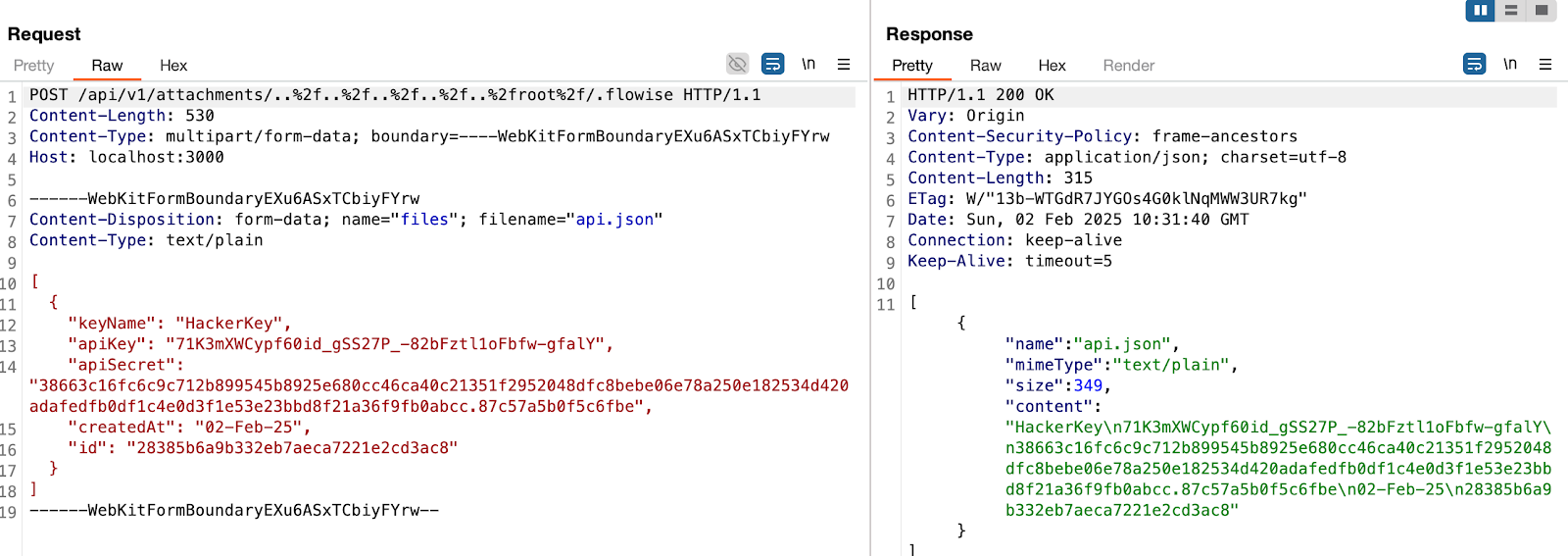
in this example, the dir variable will be
var dir = '/root/.flowise/storage/test/../../../../../../../../root/.flowise/'
and the file name is
api.json
And the API Keys in the UI

Impact
This vulnerability could potentially lead to * Remote Code Execution * Server Takeover * Data Theft And more
{
"affected": [
{
"package": {
"ecosystem": "npm",
"name": "flowise"
},
"ranges": [
{
"events": [
{
"introduced": "0"
},
{
"last_affected": "2.2.7"
}
],
"type": "ECOSYSTEM"
}
]
}
],
"aliases": [],
"database_specific": {
"cwe_ids": [
"CWE-434"
],
"github_reviewed": true,
"github_reviewed_at": "2025-03-13T22:38:03Z",
"nvd_published_at": null,
"severity": "CRITICAL"
},
"details": "## Summary\nAn unauthorized attacker can leverage the whitelisted route `/api/v1/attachments` to upload arbitrary files when the `storageType` is set to **local** (default).\n\n## Details\nWhen a new request arrives, the system first checks if the URL starts with `/api/v1/`. If it does, the system then verifies whether the URL is included in the whitelist (*whitelistURLs*). If the URL is whitelisted, the request proceeds; otherwise, the system enforces authentication.\n\n@ */packages/server/src/index.ts*\n```typescript\n this.app.use(async (req, res, next) =\u003e {\n // Step 1: Check if the req path contains /api/v1 regardless of case\n if (URL_CASE_INSENSITIVE_REGEX.test(req.path)) {\n // Step 2: Check if the req path is case sensitive\n if (URL_CASE_SENSITIVE_REGEX.test(req.path)) {\n // Step 3: Check if the req path is in the whitelist\n const isWhitelisted = whitelistURLs.some((url) =\u003e req.path.startsWith(url))\n if (isWhitelisted) {\n next()\n } else if (req.headers[\u0027x-request-from\u0027] === \u0027internal\u0027) {\n basicAuthMiddleware(req, res, next)\n } else {\n const isKeyValidated = await validateAPIKey(req)\n if (!isKeyValidated) {\n return res.status(401).json({ error: \u0027Unauthorized Access\u0027 })\n }\n next()\n }\n } else {\n return res.status(401).json({ error: \u0027Unauthorized Access\u0027 })\n }\n } else {\n // If the req path does not contain /api/v1, then allow the request to pass through, example: /assets, /canvas\n next()\n }\n }\n```\n\n**The whitelist is defined as follows**\n\n```typescript\nexport const WHITELIST_URLS = [\n \u0027/api/v1/verify/apikey/\u0027,\n \u0027/api/v1/chatflows/apikey/\u0027,\n \u0027/api/v1/public-chatflows\u0027,\n \u0027/api/v1/public-chatbotConfig\u0027,\n \u0027/api/v1/prediction/\u0027,\n \u0027/api/v1/vector/upsert/\u0027,\n \u0027/api/v1/node-icon/\u0027,\n \u0027/api/v1/components-credentials-icon/\u0027,\n \u0027/api/v1/chatflows-streaming\u0027,\n \u0027/api/v1/chatflows-uploads\u0027,\n \u0027/api/v1/openai-assistants-file/download\u0027,\n \u0027/api/v1/feedback\u0027,\n \u0027/api/v1/leads\u0027,\n \u0027/api/v1/get-upload-file\u0027,\n \u0027/api/v1/ip\u0027,\n \u0027/api/v1/ping\u0027,\n \u0027/api/v1/version\u0027,\n \u0027/api/v1/attachments\u0027,\n \u0027/api/v1/metrics\u0027\n]\n```\nThis means that every route in the whitelist does not require authentication. Now, let\u0027s examine the `/api/v1/attachments` route.\n\n@ */packages/server/src/routes/attachments/index.ts*\n```typescript\nconst router = express.Router()\n// CREATE\nrouter.post(\u0027/:chatflowId/:chatId\u0027, getMulterStorage().array(\u0027files\u0027), attachmentsController.createAttachment)\nexport default router\n```\nAfter several calls, the request reaches the `createFileAttachment` function @ (*packages/server/src/utils/createAttachment.ts*)\nInitially, the function retrieves *chatflowid* and *chatId* from the request without any additional validation. The only check performed is whether these parameters exist in the request.\n\n```typescript\n const chatflowid = req.params.chatflowId\n if (!chatflowid) {\n throw new Error(\n \u0027Params chatflowId is required! Please provide chatflowId and chatId in the URL: /api/v1/attachments/:chatflowId/:chatId\u0027\n )\n }\n\n const chatId = req.params.chatId\n if (!chatId) {\n throw new Error(\n \u0027Params chatId is required! Please provide chatflowId and chatId in the URL: /api/v1/attachments/:chatflowId/:chatId\u0027\n )\n }\n```\n\nNext, the function retrieves the uploaded files and attempts to add them to the storage by calling the `addArrayFilesToStorage` function.\n\n```typescript\nconst files = (req.files as Express.Multer.File[]) || []\n const fileAttachments = []\n if (files.length) {\n // ...\n for (const file of files) {\n const fileBuffer = await getFileFromUpload(file.path ?? file.key) // get the uploaded file\n const fileNames: string[] = []\n file.originalname = Buffer.from(file.originalname, \u0027latin1\u0027).toString(\u0027utf8\u0027)\n // add it to the storage\n const storagePath = await addArrayFilesToStorage(file.mimetype, \n fileBuffer,\n file.originalname,\n fileNames,\n chatflowid, chatId) // add it to the storage\n\n // ...\n\n await removeSpecificFileFromUpload(file.path ?? file.key) // delete from tmp\n // ...\n\n fileAttachments.push({\n name: file.originalname,\n mimeType: file.mimetype,\n size: file.size,\n content\n })\n } catch (error) {\n throw new Error(`Failed operation: createFileAttachment - ${getErrorMessage(error)}`)\n }\n }\n }\n\n return fileAttachments\n```\n\nNow lets take a look at `addArrayFilesToStorage` function @ (*/packages/components/src/storageUtils.ts*)\n\n```typescript\nexport const addArrayFilesToStorage = async (mime: string, bf: Buffer, fileName: string, fileNames: string[], ...paths: string[]) =\u003e {\n const storageType = getStorageType()\n\n const sanitizedFilename = _sanitizeFilename(fileName)\n if (storageType === \u0027s3\u0027) {\n // ...\n } else {\n const dir = path.join(getStoragePath(), ...paths) // PATH TRAVERSAL.\n if (!fs.existsSync(dir)) {\n fs.mkdirSync(dir, { recursive: true })\n }\n const filePath = path.join(dir, sanitizedFilename)\n fs.writeFileSync(filePath, bf)\n fileNames.push(sanitizedFilename)\n return \u0027FILE-STORAGE::\u0027 + JSON.stringify(fileNames)\n }\n}\n```\n\nAs noted in the comment, to construct the directory, the function joins the output of the `getStoragePath` function with `...paths`, which are essentially the `chatflowid` and `chatId` extracted earlier from the request.\nHowever, as mentioned previously, these values are not validated to ensure they are UUIDs or numbers. As a result, an attacker could manipulate these variables to set the **dir** variable to any value.\nCombined with the fact that the filename is also provided by the user, this leads to **unauthenticated arbitrary file upload**.\n\n## POC\nThis is the a HTTP request. As observed, we are not authenticated, and by manipulating the `chatId` parameter, we can perform a path traversal. In this example, we overwrite the `api.json` file, which contains the API keys for the system.\n\n\n\n\u003e in this example, the **dir** variable will be\n```typescript\nvar dir = \u0027/root/.flowise/storage/test/../../../../../../../../root/.flowise/\u0027\n```\n\u003e and the file name is `api.json`\n\nAnd the API Keys in the UI\n\n\n\n### Impact\nThis vulnerability could potentially lead to\n* Remote Code Execution\n* Server Takeover\n* Data Theft\nAnd more",
"id": "GHSA-h42x-xx2q-6v6g",
"modified": "2025-03-13T22:38:03Z",
"published": "2025-03-13T22:38:03Z",
"references": [
{
"type": "WEB",
"url": "https://github.com/FlowiseAI/Flowise/security/advisories/GHSA-h42x-xx2q-6v6g"
},
{
"type": "WEB",
"url": "https://github.com/FlowiseAI/Flowise/commit/c2b830f279e454e8b758da441016b2234f220ac7"
},
{
"type": "PACKAGE",
"url": "https://github.com/FlowiseAI/Flowise"
}
],
"schema_version": "1.4.0",
"severity": [
{
"score": "CVSS:4.0/AV:N/AC:L/AT:N/PR:N/UI:N/VC:H/VI:H/VA:H/SC:N/SI:N/SA:N",
"type": "CVSS_V4"
}
],
"summary": "Flowise Pre-auth Arbitrary File Upload"
}
GHSA-H43F-3486-2W3C
Vulnerability from github – Published: 2025-07-25 15:30 – Updated: 2025-07-25 15:30The Ebook Store plugin for WordPress is vulnerable to arbitrary file uploads due to missing file type validation in the ebook_store_save_form function in all versions up to, and including, 5.8012. This makes it possible for unauthenticated attackers to upload arbitrary files on the affected site's server which may make remote code execution possible.
{
  "affected": [],
  "aliases": [
    "CVE-2025-7437"
  ],
  "database_specific": {
    "cwe_ids": [
      "CWE-434"
    ],
    "github_reviewed": false,
    "github_reviewed_at": null,
    "nvd_published_at": "2025-07-24T07:15:54Z",
    "severity": "CRITICAL"
  },
  "details": "The Ebook Store plugin for WordPress is vulnerable to arbitrary file uploads due to missing file type validation in the ebook_store_save_form function in all versions up to, and including, 5.8012. This makes it possible for unauthenticated attackers to upload arbitrary files on the affected site\u0027s server which may make remote code execution possible.",
  "id": "GHSA-h43f-3486-2w3c",
  "modified": "2025-07-25T15:30:43Z",
  "published": "2025-07-25T15:30:42Z",
  "references": [
    {
      "type": "ADVISORY",
      "url": "https://nvd.nist.gov/vuln/detail/CVE-2025-7437"
    },
    {
      "type": "WEB",
      "url": "https://plugins.trac.wordpress.org/browser/ebook-store/trunk/functions.php#L2442"
    },
    {
      "type": "WEB",
      "url": "https://plugins.trac.wordpress.org/changeset/3328355"
    },
    {
      "type": "WEB",
      "url": "https://www.wordfence.com/threat-intel/vulnerabilities/id/0dc5c05d-51b7-4aee-bb4e-366ded45c4d8?source=cve"
    }
  ],
  "schema_version": "1.4.0",
  "severity": [
    {
      "score": "CVSS:3.1/AV:N/AC:L/PR:N/UI:N/S:U/C:H/I:H/A:H",
      "type": "CVSS_V3"
    }
  ]
}
GHSA-H464-V7F9-FWJM
Vulnerability from github – Published: 2022-12-21 21:30 – Updated: 2022-12-21 21:30In AeroCms v0.0.1, there is an arbitrary file upload vulnerability at /admin/posts.php?source=edit_post , through which we can upload webshell and control the web server.
{
  "affected": [],
  "aliases": [
    "CVE-2022-46135"
  ],
  "database_specific": {
    "cwe_ids": [
      "CWE-434"
    ],
    "github_reviewed": false,
    "github_reviewed_at": null,
    "nvd_published_at": "2022-12-16T16:15:00Z",
    "severity": "CRITICAL"
  },
  "details": "In AeroCms v0.0.1, there is an arbitrary file upload vulnerability at /admin/posts.php?source=edit_post , through which we can upload webshell and control the web server.",
  "id": "GHSA-h464-v7f9-fwjm",
  "modified": "2022-12-21T21:30:15Z",
  "published": "2022-12-21T21:30:15Z",
  "references": [
    {
      "type": "ADVISORY",
      "url": "https://nvd.nist.gov/vuln/detail/CVE-2022-46135"
    },
    {
      "type": "WEB",
      "url": "https://github.com/MegaTKC/AeroCMS/issues/5"
    }
  ],
  "schema_version": "1.4.0",
  "severity": [
    {
      "score": "CVSS:3.1/AV:N/AC:L/PR:N/UI:N/S:U/C:H/I:H/A:H",
      "type": "CVSS_V3"
    }
  ]
}
GHSA-H469-4QHX-PWH7
Vulnerability from github – Published: 2025-11-14 21:30 – Updated: 2025-11-14 21:30A security flaw has been discovered in Bdtask/CodeCanyon News365 up to 7.0.3. This affects an unknown function of the file /admin/dashboard/profile. The manipulation of the argument profile_image/banner_image results in unrestricted upload. The attack can be launched remotely. The exploit has been released to the public and may be exploited. The vendor was contacted early about this disclosure but did not respond in any way.
{
  "affected": [],
  "aliases": [
    "CVE-2025-13185"
  ],
  "database_specific": {
    "cwe_ids": [
      "CWE-284",
      "CWE-434"
    ],
    "github_reviewed": false,
    "github_reviewed_at": null,
    "nvd_published_at": "2025-11-14T21:15:44Z",
    "severity": "MODERATE"
  },
  "details": "A security flaw has been discovered in Bdtask/CodeCanyon News365 up to 7.0.3. This affects an unknown function of the file /admin/dashboard/profile. The manipulation of the argument profile_image/banner_image results in unrestricted upload. The attack can be launched remotely. The exploit has been released to the public and may be exploited. The vendor was contacted early about this disclosure but did not respond in any way.",
  "id": "GHSA-h469-4qhx-pwh7",
  "modified": "2025-11-14T21:30:30Z",
  "published": "2025-11-14T21:30:30Z",
  "references": [
    {
      "type": "ADVISORY",
      "url": "https://nvd.nist.gov/vuln/detail/CVE-2025-13185"
    },
    {
      "type": "WEB",
      "url": "https://github.com/4m3rr0r/PoCVulDb/issues/5"
    },
    {
      "type": "WEB",
      "url": "https://vuldb.com/?ctiid.332473"
    },
    {
      "type": "WEB",
      "url": "https://vuldb.com/?id.332473"
    },
    {
      "type": "WEB",
      "url": "https://vuldb.com/?submit.685028"
    }
  ],
  "schema_version": "1.4.0",
  "severity": [
    {
      "score": "CVSS:3.1/AV:N/AC:L/PR:H/UI:N/S:U/C:L/I:L/A:L",
      "type": "CVSS_V3"
    },
    {
      "score": "CVSS:4.0/AV:N/AC:L/AT:N/PR:H/UI:N/VC:L/VI:L/VA:L/SC:N/SI:N/SA:N/E:P/CR:X/IR:X/AR:X/MAV:X/MAC:X/MAT:X/MPR:X/MUI:X/MVC:X/MVI:X/MVA:X/MSC:X/MSI:X/MSA:X/S:X/AU:X/R:X/V:X/RE:X/U:X",
      "type": "CVSS_V4"
    }
  ]
}
GHSA-H46G-35R6-CHX9
Vulnerability from github – Published: 2025-05-13 12:31 – Updated: 2025-05-13 12:31Download of Code Without Integrity Check vulnerability in Centreon web allows Reflected XSS. A user with elevated privileges can inject XSS by altering the content of a SVG media during the submit request. This issue affects web: from 24.10.0 before 24.10.5, from 24.04.0 before 24.04.11, from 23.10.0 before 23.10.22, from 23.04.0 before 23.04.27, from 22.10.0 before 22.10.29.
{
  "affected": [],
  "aliases": [
    "CVE-2025-4648"
  ],
  "database_specific": {
    "cwe_ids": [
      "CWE-434",
      "CWE-494"
    ],
    "github_reviewed": false,
    "github_reviewed_at": null,
    "nvd_published_at": "2025-05-13T10:15:29Z",
    "severity": "HIGH"
  },
  "details": "Download of Code Without Integrity Check vulnerability in Centreon web allows Reflected XSS.\nA user with elevated privileges can inject XSS by altering the content of a SVG media during the submit request.\nThis issue affects web: from 24.10.0 before 24.10.5, from 24.04.0 before 24.04.11, from 23.10.0 before 23.10.22, from 23.04.0 before 23.04.27, from 22.10.0 before 22.10.29.",
  "id": "GHSA-h46g-35r6-chx9",
  "modified": "2025-05-13T12:31:37Z",
  "published": "2025-05-13T12:31:37Z",
  "references": [
    {
      "type": "ADVISORY",
      "url": "https://nvd.nist.gov/vuln/detail/CVE-2025-4648"
    },
    {
      "type": "WEB",
      "url": "https://github.com/centreon/centreon/releases"
    },
    {
      "type": "WEB",
      "url": "https://thewatch.centreon.com/latest-security-bulletins-64/cve-2024-55575-centreon-web-high-severity-4434"
    }
  ],
  "schema_version": "1.4.0",
  "severity": [
    {
      "score": "CVSS:3.1/AV:N/AC:L/PR:H/UI:R/S:C/C:H/I:H/A:H",
      "type": "CVSS_V3"
    }
  ]
}
GHSA-H49C-7RMJ-5X4H
Vulnerability from github – Published: 2022-05-24 19:05 – Updated: 2022-05-24 19:05bloofoxCMS 0.5.2.1 is infected with Unrestricted File Upload that allows attackers to upload malicious files (ex: php files).
{
  "affected": [],
  "aliases": [
    "CVE-2020-35760"
  ],
  "database_specific": {
    "cwe_ids": [
      "CWE-434"
    ],
    "github_reviewed": false,
    "github_reviewed_at": null,
    "nvd_published_at": "2021-06-16T16:15:00Z",
    "severity": "CRITICAL"
  },
  "details": "bloofoxCMS 0.5.2.1 is infected with Unrestricted File Upload that allows attackers to upload malicious files (ex: php files).",
  "id": "GHSA-h49c-7rmj-5x4h",
  "modified": "2022-05-24T19:05:29Z",
  "published": "2022-05-24T19:05:29Z",
  "references": [
    {
      "type": "ADVISORY",
      "url": "https://nvd.nist.gov/vuln/detail/CVE-2020-35760"
    },
    {
      "type": "WEB",
      "url": "https://github.com/alexlang24/bloofoxCMS/issues/9"
    }
  ],
  "schema_version": "1.4.0",
  "severity": []
}
GHSA-H49H-JPP7-XV85
Vulnerability from github – Published: 2026-01-10 09:30 – Updated: 2026-01-10 09:30A security flaw has been discovered in Sangfor Operation and Maintenance Management System up to 3.0.8. The impacted element is an unknown function of the file /fort/trust/version/common/common.jsp. Performing a manipulation of the argument File results in unrestricted upload. The attack is possible to be carried out remotely. The exploit has been released to the public and may be used for attacks. The vendor was contacted early about this disclosure but did not respond in any way.
{
  "affected": [],
  "aliases": [
    "CVE-2025-15503"
  ],
  "database_specific": {
    "cwe_ids": [
      "CWE-284",
      "CWE-434"
    ],
    "github_reviewed": false,
    "github_reviewed_at": null,
    "nvd_published_at": "2026-01-10T09:15:49Z",
    "severity": "MODERATE"
  },
  "details": "A security flaw has been discovered in Sangfor Operation and Maintenance Management System up to 3.0.8. The impacted element is an unknown function of the file /fort/trust/version/common/common.jsp. Performing a manipulation of the argument File results in unrestricted upload. The attack is possible to be carried out remotely. The exploit has been released to the public and may be used for attacks. The vendor was contacted early about this disclosure but did not respond in any way.",
  "id": "GHSA-h49h-jpp7-xv85",
  "modified": "2026-01-10T09:30:19Z",
  "published": "2026-01-10T09:30:19Z",
  "references": [
    {
      "type": "ADVISORY",
      "url": "https://nvd.nist.gov/vuln/detail/CVE-2025-15503"
    },
    {
      "type": "WEB",
      "url": "https://github.com/master-abc/cve/issues/13"
    },
    {
      "type": "WEB",
      "url": "https://github.com/master-abc/cve/issues/13#issue-3770623333"
    },
    {
      "type": "WEB",
      "url": "https://vuldb.com/?ctiid.340348"
    },
    {
      "type": "WEB",
      "url": "https://vuldb.com/?id.340348"
    },
    {
      "type": "WEB",
      "url": "https://vuldb.com/?submit.727253"
    }
  ],
  "schema_version": "1.4.0",
  "severity": [
    {
      "score": "CVSS:3.1/AV:N/AC:L/PR:N/UI:N/S:U/C:L/I:L/A:L",
      "type": "CVSS_V3"
    },
    {
      "score": "CVSS:4.0/AV:N/AC:L/AT:N/PR:N/UI:N/VC:L/VI:L/VA:L/SC:N/SI:N/SA:N/E:P/CR:X/IR:X/AR:X/MAV:X/MAC:X/MAT:X/MPR:X/MUI:X/MVC:X/MVI:X/MVA:X/MSC:X/MSI:X/MSA:X/S:X/AU:X/R:X/V:X/RE:X/U:X",
      "type": "CVSS_V4"
    }
  ]
}
GHSA-H4C9-8J9C-XF43
Vulnerability from github – Published: 2024-11-20 18:32 – Updated: 2024-11-30 00:32An arbitrary file upload vulnerability in the component /admin/friendlink_edit of DedeBIZ v6.3.0 allows attackers to execute arbitrary code via uploading a crafted file.
{
  "affected": [],
  "aliases": [
    "CVE-2024-52769"
  ],
  "database_specific": {
    "cwe_ids": [
      "CWE-434"
    ],
    "github_reviewed": false,
    "github_reviewed_at": null,
    "nvd_published_at": "2024-11-20T17:15:19Z",
    "severity": "HIGH"
  },
  "details": "An arbitrary file upload vulnerability in the component /admin/friendlink_edit of DedeBIZ v6.3.0 allows attackers to execute arbitrary code via uploading a crafted file.",
  "id": "GHSA-h4c9-8j9c-xf43",
  "modified": "2024-11-30T00:32:13Z",
  "published": "2024-11-20T18:32:17Z",
  "references": [
    {
      "type": "ADVISORY",
      "url": "https://nvd.nist.gov/vuln/detail/CVE-2024-52769"
    },
    {
      "type": "WEB",
      "url": "https://co-a1natas.feishu.cn/docx/Zsd9dnGUvoBW6tx0G5fcVx6vnBb"
    },
    {
      "type": "WEB",
      "url": "https://github.com/DedeBIZ/DedeV6"
    }
  ],
  "schema_version": "1.4.0",
  "severity": [
    {
      "score": "CVSS:3.1/AV:N/AC:L/PR:H/UI:N/S:U/C:H/I:H/A:H",
      "type": "CVSS_V3"
    }
  ]
}
GHSA-H4CC-FXPP-PGW9
Vulnerability from github – Published: 2023-03-23 20:00 – Updated: 2023-03-28 18:06Impact
There is a Remote Code Execution (RCE) Vulnerability on the management system of baserCMS.
Target
baserCMS 4.7.3 and earlier versions
Patches
Update to the latest version of baserCMS
Credits
島峰泰平@三井物産セキュアディレクション株式会社
{
  "affected": [
    {
      "package": {
        "ecosystem": "Packagist",
        "name": "baserproject/basercms"
      },
      "ranges": [
        {
          "events": [
            {
              "introduced": "0"
            },
            {
              "fixed": "4.7.5"
            }
          ],
          "type": "ECOSYSTEM"
        }
      ]
    }
  ],
  "aliases": [
    "CVE-2023-25654"
  ],
  "database_specific": {
    "cwe_ids": [
      "CWE-434"
    ],
    "github_reviewed": true,
    "github_reviewed_at": "2023-03-23T20:00:08Z",
    "nvd_published_at": "2023-03-23T20:15:00Z",
    "severity": "CRITICAL"
  },
  "details": "### Impact\nThere is a Remote Code Execution (RCE) Vulnerability on the management system of baserCMS.\n\n### Target\nbaserCMS 4.7.3 and earlier versions\n\n### Patches\nUpdate to the latest version of baserCMS\n\n### Credits\n\u5cf6\u5cf0\u6cf0\u5e73\uff20\u4e09\u4e95\u7269\u7523\u30bb\u30ad\u30e5\u30a2\u30c7\u30a3\u30ec\u30af\u30b7\u30e7\u30f3\u682a\u5f0f\u4f1a\u793e\n",
  "id": "GHSA-h4cc-fxpp-pgw9",
  "modified": "2023-03-28T18:06:06Z",
  "published": "2023-03-23T20:00:08Z",
  "references": [
    {
      "type": "WEB",
      "url": "https://github.com/baserproject/basercms/security/advisories/GHSA-h4cc-fxpp-pgw9"
    },
    {
      "type": "ADVISORY",
      "url": "https://nvd.nist.gov/vuln/detail/CVE-2023-25654"
    },
    {
      "type": "WEB",
      "url": "https://github.com/baserproject/basercms/commit/002886be0998c74c386e04f0b43688a8a45d7a96"
    },
    {
      "type": "WEB",
      "url": "https://github.com/baserproject/basercms/commit/08247f0a633d8e836ce2e5cd2d53aa19901a1359"
    },
    {
      "type": "WEB",
      "url": "https://github.com/baserproject/basercms/commit/60f83054d8131b0ace60716cec7e629b5eb3a8f0"
    },
    {
      "type": "PACKAGE",
      "url": "https://github.com/baserproject/basercms"
    },
    {
      "type": "WEB",
      "url": "https://github.com/baserproject/basercms/releases/tag/basercms-4.7.5"
    }
  ],
  "schema_version": "1.4.0",
  "severity": [
    {
      "score": "CVSS:3.1/AV:N/AC:L/PR:N/UI:N/S:U/C:H/I:H/A:H",
      "type": "CVSS_V3"
    }
  ],
  "summary": "baserCMS File Uploader Remote Code Execution (RCE) vulnerability"
}
Mitigation
Generate a new, unique filename for an uploaded file instead of using the user-supplied filename, so that no external input is used at all.[REF-422] [REF-423]
Mitigation MIT-21
Strategy: Enforcement by Conversion
When the set of acceptable objects, such as filenames or URLs, is limited or known, create a mapping from a set of fixed input values (such as numeric IDs) to the actual filenames or URLs, and reject all other inputs.
Mitigation
Consider storing the uploaded files outside of the web document root entirely. Then, use other mechanisms to deliver the files dynamically. [REF-423]
Mitigation MIT-5
Strategy: Input Validation
- Assume all input is malicious. Use an "accept known good" input validation strategy, i.e., use a list of acceptable inputs that strictly conform to specifications. Reject any input that does not strictly conform to specifications, or transform it into something that does.
- When performing input validation, consider all potentially relevant properties, including length, type of input, the full range of acceptable values, missing or extra inputs, syntax, consistency across related fields, and conformance to business rules. As an example of business rule logic, "boat" may be syntactically valid because it only contains alphanumeric characters, but it is not valid if the input is only expected to contain colors such as "red" or "blue."
- Do not rely exclusively on looking for malicious or malformed inputs. This is likely to miss at least one undesirable input, especially if the code's environment changes. This can give attackers enough room to bypass the intended validation. However, denylists can be useful for detecting potential attacks or determining which inputs are so malformed that they should be rejected outright.
- For example, limiting filenames to alphanumeric characters can help to restrict the introduction of unintended file extensions.
Mitigation
Define a very limited set of allowable extensions and only generate filenames that end in these extensions. Consider the possibility of XSS (CWE-79) before allowing .html or .htm file types.
Mitigation
Strategy: Input Validation
Ensure that only one extension is used in the filename. Some web servers, including some versions of Apache, may process files based on inner extensions so that "filename.php.gif" is fed to the PHP interpreter.[REF-422] [REF-423]
Mitigation
When running on a web server that supports case-insensitive filenames, perform case-insensitive evaluations of the extensions that are provided.
Mitigation MIT-15
For any security checks that are performed on the client side, ensure that these checks are duplicated on the server side, in order to avoid CWE-602. Attackers can bypass the client-side checks by modifying values after the checks have been performed, or by changing the client to remove the client-side checks entirely. Then, these modified values would be submitted to the server.
Mitigation
Do not rely exclusively on sanity checks of file contents to ensure that the file is of the expected type and size. It may be possible for an attacker to hide code in some file segments that will still be executed by the server. For example, GIF images may contain a free-form comments field.
Mitigation
Do not rely exclusively on the MIME content type or filename attribute when determining how to render a file. Validating the MIME content type and ensuring that it matches the extension is only a partial solution.
Mitigation MIT-17
Strategy: Environment Hardening
Run your code using the lowest privileges that are required to accomplish the necessary tasks [REF-76]. If possible, create isolated accounts with limited privileges that are only used for a single task. That way, a successful attack will not immediately give the attacker access to the rest of the software or its environment. For example, database applications rarely need to run as the database administrator, especially in day-to-day operations.
Mitigation MIT-22
Strategy: Sandbox or Jail
- Run the code in a "jail" or similar sandbox environment that enforces strict boundaries between the process and the operating system. This may effectively restrict which files can be accessed in a particular directory or which commands can be executed by the software.
- OS-level examples include the Unix chroot jail, AppArmor, and SELinux. In general, managed code may provide some protection. For example, java.io.FilePermission in the Java SecurityManager allows the software to specify restrictions on file operations.
- This may not be a feasible solution, and it only limits the impact to the operating system; the rest of the application may still be subject to compromise.
- Be careful to avoid CWE-243 and other weaknesses related to jails.
CAPEC-1: Accessing Functionality Not Properly Constrained by ACLs
In applications, particularly web applications, access to functionality is mitigated by an authorization framework. This framework maps Access Control Lists (ACLs) to elements of the application's functionality; particularly URL's for web apps. In the case that the administrator failed to specify an ACL for a particular element, an attacker may be able to access it with impunity. An attacker with the ability to access functionality not properly constrained by ACLs can obtain sensitive information and possibly compromise the entire application. Such an attacker can access resources that must be available only to users at a higher privilege level, can access management sections of the application, or can run queries for data that they otherwise not supposed to.